8Audio 8.1Audio Modality Basics
8.1.2 Theory of Audio Features
How a list of samples becomes features a model can learn from: frames and windows, the Fourier transform, spectrograms in decibels, the mel scale, MFCCs and a few simple features, all built with NumPy.
Why audio features?
In Waveforms, Sampling Rate, Duration, Amplitude, and Channels, we saw that a sound file is a long list of samples. That list is a poor input for a model: one second of speech is 16,000 numbers, and the same word spoken a little later gives a completely different list.
Audio features describe short slices of a sound by the frequencies they contain, on a scale that matches human hearing. Almost every audio model, from logistic regression to a convolutional network, works on such features rather than on raw samples. This page builds them with NumPy so that each step is visible; the next two modules do the same work in one line each.
What you need to know
By the end of this module, you should be comfortable with these ideas:
| Idea | In one line |
|---|---|
| Frames and hop length | Cut the signal into short, overlapping slices; the hop is the step between them. |
| Window | Fades each frame in and out, so its cut edges do not add false frequencies. |
| Fourier transform | Turns a slice of samples into the strength of each frequency: its spectrum. |
| Spectrogram | The spectra of all frames side by side: frequency against time, usually in decibels. |
| Mel scale | A frequency scale that matches how we hear pitch: fine at low frequencies, coarse at high ones. |
| Mel spectrogram | The spectrogram with its frequencies grouped into bands on the mel scale. |
| MFCCs | About a dozen numbers per frame that summarise the shape of the mel spectrum. |
| RMS, zero-crossing rate, spectral centroid | Simple per-frame measures of loudness, noisiness and brightness. |
| Fixed-length inputs | Averages over time for classical models, or a spectrogram as an image for a CNN. |
Learn it properly
The ideas build on each other, so take them in order. Pictures help a lot with the Fourier transform, which is why our pick includes a video.
Pick one main course
Our pick: Hugging Face Audio Course, then 3Blue1Brown
Read the second half of Introduction to audio data, from "The frequency spectrum" to the end. It shows the spectrum, the spectrogram and the mel spectrogram of real sounds. Then watch 3Blue1Brown's But what is the Fourier Transform? A visual introduction., which shows why the Fourier transform can pull the frequencies out of a mixed signal.
If you prefer something else
- A video series: Valerio Velardo's Audio Signal Processing for Machine Learning has one video per idea on this page, including Mel Spectrograms Explained Easily and Mel-Frequency Cepstral Coefficients Explained Easily.
- From scratch in NumPy: Haytham Fayek's post Speech Processing for Machine Learning builds frames, mel filter banks and MFCCs step by step. Its code is for an old version of Python, so read it for the ideas.
A quick tour
The rest of this page builds the common audio features one step at a time, on test sounds whose frequencies we know exactly. Go through your chosen course first, then run each cell in a notebook as you read.
Why raw samples are hard for a model
A 440 Hz tone, and the same tone starting half a cycle later, sound identical. Sample by sample, they are opposites:
import numpy as np

sample_rate = 16000
times = np.arange(sample_rate) / sample_rate      # one second

tone = np.sin(2 * np.pi * 440 * times)
delay = 1 / 880                                   # half a cycle
shifted = np.sin(2 * np.pi * 440 * (times - delay))

correlation = np.corrcoef(tone, shifted)[0, 1]
print(round(correlation, 3))-1.0A model reading samples one by one would see two opposite inputs for one sound. What stays the same is which frequencies are present, and how strongly, and every feature below is built on that.
Frames and hop length
Speech and music change all the time, so we cut a clip into short, overlapping frames and describe each one separately. The frame length is the number of samples per frame (512 samples is 32 milliseconds at 16,000 Hz), and the hop length is how far we move to start the next one (256 samples, so each frame overlaps the previous one by half):
from numpy.lib.stride_tricks import sliding_window_view

frame_length = 512
hop_length = 256

n_frames = 1 + (len(tone) - frame_length) // hop_length
frames = sliding_window_view(tone, frame_length)[::hop_length]
print(n_frames, frames.shape)61 (61, 512)sliding_window_view makes every possible frame, and [::hop_length] keeps one in every 256. One second of sound has become 61 frames of 512 samples each.
Windows
Cutting a frame out leaves sharp edges where the wave stops mid-cycle, and the Fourier transform below would see those jumps as extra frequencies. So each frame is multiplied by a window, a curve that rises from 0 to 1 and falls back to 0. The usual one is the Hann window:
window = np.hanning(frame_length)
print(window[[0, 128, 256, 384, 511]].round(3))

windowed_frames = frames * window # every frame times the window[0. 0.502 1. 0.495 0. ]Spectrogram functions in every library apply a Hann window unless you ask for another.
The Fourier transform
Any sound can be written as a sum of sine waves of different frequencies and strengths. The Fourier transform finds them: give it samples, and it returns how strongly each frequency is present, the sound's spectrum. The fast algorithm for it is the FFT. To check it, we build a chord from three tones we choose ourselves, 262, 330 and 392 Hz (close to C, E and G):
chord = (0.5 * np.sin(2 * np.pi * 262 * times)
         + 0.3 * np.sin(2 * np.pi * 330 * times)
         + 0.2 * np.sin(2 * np.pi * 392 * times))

spectrum = np.fft.rfft(chord)
frequencies = np.fft.rfftfreq(len(chord), d=1 / sample_rate)
print(spectrum.shape, frequencies[:3], frequencies[-1])(8001,) [0. 1. 2.] 8000.0np.fft.rfft returns one complex number per frequency from 0 Hz up to the Nyquist limit of 8,000 Hz, and rfftfreq says which frequency each one is. For features we keep only the strength, the magnitude, with np.abs. Scaled by , it gives back each sine wave's amplitude:
magnitude = np.abs(spectrum)
amplitudes = 2 * magnitude / len(chord)

strongest = np.argsort(amplitudes)[-3:][::-1]
print(frequencies[strongest])
print(amplitudes[strongest].round(3))[262. 330. 392.]
[0.5 0.3 0.2]The FFT found exactly the three frequencies and amplitudes we put in.
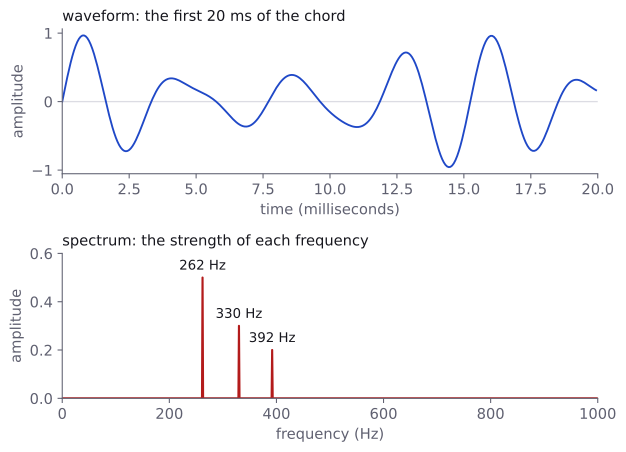
The magnitudes also solve the problem from the start of the page: shifting a sound changes only the phase, so the tone and its shifted copy have the same magnitude spectrum.
tone_magnitude = np.abs(np.fft.rfft(tone))
shifted_magnitude = np.abs(np.fft.rfft(shifted))
print(np.allclose(tone_magnitude, shifted_magnitude))TrueThe spectrogram
To see how the frequencies change over time, we take the spectrum of every frame and put them side by side. This is the short-time Fourier transform (STFT), and its picture is a spectrogram: time across, frequency up, brightness for strength. We test it on a clip of three parts: the chord, a chirp (a tone rising from 200 to 4,000 Hz) and random noise:
from scipy.signal import chirp

half_second = np.arange(sample_rate // 2) / sample_rate
part_chord = chord[:sample_rate // 2]
part_chirp = 0.5 * chirp(half_second, f0=200, t1=0.5, f1=4000)
rng = np.random.default_rng(0)
part_noise = rng.uniform(-0.3, 0.3, size=sample_rate // 4)

clip = np.concatenate([part_chord, part_chirp, part_noise])
print(len(clip), len(clip) / sample_rate)20000 1.25The STFT is the three steps above in a row: cut frames, apply the window, take the FFT of every frame.
def stft_magnitude(signal, frame_length=512, hop_length=256):
    frames = sliding_window_view(signal, frame_length)[::hop_length]
    windowed = frames * np.hanning(frame_length)
    spectra = np.fft.rfft(windowed, axis=1)    # one FFT per row
    return np.abs(spectra).T                   # (frequencies, frames)

magnitude = stft_magnitude(clip)
print(magnitude.shape)(257, 77)257 frequency rows (0 to 8,000 Hz in steps of Hz) by 77 frames. Longer frames would separate nearby frequencies better but blur changes in time; for speech, 20 to 40 milliseconds is the usual compromise. Step through the STFT one frame at a time:
Spectrograms in decibels
The strongest magnitudes are hundreds of times larger than the quiet ones, so a plain picture is mostly black. As for amplitudes in the previous module, we convert to decibels, relative to the loudest point, and cut off everything more than 80 dB below it:
def to_decibels(magnitude, floor_db=-80):
    relative = magnitude / magnitude.max()
    decibels = 20 * np.log10(np.maximum(relative, 1e-10))
    return np.maximum(decibels, floor_db)

spectrogram_db = to_decibels(magnitude)
print(f"{magnitude.min():.1e}", round(magnitude.max(), 1))
print(spectrogram_db.min(), spectrogram_db.max())1.5e-09 59.0
-80.0 0.0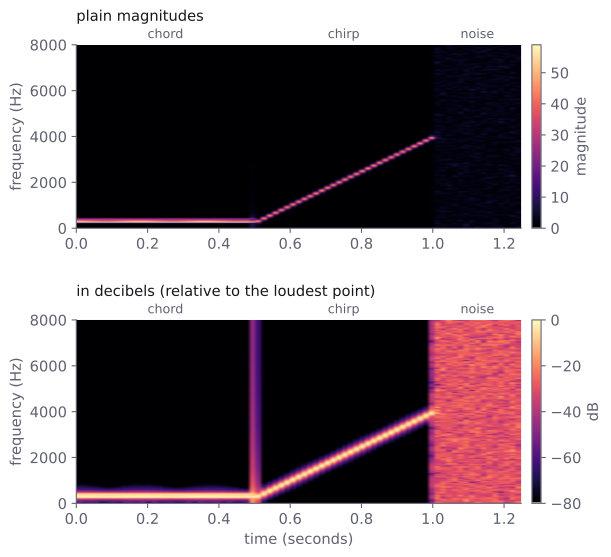
Each sound has its own shape: the chord is a flat band at the bottom, the chirp a rising line, the noise covers every frequency. Speech mixes all three.
OptionalThe thin vertical line at 0.5 seconds
The line is a click where the chord stops abruptly and the chirp begins. A sudden jump in the samples contains all frequencies, just as the cut edges of a frame do without a window. In the first frame of the tone, the Hann window lowers those false frequencies above 2,000 Hz from about −52 dB to below −118 dB, relative to the tone itself. This false spreading is called spectral leakage.
The mel scale and the mel spectrogram
The spectrogram spaces its frequencies evenly, but hearing does not: going from 100 to 200 Hz is a whole octave, a big jump in pitch, while 7,000 to 7,100 Hz is barely noticeable. The mel scale stretches low frequencies and squeezes high ones so that equal steps in mels sound like equal steps in pitch. A common formula is
def hz_to_mel(hz):
    return 2595 * np.log10(1 + hz / 700)

for low in [100, 1000, 4000]:
    step = hz_to_mel(low + 100) - hz_to_mel(low)
print(f"{low} to {low + 100} Hz: {step:.1f} mel")100 to 200 Hz: 132.7 mel
1000 to 1100 Hz: 64.4 mel
4000 to 4100 Hz: 23.7 melA mel spectrogram groups the spectrogram's bins into a few dozen bands, evenly spaced in mels. Each band is a triangle-shaped filter that adds up the power of the bins under it, and the whole set is a mel filter bank:
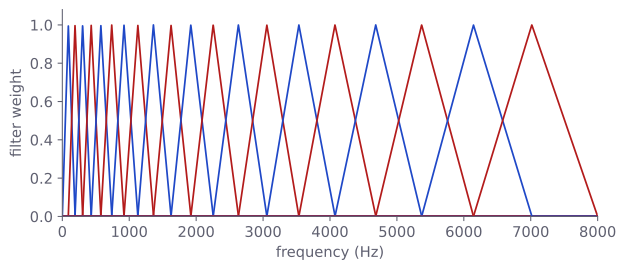
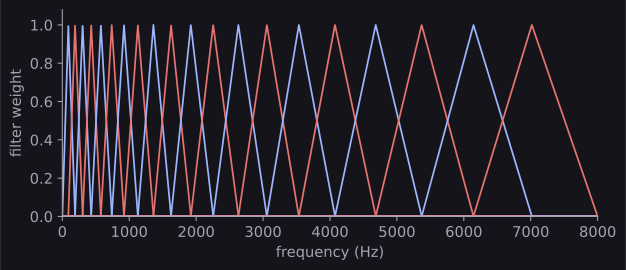
The filter bank is just a matrix with one row per filter and one column per frequency bin. Libraries build it for you; here it is in NumPy, so that nothing is hidden:
def mel_to_hz(mel):
    return 700 * (10 ** (mel / 2595) - 1)

def mel_filter_bank(n_mels, frame_length, sample_rate):
    n_bins = frame_length // 2 + 1
    bin_hz = np.linspace(0, sample_rate / 2, n_bins)
    top_mel = hz_to_mel(sample_rate / 2)
    edges_hz = mel_to_hz(np.linspace(0, top_mel, n_mels + 2))
    filters = np.zeros((n_mels, n_bins))
    for m in range(n_mels):
        left, centre, right = edges_hz[m:m + 3]
        rising = (bin_hz - left) / (centre - left)
        falling = (right - bin_hz) / (right - centre)
        filters[m] = np.maximum(0, np.minimum(rising, falling))
    return filters

filters = mel_filter_bank(n_mels=40, frame_length=512,
                          sample_rate=sample_rate)
print(filters.shape)(40, 257)Multiplying it by the power spectrogram (the squared magnitudes) gives the mel spectrogram, and we take decibels as before:
power = magnitude ** 2
mel_spectrogram = filters @ power
mel_db = 10 * np.log10(np.maximum(mel_spectrogram, 1e-10))
print(power.shape, mel_spectrogram.shape)(257, 77) (40, 77)Each 32-millisecond frame is now 40 numbers instead of 257. (The 10 instead of 20 is because power is amplitude squared.) This log-mel spectrogram is the most common input for audio neural networks.
MFCCs
Mel-frequency cepstral coefficients (MFCCs) summarise each column of the log-mel spectrogram in about a dozen numbers. They describe the column's curve as a sum of cosine shapes of increasing detail, using the discrete cosine transform (DCT): the first coefficient is the overall level, the second the overall tilt, later ones finer wiggles. Keeping the first 13 keeps the broad shape of the spectrum, which carries much of what tells one vowel or instrument from another. SciPy has the DCT:
from scipy.fft import dct

mfcc = dct(mel_db, type=2, axis=0, norm="ortho")[:13]
print(mfcc.shape)(13, 77)Each of the 77 frames is now 13 numbers. You do not need to interpret them one by one; together they describe the shape of the spectrum compactly, and they are a strong, cheap choice for classical models.
OptionalCheck: the first coefficient is the average level
With norm="ortho", coefficient 0 is the frame's average log-mel value times :
average_level = mel_db.mean(axis=0) * np.sqrt(40)
print(np.allclose(mfcc[0], average_level))TrueSimple features: RMS, zero-crossing rate and spectral centroid
Three cheap features give one number per frame each: RMS energy (how loud the frame is), the zero-crossing rate (how often the wave crosses zero; high for noise) and the spectral centroid (the average frequency weighted by power; high for bright, hissing sounds).
bin_hz = np.fft.rfftfreq(frame_length, d=1 / sample_rate)

def simple_features(signal):
    frames = sliding_window_view(signal, frame_length)[::hop_length]
    rms = np.sqrt(np.mean(frames ** 2, axis=1))
    sign_changes = np.diff(np.sign(frames), axis=1) != 0
    zcr = sign_changes.mean(axis=1)
    power = stft_magnitude(signal) ** 2           # (257, frames)
    weighted = (bin_hz[:, None] * power).sum(axis=0)
    centroid = weighted / power.sum(axis=0)
    return rms, zcr, centroid

noise = rng.uniform(-0.5, 0.5, size=sample_rate)
for name, sound in [("tone", tone), ("chord", chord),
                    ("noise", noise)]:
    rms, zcr, centroid = simple_features(sound)
    print(f"{name:6} rms {rms.mean():.3f}  zcr {zcr.mean():.3f}"
f" centroid {centroid.mean():.0f} Hz")tone rms 0.707 zcr 0.055 centroid 440 Hz
chord rms 0.436 zcr 0.036 centroid 292 Hz
noise rms 0.288 zcr 0.503 centroid 4024 HzThe tone's centroid is its own frequency, and the noise crosses zero about every second sample with its power spread evenly up to 8,000 Hz.
OptionalChecking these numbers by hand
- RMS: a sine wave of amplitude has RMS , so the tone gives .
- Zero-crossing rate: a tone of Hz crosses zero times a second, so 880 crossings in 16,000 samples gives 0.055.
- Centroid: the chord's 292 Hz is the average of 262, 330 and 392 Hz weighted by their powers , and . The noise's power is spread evenly from 0 to 8,000 Hz, so its centroid is near the middle.
- In
bin_hz[:, None],Noneadds an axis so that the frequencies multiply down each column.
From features to a model
Every feature gives one column per frame, so a longer clip gives more columns, but most models need inputs of one fixed size. There are two common ways.
Summary statistics, for classical models. Take the mean and the standard deviation of each feature over all frames. Any clip then becomes one row of the same length, ready for logistic regression or a small MLP:
def mfcc_features(signal, n_mfcc=13):
    power = stft_magnitude(signal) ** 2
    mel_db = 10 * np.log10(np.maximum(filters @ power, 1e-10))
    return dct(mel_db, type=2, axis=0, norm="ortho")[:n_mfcc]

def summary_vector(features):
    means = features.mean(axis=1)      # one mean per row
    stds = features.std(axis=1)
    return np.concatenate([means, stds])

for sound in [clip[:8000], clip]:          # 0.5 s and 1.25 s
    features = mfcc_features(sound)
print(features.shape, summary_vector(features).shape)(13, 30) (26,)
(13, 77) (26,)Both clips become 26 numbers. The price is that the order of events is lost: a rising and a falling sound can have the same averages. Audio Feature Extraction with Librosa trains a classifier this way.
A spectrogram as an image, for neural networks. A log-mel spectrogram is a grid of numbers, like a grayscale image. Add a channel axis, and pad or cut every clip to the same width:
image = mel_db[np.newaxis, :, :]       # (channels, height, width)
print(image.shape)

# pad or crop every clip to the same number of frames
n_frames = 100
padded = np.pad(mel_db, ((0, 0), (0, n_frames - mel_db.shape[1])),
                constant_values=mel_db.min())
print(padded.shape)(1, 40, 77)
(40, 100)Convolutional layers can then find patterns such as a rising line or a burst of noise wherever they occur, keeping the order that averages throw away. The network in Convolutional Neural Networks works on spectrograms with one input channel.
Common mistakes
| Mistake | What you see | Fix |
|---|---|---|
Using the FFT result without np.abs |
TypeError: Image data of dtype complex128 cannot be converted to float from plt.imshow, or complex numbers in your features |
Take the magnitude with np.abs (and square it for power). |
np.fft.rfftfreq(n, d=sample_rate) instead of d=1 / sample_rate |
No error, but the highest frequency is 3.125e-05 instead of 8,000 |
d is the time between samples: 1 / sample_rate. |
| Averaging features over the wrong axis | Vectors whose length depends on the clip, and later ValueError: all input arrays must have the same shape |
Average over the frames (time) axis. |
| Different settings for training and test clips | No error, but the model sees features it was never trained on | Use the same sampling rate, frame length, hop and number of mel bands everywhere. |
How to practise
There is no audio section on the practice sites we use (CodeChef, CS50 and HackerRank), so change the code on this page and predict the result before you run it:
- Add a fourth tone of 494 Hz with amplitude 0.4 to the chord. Where does the new peak appear, and how does the spectral centroid change?
- Compute the chord's spectrogram with frames of 128 and of 2,048 samples. Which one separates the three tones, and which shows time more sharply?
- Make a falling chirp from 4,000 Hz to 200 Hz. Do its 26 summary numbers differ from the rising chirp's?
Check yourself
What comes next
- Loading Audio with Librosa: reading real audio files, resampling and saving them, with librosa and with the libraries on the contest machines.
- Audio Feature Extraction with Librosa: every feature on this page in one line of code, and a classifier for spoken digits built on them.
Resources
| Source | Title | Why read it |
|---|---|---|
| Hugging Face Audio Course | Introduction to audio data | Our recommended starting point: the second half of the page covers the frequency spectrum, the spectrogram and the mel spectrogram. |
| 3Blue1Brown | But what is the Fourier Transform? A visual introduction. | A visual explanation of how the Fourier transform finds the frequencies inside a signal. |
| Valerio Velardo, The Sound of AI | Audio Signal Processing for Machine Learning | A video series that covers each feature on this page, from RMS energy to MFCCs, with Python notebooks. |
| Haytham Fayek | Speech Processing for Machine Learning: Filter banks, Mel-Frequency Cepstral Coefficients (MFCCs) and What's In-Between | Builds mel filter banks and MFCCs from scratch with NumPy, step by step. |
| librosa | Frequency and time-frequency analysis | The Fourier transform and the short-time Fourier transform, explained with librosa. |
Finished this module? Mark it done.
Comments
Stuck on something, spotted a mistake, or found a resource that helped you? Tell us below.
Loading comments