6Computer Vision 6.2Computer Vision Theory
6.2.1 Convolutional Layers
The layer that reads an image a small window at a time: kernels, convolution by hand and in code, padding, stride, the output-size formula, channels and nn.Conv2d.
Why learn convolutional layers?
In Basic Image Terminology, we saw that an image is a grid of numbers with one or more channels, and that a photo of 500 × 430 pixels holds 645,000 of them. The MLP from A Simple MLP in PyTorch could read such an image only by flattening it into one long row, and that is a poor fit for two reasons. It needs an enormous number of weights, and it has no idea which pixels are next to each other.
A convolutional layer fixes both. It slides a small grid of weights, the kernel, over the image, and at every position it computes one number from the small patch underneath. The same few weights are used everywhere, so the layer is tiny, and each output only looks at neighbouring pixels, so the grid structure is kept. Convolutional layers are the building block of the networks that read images, and they also work on anything else that can be drawn as a grid, such as the spectrograms of sound in Part 8.
What you need to know
By the end of this module, you should be comfortable with these ideas:
| Idea | In one line |
|---|---|
| Why not an MLP | Flattening an image needs huge weight matrices and throws away which pixels are neighbours. |
| Kernel (filter) | A small grid of weights, such as 3 × 3, that is slid over the image. |
| Convolution | At each position, multiply the patch by the kernel element by element and add everything up. |
| Feature map | The grid of outputs from one kernel. |
| Padding | Extra pixels (usually zeros) added around the border, so the output does not shrink. |
| Stride | How many pixels the kernel moves at each step. |
| Output size | for input size , padding , kernel size and stride . |
| Channels | A kernel spans all input channels; each kernel gives one output channel. |
nn.Conv2d |
PyTorch's layer: weight of shape (out_channels, in_channels, K, K) and one bias per output channel. |
Learn it properly
Convolution is easiest to understand by doing it by hand once, which this page does. The course below shows the same operation with more pictures, so use both.
Pick one main course
As before, choose one main resource and finish it.
Our pick: Dive into Deep Learning, sections 7.2 to 7.4
Read three short sections of Dive into Deep Learning: Convolutions for Images, Padding and Stride and Multiple Input and Multiple Output Channels. They compute a convolution by hand, detect edges with a hand-made kernel, let gradient descent learn that kernel, and then add padding, stride and colour channels. Choose the PyTorch tab for the code.
If you prefer something else
- Course notes with a demo: the Convolutional Layer section of Stanford CS231n's Convolutional Neural Networks notes covers the same ideas concisely, with an animated demo of two filters sliding with stride 2 and padding 1.
- A video: 3Blue1Brown's But what is a convolution? builds the idea from adding dice up to blurring and edge detection in images.
- Play with it: Image Kernels Explained Visually lets you apply blur, sharpen, outline and Sobel kernels in your browser and hover over pixels to see each sum. CNN Explainer shows every layer of a small trained network.
A quick tour
The rest of this page computes a convolution by hand, slides kernels over a real photo, and ends with PyTorch's nn.Conv2d. Go through your chosen course first, then run each cell in a notebook as you read.
Why an MLP is a poor fit for images
Take the macaw photo from Basic Image Terminology, with numbers. An nn.Linear layer gives every output neuron one weight per input number, so even a first layer with only 16 neurons needs over ten million weights:
import torch
from torch import nn

def count_parameters(model):
    total = 0
    for p in model.parameters():
        total += p.numel()
    return total

first_layer = nn.Linear(430 * 500 * 3, 16)
count_parameters(first_layer)10320016That is weights plus 16 biases, for one small layer. The size is only the first problem:
- No neighbourhoods. The layer treats the 645,000 inputs as an unordered list. If we shuffled the pixels of every image in the same fixed way, an MLP would learn exactly as well, because nothing in it knows that pixel 1 is next to pixel 2. Yet in images, almost everything useful (an edge, a stripe, an eye) is a pattern among neighbouring pixels.
- No reuse. An eye in the top-left corner and an eye in the bottom-right corner reach the MLP through completely different weights, so it must learn to recognise an eye separately in every position.
A convolutional layer keeps the grid. It looks at small neighbourhoods only, and it uses the same weights in every position.
A kernel and one output value
A kernel (also called a filter) is a small grid of weights, typically 3 × 3. To compute one output value, we place the kernel on a patch of the image of the same size, multiply each pixel by the weight on top of it, and add up the products.
We will work with a made-up 6 × 6 grayscale image with values from 1 (dark) to 9 (bright). It is dark at the top left and bright at the bottom right, with a diagonal edge between:
| col 0 | col 1 | col 2 | col 3 | col 4 | col 5 | |
|---|---|---|---|---|---|---|
| row 0 | 1 | 1 | 2 | 6 | 8 | 9 |
| row 1 | 1 | 2 | 5 | 8 | 9 | 9 |
| row 2 | 2 | 4 | 8 | 9 | 9 | 8 |
| row 3 | 3 | 7 | 9 | 9 | 8 | 9 |
| row 4 | 6 | 8 | 9 | 8 | 9 | 9 |
| row 5 | 8 | 9 | 9 | 9 | 9 | 8 |
And here is our kernel:
Placed on the top-left 3 × 3 patch (rows 0 to 2, columns 0 to 2), the nine products add up to
Because the middle column of the kernel is 0, this kernel simply computes (right column of the patch) − (left column of the patch): . A large positive value means the image gets brighter from left to right inside the patch; 0 means it does not change. This is a vertical edge detector.
Sliding the kernel over the image
Convolution repeats that computation at every position where the kernel fits: slide it one pixel to the right, compute again, and at the end of the row move down one pixel and start again from the left. Each position gives one output value, and together they form a new grid called a feature map. Step through it:
The 3 × 3 kernel fits in 4 positions across a row of 6 pixels, and in 4 rows, so the output is 4 × 4: it is smaller than the input. The values are large along the diagonal edge and 0 in the flat bright corner at the bottom right, where neighbouring pixels are equal.
The same computation in code
Let us write convolution as a short function, exactly as described: two loops over the output positions, and one multiply-and-add over each patch.
image = torch.tensor([[1, 1, 2, 6, 8, 9],
                      [1, 2, 5, 8, 9, 9],
                      [2, 4, 8, 9, 9, 8],
                      [3, 7, 9, 9, 8, 9],
                      [6, 8, 9, 8, 9, 9],
                      [8, 9, 9, 9, 9, 8]], dtype=torch.float32)
kernel = torch.tensor([[-1, 0, 1],
                       [-1, 0, 1],
                       [-1, 0, 1]], dtype=torch.float32)

def convolve(image, kernel):
    k = kernel.shape[0]
    out_height = image.shape[0] - k + 1
    out_width = image.shape[1] - k + 1
    output = torch.zeros(out_height, out_width)
    for row in range(out_height):
        for col in range(out_width):
            patch = image[row:row + k, col:col + k]
            output[row, col] = (patch * kernel).sum()
    return output

convolve(image, kernel)tensor([[11., 16., 11., 3.],
[16., 13., 4., 0.],
[15., 7., 0., 0.],
[10., 2., -1., 0.]])The same 4 × 4 grid as in the figure. PyTorch has this operation built in as torch.nn.functional.conv2d. It works on batches of images with channels, so the image must have shape (N, C, H, W) and the kernel shape (out_channels, in_channels, K, K), here (1, 1, 6, 6) and (1, 1, 3, 3). We add the two extra dimensions with unsqueeze, as in Basic Image Terminology:
import torch.nn.functional as F

image_batch = image.unsqueeze(0).unsqueeze(0)      # (1, 1, 6, 6)
kernel_4d = kernel.unsqueeze(0).unsqueeze(0)       # (1, 1, 3, 3)
result = F.conv2d(image_batch, kernel_4d)
print(result.shape)
print(torch.equal(result[0, 0], convolve(image, kernel)))torch.Size([1, 1, 4, 4])
TrueOptionalConvolution or cross-correlation?
In mathematics and signal processing, a convolution first flips the kernel upside down and left to right, and then slides it. What we computed, and what PyTorch computes, slides the kernel without flipping it. Strictly, that operation is called cross-correlation. Deep learning libraries all use cross-correlation and call it convolution anyway. In a network, the kernel's weights are learned, so a flipped kernel would simply be learned the other way round, and the results are the same. Section 7.2.5 of Dive into Deep Learning discusses this. You only need to remember it when you copy a kernel from a signal-processing book.
Real kernels on a real photo
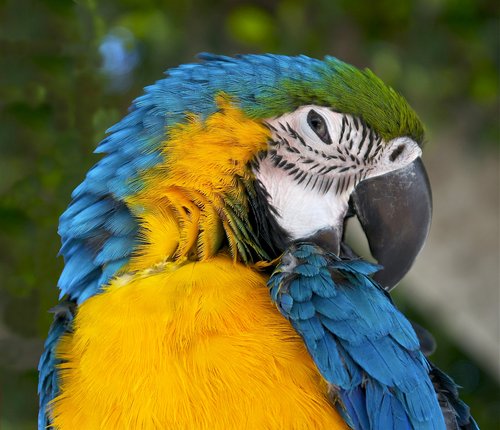
The kernel decides what the feature map shows. Let us apply three kernels to the grayscale macaw photo (download macaw.jpg): our vertical edge detector, the same kernel turned on its side to find horizontal edges, and a 5 × 5 kernel whose 25 weights are all , which replaces each pixel by the average of its neighbourhood.
import numpy as np
from PIL import Image

gray = Image.open("macaw.jpg").convert("L")
photo = torch.tensor(np.asarray(gray), dtype=torch.float32) / 255
photo = photo.unsqueeze(0).unsqueeze(0)     # (1, 1, 430, 500)

vertical = kernel                           # right minus left
horizontal = kernel.T                       # bottom minus top
blur = torch.ones(5, 5) / 25                # average of 25 pixels

vertical_map = F.conv2d(photo, vertical.unsqueeze(0).unsqueeze(0))
horizontal_map = F.conv2d(photo, horizontal.unsqueeze(0).unsqueeze(0))
blur_map = F.conv2d(photo, blur.unsqueeze(0).unsqueeze(0))
print(vertical_map.shape, blur_map.shape)torch.Size([1, 1, 428, 498]) torch.Size([1, 1, 426, 496])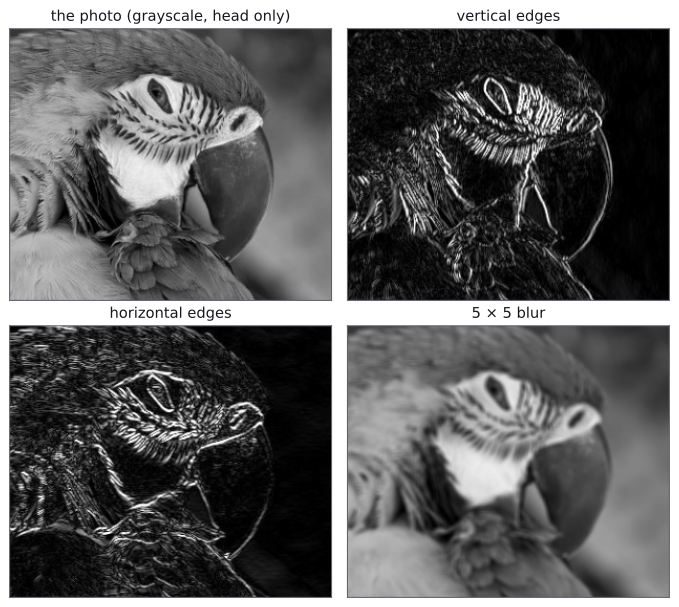
Each feature map lights up where the patch under the kernel looks like the kernel. The vertical edge detector picks out the curved front of the beak and the sides of the eye; the horizontal one picks out the top of the head and the lower edge of the beak. Both respond to the stripes on the face, which run diagonally and so change in both directions. The blur kernel keeps the picture but softens it, because averaging removes the small differences between neighbouring pixels. Notice also that the 5 × 5 kernel shrank the image by 4 pixels in each direction, the 3 × 3 kernels by 2.
These kernels were designed by hand. In a convolutional layer, the kernel's weights are parameters, learned by gradient descent like the weights of nn.Linear, and the first layers of trained networks often end up with kernels much like these. Convolutional Neural Networks shows what the kernels of a trained network respond to.
Padding
Each 3 × 3 convolution shrinks the image by 2 pixels in each direction, and after many layers there would be nothing left. Pixels at the border are also used less often than pixels in the middle: the top-left pixel is under the kernel only once. Padding fixes both by adding a frame of extra pixels, usually zeros, around the image before sliding. With padding=1, our 6 × 6 image becomes 8 × 8 with zeros around it, and the output is 6 × 6, the same size as the input:
padded_result = F.conv2d(image_batch, kernel_4d, padding=1)
print(padded_result.shape)
print(padded_result[0, 0])torch.Size([1, 1, 6, 6])
tensor([[ 3., 5., 11., 10., 4., -17.],
[ 7., 11., 16., 11., 3., -26.],
[ 13., 16., 13., 4., 0., -26.],
[ 19., 15., 7., 0., 0., -26.],
[ 24., 10., 2., -1., 0., -26.],
[ 17., 4., 0., 0., 0., -18.]])The middle 4 × 4 block is our old output. Look at the new last column: large negative values, although the image has no edge there. The bright pixels in column 5 sit next to the zeros of the padding, so the kernel sees a sudden drop from bright to dark. Zero padding invents a dark frame around the image; networks learn to live with it, and it is still the standard choice.
For a kernel of size (an odd number) and stride 1, padding=(K - 1) // 2 keeps the size unchanged: 1 for a 3 × 3 kernel, 2 for 5 × 5. PyTorch also accepts padding="same", which works this out for you.
Stride
The stride is how far the kernel moves at each step. So far it was 1. With stride=2, the kernel jumps two pixels at a time, both along the row and down to the next row, so it visits every second position:
strided_result = F.conv2d(image_batch, kernel_4d, stride=2)
print(strided_result[0, 0])tensor([[11., 11.],
[15., 0.]])These are the values at rows 0 and 2 and columns 0 and 2 of the stride-1 output. A stride of 2 roughly halves the height and the width, so the next layer has four times fewer positions to compute. That is one way to shrink feature maps on purpose; Pooling is the other.
The output-size formula
Putting kernel size, padding and stride together: for an input of height , a kernel of size , padding on each side and stride , the output height is
and the width follows the same formula. The means rounding down: if the last step would hang over the edge, it is skipped. To see where it comes from: after padding, the input is pixels tall; the kernel's top edge can start at row 0 and must stop rows before the end, so it has rows to move through, in steps of , plus the starting position. Let us check it against PyTorch on the photo, which is 430 pixels tall:
def output_size(size, kernel_size, padding, stride):
    return (size + 2 * padding - kernel_size) // stride + 1

settings = [(3, 0, 1), (3, 1, 1), (5, 0, 1), (3, 1, 2), (7, 3, 2)]
for kernel_size, padding, stride in settings:
    layer = nn.Conv2d(1, 1, kernel_size, stride=stride,
                      padding=padding)
    real_height = layer(photo).shape[2]
    formula = output_size(430, kernel_size, padding, stride)
print(kernel_size, padding, stride, real_height, formula)3 0 1 428 428
3 1 1 430 430
5 0 1 426 426
3 1 2 215 215
7 3 2 215 215The columns are the kernel size, padding, stride, the height PyTorch produced and the height from the formula; they agree every time. This calculation tells you the size of every feature map before you run the network, which you need for the first nn.Linear after the convolutions.
Several input channels
A colour image has three channels, and a kernel for it has three channels too: one 3 × 3 grid of weights for red, one for green and one for blue, a block of weights. At each position, every channel's grid is applied to the same patch of its own channel, and the three results are added into one number, plus one bias. So the output is still a single feature map, however many channels went in.
We can check this on a small random input with 3 channels, computing each channel separately and adding:
torch.manual_seed(0)
colour_input = torch.rand(1, 3, 5, 5)      # (N, C, H, W)
weight = torch.rand(1, 3, 3, 3)            # 1 kernel, 3 channels
bias = torch.tensor([0.5])

all_at_once = F.conv2d(colour_input, weight, bias)

by_channel = torch.zeros(1, 1, 3, 3)
for channel in range(3):
    one_channel = colour_input[:, channel:channel + 1]   # (1, 1, 5, 5)
    one_kernel = weight[:, channel:channel + 1]          # (1, 1, 3, 3)
    by_channel += F.conv2d(one_channel, one_kernel)
by_channel += bias

print(all_at_once.shape)
print(torch.allclose(all_at_once, by_channel))torch.Size([1, 1, 3, 3])
TrueSlicing with channel:channel + 1 instead of channel keeps the channel dimension, so each piece still has the four dimensions conv2d needs.
Several output channels
One kernel finds one kind of pattern. A layer usually has many kernels, each with its own weights and bias, and each produces its own feature map. The feature maps are stacked as the channels of the output. A layer with 16 kernels turns an RGB image into a 16-channel output: the 3 input channels of colour become 16 channels of "how much of pattern 1, pattern 2, …, pattern 16 is here". The next convolutional layer then has kernels with 16 channels each, which combine these patterns into bigger ones.
So the weights of a whole layer form a 4-dimensional tensor of shape (out_channels, in_channels, K, K): one kernel per output channel, each spanning all the input channels.
nn.Conv2d
PyTorch's convolutional layer, nn.Conv2d, holds exactly that weight tensor and one bias per output channel, and creates them with random starting values for training to adjust:
torch.manual_seed(0)
conv = nn.Conv2d(in_channels=3, out_channels=16, kernel_size=3,
                 padding=1)
print(conv.weight.shape)
print(conv.bias.shape)
print(count_parameters(conv))torch.Size([16, 3, 3, 3])
torch.Size([16])
448Each of the 16 kernels has weights and one bias, so the layer has parameters. In general, a Conv2d layer has
parameters. Notice what is not in this formula: the size of the image. The same 448 parameters work on a 6 × 6 image or a 4000 × 3000 one, because the kernels are shared by every position.
Let us run it on the colour photo, scaled to between 0 and 1 and with channels first:
rgb = np.asarray(Image.open("macaw.jpg"))           # (430, 500, 3)
rgb = torch.tensor(rgb, dtype=torch.float32) / 255
rgb = rgb.permute(2, 0, 1).unsqueeze(0)             # (1, 3, 430, 500)
feature_maps = conv(rgb)
print(feature_maps.shape)
print(feature_maps.numel())torch.Size([1, 16, 430, 500])
3440000Compare the two layers we have met on this page, both on the same photo:
| Layer | Parameters | Numbers out |
|---|---|---|
nn.Linear(645000, 16) |
10,320,016 | 16 |
nn.Conv2d(3, 16, 3, padding=1) |
448 | 3,440,000 |
The convolutional layer has over 20,000 times fewer parameters and produces a full 430 × 500 map for each of its 16 kernels, keeping the position of everything it finds. These two properties, local connections (each output looks only at a small patch) and weight sharing (the same kernel everywhere), are what make convolutional layers the standard first step for images.
A convolutional layer is usually followed by an activation such as ReLU, exactly as nn.Linear is in an MLP. Stacking them into a network, together with the pooling layers of the next module, is the subject of Convolutional Neural Networks.
Common mistakes
The messages are exactly what PyTorch prints.
| Mistake | What you see | Fix |
|---|---|---|
in_channels does not match the image, e.g. nn.Conv2d(1, 8, 3) on RGB images |
RuntimeError: Given groups=1, weight of size [8, 1, 3, 3], expected input[1, 3, 430, 500] to have 1 channels, but got 3 channels instead |
Set in_channels to the number of channels in the input: 3 for RGB, 1 for grayscale, or the previous layer's out_channels. |
| An image without the batch and channel dimensions | RuntimeError: Expected 3D (unbatched) or 4D (batched) input to conv2d, but got input of size: [6, 6] |
Give the layer (N, C, H, W); add dimensions with unsqueeze. |
A 2-dimensional kernel for F.conv2d |
RuntimeError: weight should have at least three dimensions |
Give the weight the shape (out_channels, in_channels, K, K). |
| A kernel larger than the (padded) input | RuntimeError: Calculated padded input size per channel: (3 x 3). Kernel size: (5 x 5). Kernel size can't be greater than actual input size |
Use a smaller kernel, add padding, or shrink the image less in earlier layers. |
padding="same" with a stride above 1 |
ValueError: padding='same' is not supported for strided convolutions |
Give the padding as a number, such as padding=1. |
The wrong size for the first nn.Linear after the convolutions |
RuntimeError: mat1 and mat2 shapes cannot be multiplied (1x256 and 576x10) |
Work out the feature-map size with the output-size formula, or print the shape of one batch before the nn.Linear. |
How to practise
There is no section on convolutional layers on the practice sites we use (CodeChef, CS50 and HackerRank). The closest is CS50x's Filter (more comfortable) problem, which asks you to write a box blur and an edge detector with Sobel kernels. It is written in C, so do it only if you know some C; otherwise, write the same two filters in PyTorch, as below:
- Write a 3 × 3 box blur and the two 3 × 3 Sobel kernels, and its transpose. Apply them to the photo with
F.conv2dand compare the Sobel edges with the edges on this page. - Extend the
convolvefunction on this page withpaddingandstridearguments, and check it againstF.conv2dfor several settings. - Predict the output shape of
nn.Conv2d(3, 32, 5, stride=2, padding=2)on an image of 224 × 224, then check it in code.
Check yourself
What comes next
- Pooling: shrinking feature maps by summarising small windows, the other common layer in image networks.
- Convolutional Neural Networks: convolutional layers, ReLU and pooling stacked into a network, and trained on the digits.
Resources
| Source | Title | Why read it |
|---|---|---|
| Dive into Deep Learning | 7.2 Convolutions for Images | Our recommended starting point, with sections 7.3 and 7.4: convolution, edge detection, padding, stride and channels, with PyTorch code. |
| Dive into Deep Learning | 7.3 Padding and Stride | The output-size formula, worked through with examples. |
| Dive into Deep Learning | 7.4 Multiple Input and Multiple Output Channels | How kernels extend through the channels, and 1 × 1 convolutions. |
| Stanford CS231n | Convolutional Neural Networks: Convolutional Layer | Concise course notes with an animated demo of a convolution with two filters, stride 2 and padding 1. |
| 3Blue1Brown | But what is a convolution? | A visual explanation of convolution, from dice to image blurring and edge detection. |
| Victor Powell | Image Kernels Explained Visually | Try blur, sharpen, outline and Sobel kernels on an image in your browser. |
| Polo Club, Georgia Tech | CNN Explainer | An interactive view of every layer of a small trained CNN. |
| Wikimedia Commons | Ara ararauna portrait Rhodes.jpg | The photograph used on this page, by Jebulon, released under CC0 (public domain dedication). |

Finished this module? Mark it done.
Comments
Stuck on something, spotted a mistake, or found a resource that helped you? Tell us below.
Loading comments