8Audio 8.2Librosa
8.2.1 Loading Audio with Librosa
Read audio files into NumPy arrays with librosa, control the sampling rate and channels, resample and save, and do the same with SciPy and torchaudio, the backup on the official IOAI library list.
Why learn to load audio properly?
In Theory of Audio Features, we built spectrograms and MFCCs from sounds we generated ourselves. In a contest, the sounds arrive as files: a folder of WAV recordings and a CSV file of labels. Before any feature can be computed, every file has to become a NumPy array of samples with a known sampling rate, in the same form as all the others.
librosa is a widely used Python library for audio analysis, and loading a file with it takes one line. That line makes choices on your behalf, though, such as changing the sampling rate, and a dataset that mixes rates, channels and sample types will break a pipeline in ways that give no error. This module shows what librosa.load does, how to control it, and how to check a folder of files before you train on it.
librosa was not in the library list of the IOAI 2026 Technical Appendix when it was published, but the organisers added it before the contest: I took part in IOAI 2026, and it was installed on the contest machines. Lists like this can change, so every step on this page is also shown with SciPy and torchaudio, which were on the list from the start. That way you have a backup if a machine ever lacks librosa.
What you need to know
By the end of this module, you should be comfortable with these ideas:
| Idea | In one line |
|---|---|
librosa.load |
Reads a file and returns the samples as a float32 NumPy array, plus the sampling rate. |
| Its defaults | It resamples to 22,050 Hz and mixes stereo to mono unless you tell it not to. |
sr=None, mono=False |
Keep the file's own sampling rate, and keep its channels. |
offset, duration |
Load only part of a file, in seconds. |
librosa.get_duration |
The length in seconds, from the samples or straight from the file. |
| Resampling | librosa.resample, or torchaudio.functional.resample without librosa. |
| Saving | soundfile.write, or scipy.io.wavfile.write without soundfile. |
scipy.io.wavfile.read |
Reads WAV files as they are stored: often 16-bit integers, samples first. |
| Checking a folder | Load every file's rate, channels, type and length into a table before training. |
Learn it properly
The functions on this page are few and short; the skill is in noticing what they do to your data. Read the tutorial below, then run this page's cells on its sounds folder.
Pick one main course
There is no long course for loading audio; the official tutorials are short and good.
Our pick: librosa's "Getting started with audio data"
Read librosa's own tutorial Getting started with audio data. It loads a recording, explains why the result has the sampling rate it has, converts between samples and seconds, plots the waveform and plays it in a notebook. Its example recording is downloaded the first time you run it, so try it at home rather than on a machine without internet.
If you prefer something else
- The reference: the page for
librosa.loadlists every argument with its default. Read it once; it answers most loading questions. - Without librosa: SciPy's
scipy.io.wavfile.readhas a table of which kind of WAV file gives which NumPy type, and PyTorch's Audio Resampling tutorial shows how torchaudio resamples and how its settings control aliasing.
A quick tour
The rest of this page loads, checks, converts and saves a small folder of audio files. Go through your chosen tutorial first, then run each cell in a notebook as you read.
The files on this page
The sounds folder next to this page holds five short WAV files, chosen to disagree with each other the way real datasets do. Download them and put them in a folder called sounds next to your notebook:
| File | What it is |
|---|---|
| 7_jackson_0.wav | "Seven", spoken by one person |
| 7_theo_0.wav | "Seven", spoken by another person |
| tone_16000.wav | A 440 Hz tone, made with NumPy |
| chord_stereo_44100.wav | A chord in stereo, made with NumPy: C, E and G on the left, the same an octave higher on the right |
| chirp_float_22050.wav | A chirp rising from 100 Hz to 5,000 Hz, made with NumPy and SciPy and stored as 32-bit floats |
The two spoken digits come from the Free Spoken Digit Dataset by Zohar Jackson and contributors, licensed CC BY-SA 4.0. The other three files were generated by our own code, the way Waveforms, Sampling Rate, Duration, Amplitude, and Channels shows.
librosa and the contest machines
Here is each step of this page in both versions:
| Step | With librosa | With SciPy and torchaudio |
|---|---|---|
| Read a WAV file | librosa.load(path, sr=None) |
scipy.io.wavfile.read(path), then convert to decimals |
| Mix stereo to mono | done for you (mono=True) |
samples.mean(axis=1) |
| Change the sampling rate | librosa.resample |
torchaudio.functional.resample |
| Length in seconds | librosa.get_duration |
len(samples) / sample_rate |
| Save a WAV file | soundfile.write |
scipy.io.wavfile.write |
Loading a file
librosa.load takes a file path and returns two things: the samples as a NumPy array, and the sampling rate.
import numpy as np
import librosa

samples, sample_rate = librosa.load("sounds/7_jackson_0.wav")
print(samples.shape, samples.dtype, sample_rate)
print(round(len(samples) / sample_rate, 3), "seconds")(9529,) float32 22050
0.432 secondsThe recording was made at 8,000 Hz and has 3,457 samples, as we saw in Waveforms, Sampling Rate, Duration, Amplitude, and Channels. librosa gave us 9,529 samples at 22,050 Hz instead. By default, librosa.load does three things to every file:
- It resamples to 22,050 Hz, whatever the file's own rate. The duration stays the same, 0.432 seconds, but the number of samples changes.
- It mixes to mono, by averaging the channels.
- It returns float32 decimals between −1 and 1, whatever the file stores.
The point of these defaults is that every file comes out in the same form, which is convenient. The cost is that they hide what the file really contains, and resampling 8,000 Hz speech up to 22,050 Hz adds 2.76 times as many samples without adding any information: nothing above the original Nyquist limit of 4,000 Hz can appear.
Keeping the file's own rate and channels
Two arguments switch the defaults off. sr=None keeps the file's own sampling rate, and mono=False keeps its channels. Let us try them on the stereo chord, recorded at 44,100 Hz:
path = "sounds/chord_stereo_44100.wav"

default, rate = librosa.load(path)
print("default:       ", default.shape, rate)

native, rate = librosa.load(path, sr=None)
print("sr=None:       ", native.shape, rate)

stereo, rate = librosa.load(path, sr=None, mono=False)
print("and mono=False:", stereo.shape, rate)default: (22050,) 22050
sr=None: (44100,) 44100
and mono=False: (2, 44100) 44100The file holds one second of sound. By default it comes back as 22,050 samples of mono; with sr=None, as 44,100 samples of mono; and with mono=False as well, with shape (2, 44100). librosa puts the channels first, as described in Mono and stereo channels.
You can also ask for a particular rate, such as sr=16000, and librosa resamples to it. That is the usual choice for speech: pick one rate for the whole dataset and load every file at that rate.
When you only need part of a long file, offset (where to start, in seconds) and duration (how many seconds to read) save time and memory:
part, rate = librosa.load("sounds/chirp_float_22050.wav", sr=None,
                          offset=0.5, duration=1.0)
print(part.shape, rate)(22050,) 22050One second at 22,050 Hz is 22,050 samples, taken from 0.5 to 1.5 seconds into the two-second chirp.
Duration
librosa.get_duration gives the length in seconds. It can work from samples you have loaded, or read just the file's header, which is much faster for a large folder. Its arguments must be given by name:
print(librosa.get_duration(y=native, sr=44100))
print(librosa.get_duration(path="sounds/chirp_float_22050.wav"))1.0
2.0Both are simply the number of samples divided by the sampling rate.
Resampling
librosa.resample changes the sampling rate of samples you have already loaded. As the Nyquist limit showed, lowering a rate properly needs a low-pass filter first, so frequencies above the new limit are removed instead of turning into aliases. librosa.resample does that for you:
speech, rate = librosa.load("sounds/7_jackson_0.wav", sr=None)
speech_16k = librosa.resample(speech, orig_sr=rate, target_sr=16000)
print(rate, speech.shape, "->", 16000, speech_16k.shape)8000 (3457,) -> 16000 (6914,)Doubling the rate doubles the number of samples, from 3,457 to 6,914, and the duration stays 0.432 seconds. As with get_duration, the two rates must be given by name.
Saving a file
librosa itself has no function to save audio; it relies on the soundfile library, which it also uses for reading. soundfile.write takes the path, the samples and the rate, in that order, and by default stores WAV files as 16-bit integers:
import soundfile

soundfile.write("seven_16k.wav", speech_16k, 16000)
print(soundfile.info("seven_16k.wav").subtype)PCM_16Without soundfile, use scipy.io.wavfile.write. Watch the order of its arguments, which is different: path, rate, samples. It stores whatever type you give it, so float32 samples become a 32-bit floating-point WAV file:
from scipy.io import wavfile

wavfile.write("seven_16k_scipy.wav", 16000, speech_16k)
rate, check = wavfile.read("seven_16k_scipy.wav")
print(rate, check.dtype, check.shape)16000 float32 (6914,)To save 16-bit integers with SciPy instead, clip and convert first, as to_int16 does in Saving a sound to a file.
Plotting a waveform
A waveform plot is a line of the samples against time. The time of each sample is its position divided by the sampling rate:
import matplotlib.pyplot as plt

times = np.arange(len(speech)) / rate
plt.figure(figsize=(8, 3))
plt.plot(times, speech, linewidth=0.6)
plt.xlabel("time (seconds)")
plt.ylabel("amplitude")
plt.show()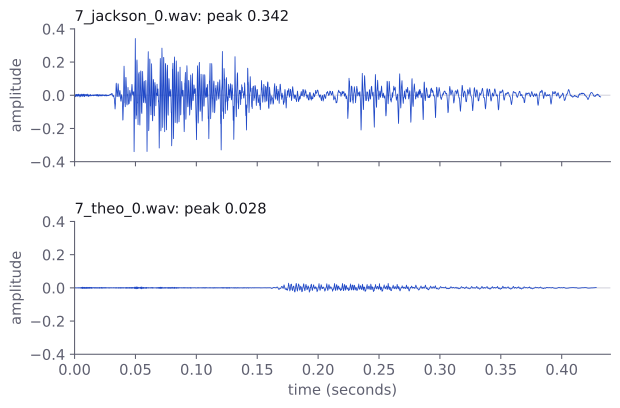
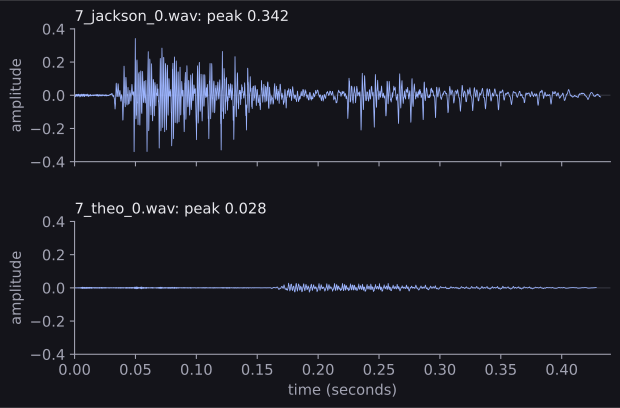
The figure plots both recordings of "seven" in this way. They say the same word, but one speaker's recording is far quieter: its loudest sample is about 0.028, against 0.34 for the other. A model should not learn to tell recordings apart by how loud they happen to be, so features that do not depend on loudness, or recordings scaled to the same peak, are often a good idea. librosa also has librosa.display.waveshow(speech, sr=rate), which draws the same plot with a time axis already labelled.
Without librosa: SciPy and torchaudio
scipy.io.wavfile.read reads a WAV file exactly as it is stored. Compare what it gives for three of our files:
for name in ["7_jackson_0.wav", "chord_stereo_44100.wav",
             "chirp_float_22050.wav"]:
    rate, data = wavfile.read("sounds/" + name)
print(f"{name:24} {rate:6} {str(data.dtype):8} {data.shape}")7_jackson_0.wav 8000 int16 (3457,)
chord_stereo_44100.wav 44100 int16 (44100, 2)
chirp_float_22050.wav 22050 float32 (44100,)Unlike librosa, SciPy keeps each file's own rate, gives 16-bit files as integers and float files as floats, and puts stereo samples first, (44100, 2). To get what librosa.load gives, we need three steps: turn integers into decimals between −1 and 1, average the channels, and resample if we want a common rate. Here they are as one function, with torchaudio doing the resampling:
import torch
import torchaudio

def load_wav(path, target_rate=None, mono=True):
    rate, samples = wavfile.read(path)
    if np.issubdtype(samples.dtype, np.integer):
        full_scale = np.iinfo(samples.dtype).max + 1
        samples = samples.astype(np.float32) / full_scale
    else:
        samples = samples.astype(np.float32)
    if samples.ndim == 2:             # (samples, channels)
        samples = samples.T           # -> (channels, samples)
        if mono:
            samples = samples.mean(axis=0)
    if target_rate is not None and target_rate != rate:
        waveform = torch.from_numpy(samples)
        waveform = torchaudio.functional.resample(
            waveform, orig_freq=rate, new_freq=target_rate)
        samples = waveform.numpy()
        rate = target_rate
    return samples, rate
Let us read it:
np.issubdtype(samples.dtype, np.integer)is true for integer files.np.iinfo(...).max + 1is 32,768 for 16-bit files, so dividing by it gives decimals between −1 and 1, as librosa does. It also works for 24-bit and 32-bit files, which SciPy reads asint32. (Rare 8-bit files are unsigned, from 0 to 255, and would need 128 subtracted first.)- Transposing a stereo array puts the channels first, like librosa, and
mean(axis=0)averages them. torchaudio.functional.resampleworks on PyTorch tensors, so we convert withtorch.from_numpyand back with.numpy(). It resamples along the last axis, which is time once the channels are first.
Now the comparison. At each file's own rate, the two loaders give exactly the same numbers; after resampling to 16,000 Hz they differ very slightly, because the two libraries use different resampling filters:
for name in ["7_jackson_0.wav", "chord_stereo_44100.wav"]:
    path = "sounds/" + name
    ours, _ = load_wav(path)
    theirs, _ = librosa.load(path, sr=None)
    ours_16k, _ = load_wav(path, target_rate=16000)
    theirs_16k, _ = librosa.load(path, sr=16000)
    same = np.array_equal(ours, theirs)
    gap = np.abs(ours_16k - theirs_16k).max()
print(f"{name:24} same: {same} 16 kHz gap: {gap:.4f}")7_jackson_0.wav same: True 16 kHz gap: 0.0043
chord_stereo_44100.wav same: True 16 kHz gap: 0.0008A largest difference of a few thousandths, on samples between −1 and 1, does not matter for features. What matters is that you use one of the two for training and test data, never a mix.
A folder of files as a table
Before training on a folder of audio, look at it. A table with one row per file shows at a glance whether the rates, channels, types and lengths agree. pandas makes the table, as in Pandas, and SciPy reads the files, so the same code runs on the contest machines:
from pathlib import Path
import pandas as pd

rows = []
for path in sorted(Path("sounds").glob("*.wav")):
    rate, data = wavfile.read(path)
    channels = 1 if data.ndim == 1 else data.shape[1]
    rows.append({"file": path.name, "rate": rate,
                 "channels": channels, "dtype": str(data.dtype),
                 "seconds": round(len(data) / rate, 3),
                 "peak": round(float(np.abs(data).max()), 3)})

files = pd.DataFrame(rows)
files| file | rate | channels | dtype | seconds | peak | |
|---|---|---|---|---|---|---|
| 0 | 7_jackson_0.wav | 8000 | 1 | int16 | 0.432 | 11207.0 |
| 1 | 7_theo_0.wav | 8000 | 1 | int16 | 0.428 | 915.0 |
| 2 | chirp_float_22050.wav | 22050 | 1 | float32 | 2.000 | 0.5 |
| 3 | chord_stereo_44100.wav | 44100 | 2 | int16 | 1.000 | 26097.0 |
| 4 | tone_16000.wav | 16000 | 1 | int16 | 1.500 | 16384.0 |
Path("sounds").glob("*.wav") finds every WAV file in the folder, and sorted puts them in a fixed order. len(data) counts samples along the first axis, which is time for SciPy's samples-first arrays, so the length in seconds is right for stereo files too.
The table shows every problem this part has warned about. There are four different sampling rates, one stereo file, and a mix of integer and float samples, so the peaks are not comparable: 11,207 is a 16-bit integer, while 0.5 is a decimal. In a real dataset, also look for files that are much shorter or longer than the rest, and for silent files, whose peak is 0.
Making a folder consistent
The fix is to load every file in the same way: one sampling rate, mono, decimals between −1 and 1. For speech, 16,000 Hz is a common choice. With the load_wav function from above:
TARGET_RATE = 16000

clips = {}
for path in sorted(Path("sounds").glob("*.wav")):
    samples, rate = load_wav(path, target_rate=TARGET_RATE)
    clips[path.name] = samples
    print(f"{path.name:24} {str(samples.shape):10} "
f"{samples.dtype} peak {np.abs(samples).max():.3f}")7_jackson_0.wav (6914,) float32 peak 0.342
7_theo_0.wav (6856,) float32 peak 0.028
chirp_float_22050.wav (32000,) float32 peak 0.522
chord_stereo_44100.wav (16000,) float32 peak 0.681
tone_16000.wav (24000,) float32 peak 0.500Every clip is now a one-dimensional float32 array at 16,000 Hz, so one second always means 16,000 samples, the peaks can be compared, and every later step can treat all files alike. (The chirp's peak rose slightly, from 0.5 to 0.522: resampling filters can overshoot a little at sharp changes, which is harmless.) With librosa, the same loop would call librosa.load(path, sr=TARGET_RATE). Keep TARGET_RATE in one place in your notebook and use it for the test files too.
Two choices are worth knowing about. Resampling 8,000 Hz speech up to 16,000 Hz cannot add the missing frequencies above 4,000 Hz, so if most of your files are at 8,000 Hz, using 8,000 Hz as the common rate loses nothing and halves the work. And loading a large folder takes time, so in a contest, load everything once, keep the arrays (or the features made from them) in variables or save them with np.save, and do not reload the audio for every experiment.
Common mistakes
The messages are exactly what librosa, SciPy, soundfile and torchaudio print.
| Mistake | What you see | Fix |
|---|---|---|
Trusting the rate that librosa.load returns as the file's rate |
No error, but every file reports 22,050 Hz | Use sr=None to see the file's own rate, or scipy.io.wavfile.read. |
| Training on files with different sampling rates | No error, but the same sound gives different features in different files | Load every file at one rate, for training and test data alike. |
| Passing SciPy's 16-bit integers to librosa | librosa.util.exceptions.ParameterError: Audio data must be floating-point |
Divide by 32,768 first, as load_wav does. |
| Resampling a samples-first stereo array with torchaudio | No error, but a (44100, 2) array comes back as (44100, 1): the channel axis was resampled |
Transpose to channels first, or mix to mono, before resampling. |
torchaudio.load without TorchCodec |
ImportError: TorchCodec is required for load_with_torchcodec. Please install torchcodec to use this function. |
Read WAV files with scipy.io.wavfile.read. |
wavfile.write(path, samples, rate) |
AttributeError: 'int' object has no attribute 'dtype' |
SciPy wants the rate before the samples: wavfile.write(path, rate, samples). |
soundfile.write(path, rate, samples) |
IndexError: tuple index out of range |
soundfile wants the samples before the rate: soundfile.write(path, samples, rate). |
| A wrong path | soundfile.LibsndfileError: Error opening 'sounds/missing.wav': System error. |
Check the folder with sorted(Path("sounds").glob("*.wav")). |
How to practise
There is no audio section on the practice sites we use (CodeChef, CS50 and HackerRank), so practise on this page's sounds folder and on a dataset of your own:
- Add a column to the folder table with the number of samples after loading each file with
librosa.loadand its default settings. Which files grew, which shrank, and by how much? - Load the stereo chord with
mono=False, save each channel as its own file withscipy.io.wavfile.write, and listen to both. Which one is an octave higher? - Download the Free Spoken Digit Dataset at home and make the folder table for all 3,000 recordings. What are the shortest and longest durations, and are all files at the same rate?
- Write a version of
load_wavthat also scales every clip so that its peak is 0.9, and compare the two recordings of "seven" afterwards.
Check yourself
What comes next
- Audio Feature Extraction with Librosa: spectrograms, mel spectrograms, MFCCs and simple features from loaded audio, and a classifier for spoken digits built on them.
- Theory of Audio Features: what those features mean, if you skipped it.
Resources
| Source | Title | Why read it |
|---|---|---|
| librosa | Getting started with audio data | Our recommended starting point: loading a file, its default sampling rate, plotting and listening. |
| librosa | librosa.load | The reference for every argument of librosa.load: sr, mono, offset, duration and dtype. |
| SciPy | scipy.io.wavfile.read | Reading WAV files without librosa, with a table of which sample type each kind of file gives. |
| PyTorch | Audio Resampling | How torchaudio resamples, and the settings that control aliasing. |
| python-soundfile | Documentation | The library librosa uses to read and write files, with soundfile.write for saving. |
| Zohar Jackson and others | Free Spoken Digit Dataset | The two spoken-digit recordings in this page's sounds folder, CC BY-SA 4.0. |
Finished this module? Mark it done.
Comments
Stuck on something, spotted a mistake, or found a resource that helped you? Tell us below.
Loading comments