5Deep Learning 5.3PyTorch Deep Learning Pipeline
5.3.2 A Simple MLP in PyTorch
Train a small PyTorch network on handwritten digits, then check its learning, keep its best weights and make predictions.
Why build an MLP in PyTorch?
In Multi-Layer Perceptrons, we built a small network and trained it on 300 made-up points, all in one batch. In Dataset and DataLoader, we fed data to a model in shuffled mini-batches. This page puts the two together on real data with ten classes: small images of handwritten digits.
We will take this one step at a time. First we will look at the images and turn them into batches. Then we will build the network, train it, and ask a more useful question than “did the code run?”: is it learning to recognise digits it has not seen? We can answer that by checking the model before training and watching its validation loss as it learns. At the end, we will keep the version that did best on validation data and try it on the test images.
What you need to know
By the end of this module, you should be comfortable with these ideas:
| Idea | In one line |
|---|---|
| A model class | __init__ creates the layers; forward says how an input flows through them. |
| Input and output sizes | The first layer takes one input per feature; a classifier's last layer has one output per class. |
| Logits, probabilities, predictions | The model outputs logits; softmax turns them into probabilities; argmax picks the class. |
CrossEntropyLoss |
The loss for one class out of many. It takes logits of shape (batch, classes) and whole-number labels. |
| The starting-loss check | An untrained classifier with classes should start near a loss of . |
| Training and validation curves | The two losses, epoch by epoch; they show when the model starts to overfit. |
model.train() and model.eval() |
Tell PyTorch whether we are training or checking the model. |
torch.no_grad() |
Skip gradient tracking when you only want predictions. |
state_dict |
The model's weights as a dictionary, used to keep the best epoch and to save to a file. |
| The device | The processor doing the work: the CPU or, when available, a GPU through CUDA. |
Learn it properly
We will train one network carefully here. If PyTorch still feels new, work through the course below as well; it gives you more chances to practise each step.
Pick one main course
As before, choose one main resource and finish it.
Our pick: Learn PyTorch for Deep Learning, chapter 02
Work through 02. PyTorch Neural Network Classification from Daniel Bourke's free course. It builds a binary classifier first, shows why it fails without an activation function, and then builds a multi-class model, with the training and evaluation loops written out in full. Do the exercises at the end. The course assumes you have done chapter 01, which PyTorch Basics also recommends.
If you prefer something else
- The official tutorials: Build the Neural Network, then Optimizing Model Parameters. Together they train an MLP on small clothing images, with the training and test loops written as two functions, just as we do below.
- A textbook: Implementation of Multilayer Perceptrons in Dive into Deep Learning builds the same kind of model from scratch and then with
nn.Sequential. The book uses its own helper library for training, so read it for the ideas rather than copying the code. - For later: Andrej Karpathy's blog post A Recipe for Training Neural Networks is a practical checklist from an experienced researcher. Some of it will only make sense after a few more modules, but its early steps are the checks on this page.
A quick tour
Let us train one network from start to finish. You can run each cell in a notebook as you read. If a step feels unfamiliar, pause there and try changing a value before moving on.
The data: handwritten digits
scikit-learn ships a small dataset of 1,797 handwritten digits, scanned as 8 by 8 pixel images. It needs no download, so it works anywhere:
from sklearn.datasets import load_digits

digits = load_digits()
X = digits.data      # one row per image: 8 x 8 = 64 pixels
y = digits.target    # the digit in each image, from 0 to 9
X.shape, y.shape((1797, 64), (1797,))Each image has been flattened into one row of 64 numbers, so for us it is a table with 64 feature columns and one label. Here are the first ten:


Each pixel is a whole number from 0 (blank) to 16 (fully dark):
print(X.min(), X.max())
X = X / 16.0 # scale every pixel to between 0 and 10.0 16.0Networks train much better when the features are on a small, similar scale, for the reasons in Gradient Descent. For pixels, dividing by the largest possible value is the usual choice. For other tables, use a StandardScaler, as PyTorch Pipeline for a Simple Machine Learning Problem does.
Training, validation and test data
We need three parts. The training set is what the model learns from. The validation set is what we check after every epoch to make decisions, such as which epoch was best. The test set is used once, at the very end, to get an honest final score. We split twice with scikit-learn, keeping the ten digits in the same proportions in every part:
from sklearn.model_selection import train_test_split

X_rest, X_test, y_rest, y_test = train_test_split(
    X, y, test_size=0.2, stratify=y, random_state=0)
X_train, X_val, y_train, y_val = train_test_split(
    X_rest, y_rest, test_size=0.25, stratify=y_rest, random_state=0)
len(X_train), len(X_val), len(X_test)(1077, 360, 360)Now each part becomes a Dataset and a DataLoader, exactly as in Dataset and DataLoader. One detail is new: the labels are class numbers, so they become long (whole-number) tensors. That is what CrossEntropyLoss expects, as Loss Functions explains.
import torch
from torch import nn
from torch.utils.data import TensorDataset, DataLoader

def make_dataset(features, labels):
    features = torch.tensor(features, dtype=torch.float32)
    labels = torch.tensor(labels, dtype=torch.long)
    return TensorDataset(features, labels)

train_set = make_dataset(X_train, y_train)
val_set = make_dataset(X_val, y_val)
test_set = make_dataset(X_test, y_test)

train_loader = DataLoader(train_set, batch_size=32, shuffle=True)
val_loader = DataLoader(val_set, batch_size=256)
test_loader = DataLoader(test_set, batch_size=256)
The model
Each image gives us 64 pixel values, and the answer is one of ten digits. So our first layer needs room for 64 inputs, and the last layer needs ten outputs. Between them, we will try two hidden layers with 128 neurons each. nn.Sequential keeps those layers in order inside our model class:
class DigitMLP(nn.Module):
    def __init__(self, n_features, n_hidden, n_classes):
        super().__init__()
        self.layers = nn.Sequential(
            nn.Linear(n_features, n_hidden),
            nn.ReLU(),
            nn.Linear(n_hidden, n_hidden),
            nn.ReLU(),
            nn.Linear(n_hidden, n_classes),
        )

    def forward(self, x):
        return self.layers(x)

device = "cuda" if torch.cuda.is_available() else "cpu"
torch.manual_seed(0)
model = DigitMLP(n_features=64, n_hidden=128, n_classes=10)
model = model.to(device)
modelDigitMLP(
(layers): Sequential(
(0): Linear(in_features=64, out_features=128, bias=True)
(1): ReLU()
(2): Linear(in_features=128, out_features=128, bias=True)
(3): ReLU()
(4): Linear(in_features=128, out_features=10, bias=True)
)
)Let us read it:
- The sizes come from the data: 64 inputs because each image has 64 pixels, and 10 outputs because there are 10 classes. Passing them in as arguments means the same class works for other tables.
- The last layer has no activation. It outputs logits, one raw score per class, because
CrossEntropyLossapplies the softmax itself. - A CPU is the computer's general-purpose processor. A GPU can do many numerical operations at once, which often helps with larger networks. CUDA is the system PyTorch uses to run this work on a compatible NVIDIA GPU. The line choosing
deviceuses"cuda"when PyTorch can use one, and"cpu"otherwise. You can follow the whole lesson on a CPU. We move the model to that device now and will move each batch there before using it.
The model has parameters in the first layer, in the second and in the last: 26,122 in total. Multi-Layer Perceptrons shows how to count them in code.
Check before you train
Before we ask the network to learn, let us check that its pieces fit together. We will send one batch through it and look at the shapes:
x_batch, y_batch = next(iter(train_loader))
x_batch = x_batch.to(device)
y_batch = y_batch.to(device)
logits = model(x_batch)
x_batch.shape, logits.shape(torch.Size([32, 64]), torch.Size([32, 10]))That is 32 images going in and 32 rows of ten scores coming out. Good: each image has one score for each digit. Now let us check the loss before training:
loss_fn = nn.CrossEntropyLoss()
round(loss_fn(logits, y_batch).item(), 3)2.322The network has not learned what any digit looks like yet. If it treated all ten answers as equally likely, each would get a probability of , and the loss would be . Our result is close. It will not be exactly 2.30 because the initial weights are random. If the loss is very far from this value, check the input scale, labels and output size before spending time training.
The training and evaluation functions
We need two loops. The first lets the model learn from the training batches. The second checks how well it does on data it did not train on, without changing its weights. We will put each loop in a function so the main training code stays easy to follow:
def train_one_epoch(model, loader, loss_fn, optimizer):
    model.train()
    total_loss = 0.0
    for x_batch, y_batch in loader:
        x_batch = x_batch.to(device)
        y_batch = y_batch.to(device)
        logits = model(x_batch)
        loss = loss_fn(logits, y_batch)
        optimizer.zero_grad()
        loss.backward()
        optimizer.step()
        total_loss += loss.item() * len(y_batch)
    return total_loss / len(loader.dataset)

def evaluate(model, loader, loss_fn):
    model.eval()
    total_loss = 0.0
    correct = 0
    with torch.no_grad():
        for x_batch, y_batch in loader:
            x_batch = x_batch.to(device)
            y_batch = y_batch.to(device)
            logits = model(x_batch)
            loss = loss_fn(logits, y_batch)
            total_loss += loss.item() * len(y_batch)
            predictions = logits.argmax(dim=1)
            correct += (predictions == y_batch).sum().item()
    n_samples = len(loader.dataset)
    return total_loss / n_samples, correct / n_samples
train_one_epoch is the five-step loop from Dataset and DataLoader, with two additions: it moves each batch to the device, and it starts with model.train(). evaluate is different in three ways:
model.eval()marks the checking part as evaluation. This particular network gives the same outputs in either mode, but other PyTorch layers behave differently, so we use the right mode from the start.torch.no_grad()tells PyTorch not to record anything for gradients, which saves memory and time.- It counts correct predictions:
argmax(dim=1)picks the class with the highest score in each row.
Training, and keeping the best weights
Now we can train. An epoch means one pass through the training set. After each pass, we check the validation set. We record both losses so we can see the learning over time, and keep a copy of the weights whenever validation improves:
import copy

optimizer = torch.optim.Adam(model.parameters(), lr=0.001)
history = {"train_loss": [], "val_loss": []}
best_val_loss = float("inf")

for epoch in range(1, 61):
    train_loss = train_one_epoch(model, train_loader, loss_fn,
                                 optimizer)
    val_loss, val_accuracy = evaluate(model, val_loader, loss_fn)
    history["train_loss"].append(train_loss)
    history["val_loss"].append(val_loss)
    if val_loss < best_val_loss:
        best_val_loss = val_loss
        best_epoch = epoch
        best_state = copy.deepcopy(model.state_dict())
    if epoch % 10 == 0:
        print(epoch, round(train_loss, 3), round(val_loss, 3),
round(val_accuracy, 3))10 0.101 0.15 0.964
20 0.037 0.13 0.972
30 0.015 0.125 0.975
40 0.008 0.144 0.978
50 0.004 0.156 0.972
60 0.002 0.158 0.978Each line shows the epoch, training loss, validation loss and validation accuracy. The two losses tell us more than accuracy alone: they show whether learning on the training images is helping on new images too. We use Adam, the optimizer from Gradient Descent, with a starting learning rate of 0.001.
model.state_dict() is a dictionary of every weight and bias in the model. We store a copy.deepcopy of it, because the dictionary itself points at the live weights, which the next epoch would change.
Reading the loss curves
The printout skips nine epochs each time. Let us draw both losses to see what happened between them:
import matplotlib.pyplot as plt

plt.plot(history["train_loss"], label="training loss")
plt.plot(history["val_loss"], label="validation loss")
plt.xlabel("epoch")
plt.ylabel("loss")
plt.legend()
plt.show()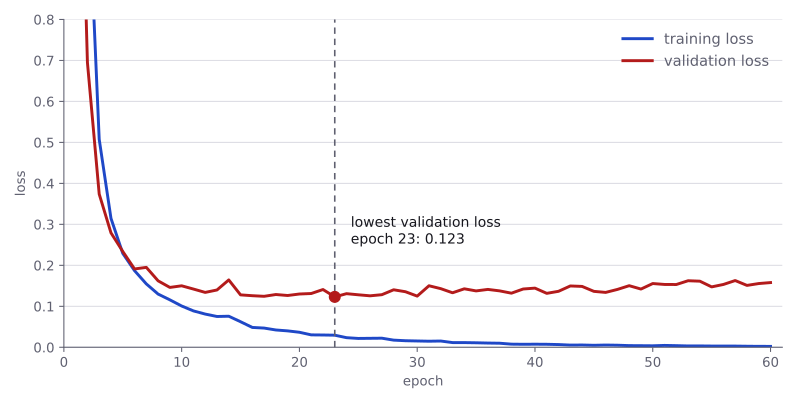
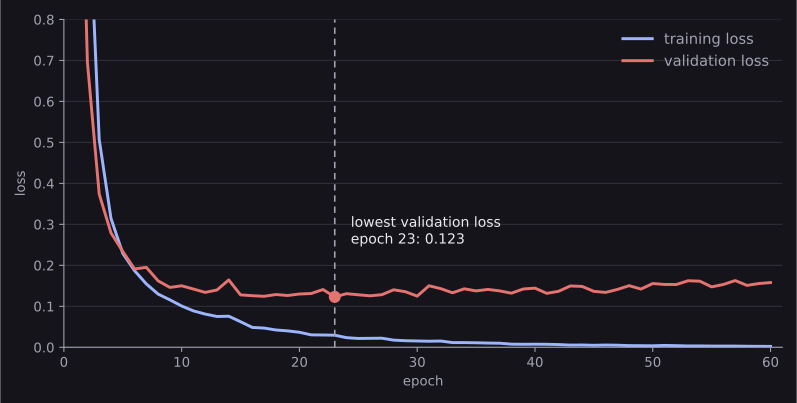
At first, both lines fall. That is what we hoped to see: the model is improving on images it trained on and images it did not. Later, the training loss keeps falling, but the validation loss reaches its lowest point at epoch 23 and starts rising. The model is now getting better at its training images while doing a little worse on new ones. We call that overfitting.
The validation accuracy in the printout hardly moves while this happens. Accuracy only counts right and wrong answers, but the loss also looks at how confident each answer is. As the model memorises the training images, it becomes more and more certain, and the few validation images it gets wrong, it now gets wrong with great confidence. That is why the loss is the better signal for choosing an epoch, and why we kept the weights from epoch 23.
The best epoch, saved to a file
We do not have to settle for the weights left after epoch 60. We saved best_state when validation was best, so let us load those weights back:
model.load_state_dict(best_state)
best_epoch, round(best_val_loss, 3)(23, 0.123)In a contest, also save them to a file. A notebook can crash or restart, and the variables are then gone; a file is not:
torch.save(best_state, "digit_mlp.pt")

restored = DigitMLP(n_features=64, n_hidden=128, n_classes=10)
restored.load_state_dict(torch.load("digit_mlp.pt"))<All keys matched successfully>Notice that the file holds only the weights. To load them, you build a model of the same shape first, which is why the class and its sizes must stay in your notebook.
From logits to predictions
What does the trained model actually say about a new image? It first gives us ten raw scores, called logits. softmax turns those scores into probabilities that add up to 1, and argmax picks the largest one. Let us look at the first test batch:
x_batch, y_batch = next(iter(test_loader))
model.eval()
with torch.no_grad():
    logits = model(x_batch.to(device))
probabilities = torch.softmax(logits, dim=1)
predictions = probabilities.argmax(dim=1)

print(probabilities[0].round(decimals=3))
print(predictions[:10])
print(y_batch[:10])tensor([0.0000, 0.0000, 0.0000, 0.0000, 0.0000, 0.0000, 0.0000, 0.9530, 0.0000,
0.0470])
tensor([7, 6, 3, 7, 7, 3, 2, 8, 9, 3])
tensor([7, 6, 3, 7, 7, 3, 2, 8, 9, 3])The model is 95% sure that the first image is a 7, and puts the remaining 5% on 9, a digit that can look similar. Every value is rounded to three decimals, so the classes it has ruled out show as 0. The ten predictions all match the true labels.
For accuracy alone, logits.argmax(dim=1) gives the same classes without the softmax, because softmax never changes which score is largest. You need the probabilities when a task is scored on them, as some IOAI tasks are.
The final test score
We have kept the test images aside until now. They did not help train the weights or choose the epoch, so their score gives us a fresh check of how the model handles new images. Let us measure it once:
test_loss, test_accuracy = evaluate(model, test_loader, loss_fn)
round(test_accuracy, 3)0.969Is that good? Always compare with a simple baseline. Here is Logistic Regression on exactly the same split:
from sklearn.linear_model import LogisticRegression

baseline = LogisticRegression(max_iter=2000)
baseline.fit(X_train, y_train)
round(baseline.score(X_test, y_test), 3)0.964The network gets 349 of the 360 test images right, and logistic regression 347. On a small, clean table like this one, a linear model is already strong, and a network only edges ahead. Networks pull clearly ahead on larger datasets, on images read as images, and on problems such as XOR where no straight boundary works. Convolutional Neural Networks tests this on these same digits, and MNIST on larger ones. Either way, always know your baseline: if a network cannot beat a simple model, use the simple model.
Using the GPU
You have already used the device choice in the code. If PyTorch finds a compatible NVIDIA GPU, torch.cuda.is_available() is true and device becomes "cuda"; otherwise it becomes "cpu". CUDA is the name PyTorch uses for running computations on that kind of GPU. You do not need to install or understand CUDA to follow the example on a CPU.
The important rule is simple: the model and the tensors it works on must be in the same place. model.to(device) moves the model; x_batch.to(device) and y_batch.to(device) move each batch. That is why we use these calls in both loops and when making predictions. A “tensors on different devices” error usually means one move was missed. This small digit dataset may not train faster on a GPU, but larger image tasks often do.
The numbers on this page come from a CPU. On a GPU, or with a different PyTorch version, the random numbers can come out differently, so expect your losses and accuracies to differ slightly in the last digits.
Common mistakes
The messages are exactly what PyTorch prints.
| Mistake | What you see | Fix |
|---|---|---|
Labels stored as float32 for CrossEntropyLoss |
RuntimeError: expected target dtype to be Long or Byte, but got Float |
Create the label tensor with dtype=torch.long. |
Labels of shape (batch, 1) instead of (batch,) |
RuntimeError: 0D or 1D target tensor expected, multi-target not supported |
Keep labels one-dimensional, or use .squeeze(1). |
| Classes numbered 1 to 10 instead of 0 to 9 | IndexError: Target 10 is out of bounds. |
Number classes from 0 to , for example by subtracting 1. |
Images not flattened before the first nn.Linear |
RuntimeError: mat1 and mat2 shapes cannot be multiplied (32x8 and 64x10) |
Flatten each image to one row, or start the model with nn.Flatten(). |
| A softmax at the end of the model | No error, but training is slower and less stable | Output raw logits; CrossEntropyLoss applies the softmax itself. |
Forgetting model.eval() before predicting |
No error here, but some layers behave differently during training | Call model.eval() before checking or predicting, and model.train() before training again. |
| Keeping the weights from the last epoch | No error, but the model may be past its best | Save a copy of state_dict() at the best validation loss. |
How to practise
There is no PyTorch section on the practice sites we use (CodeChef, CS50 and HackerRank), so practise with the course and with experiments on this page's code:
- Do the exercises at the end of chapter 02 of Learn PyTorch for Deep Learning.
- As promised in Activation Functions, train the digit model twice, once with
nn.Sigmoid()in place of eachnn.ReLU(), and compare the curves. - Change one thing at a time and watch the curves: the hidden size (32, 128, 512), the learning rate (0.01, 0.001, 0.0001), or the batch size.
- Remove the
X = X / 16.0line and train again. What happens to the curves, and why?
Check yourself
What comes next
- PyTorch Pipeline for a Simple Machine Learning Problem: the same training, inside the whole route from CSV files to a submission file.
- Simple Problem Examples: what changes in this code for regression, yes/no labels and several labels at once.
- Convolutional Neural Networks: networks that read images as images, instead of flattened rows of pixels.
Resources
| Source | Title | Why read it |
|---|---|---|
| Daniel Bourke | 02. PyTorch Neural Network Classification | Our recommended starting point: binary and multi-class classifiers built step by step, with exercises. |
| PyTorch | Build the Neural Network | The official page on nn.Module, nn.Sequential and nn.Linear. |
| PyTorch | Optimizing Model Parameters | The official training and test loops, written as two functions like the ones on this page. |
| PyTorch | Save and Load the Model | Saving weights with state_dict and loading them back. |
| Andrej Karpathy | A Recipe for Training Neural Networks | A practical checklist for training networks, including the starting-loss check used on this page. |
Finished this module? Mark it done.
Comments
Stuck on something, spotted a mistake, or found a resource that helped you? Tell us below.
Loading comments