6Computer Vision 6.4Computer Vision Models
6.4.1 Convolutional Neural Networks
Stack convolution, ReLU and pooling into a network, trace its shapes layer by layer, count its parameters, and train it honestly against the MLP on handwritten digits.
Why learn convolutional neural networks?
In Loading Images into Tensors with Torchvision, we turned image files into batches of shape (N, C, H, W). In Convolutional Layers and Pooling, we met the two layers that read such batches as grids. This page puts them together into a convolutional neural network (CNN) and trains it.
A CNN is built from a few repeated blocks of convolution, ReLU and pooling, which turn the image into a stack of small feature maps, followed by a small MLP, the classifier head, which turns those maps into one score per class. It is trained with exactly the loop from A Simple MLP in PyTorch. We use the same handwritten digits and the same split as that page, so that we can compare the two networks honestly, and the result is a useful lesson in itself. CNNs, often pretrained ones, are the standard starting point for image classification tasks.
Why use a CNN instead of an MLP for images?
The digit MLP worked by flattening each image into a row. It could learn from the pixel values, but its layers had no built-in way to treat neighbouring pixels as a group. A CNN keeps the grid and makes a few useful assumptions about images:
- Fewer parameters for finding a pattern. An MLP's first layer needs a separate weight for every input pixel and every neuron. A convolution learns a small kernel and uses the same weights across the image. This matters more as images grow: a 224 × 224 RGB photo has over 150,000 input values, while one 3 × 3 kernel over its three colour channels uses just 27 weights plus a bias.
- A pattern can appear in different places. The same kernel can find an edge near the top or the bottom without learning a separate edge detector for each position. Pooling then makes the result somewhat less sensitive to small shifts. That does not make a CNN ignore position completely, but it helps when an object moves a little within the frame.
- It can build from small details to larger ones. Early layers look at nearby pixels; later layers combine those responses over larger parts of the image. An MLP can learn complex patterns too, but a CNN gives it a starting structure that fits how images are arranged.
These are reasons to try a CNN, not a promise that it will win every comparison. Our digits are only 8 × 8 and already centred, so the MLP has a fair chance. Later we will train both on the same split and see what actually happens.
What you need to know
By the end of this module, you should be comfortable with these ideas:
| Idea | In one line |
|---|---|
| The conv block | Conv2d → ReLU → MaxPool2d: find patterns, keep the positive responses, halve the size. |
| Stacking blocks | Each block has more channels and smaller maps than the one before. |
| Flatten | Turns (N, C, H, W) into (N, C × H × W) for the classifier. |
| The classifier head | A small MLP from the flattened features to one logit per class. |
| Tracing shapes | Push one input through the layers one at a time and print each shape. |
| Parameter count | Convolutions need few parameters; most of them are often in the first nn.Linear. |
| Training | The same loop, loss and optimizer as for an MLP; only the input shape changes. |
| Honest comparison | Same split, a baseline, and several seeds before claiming one model is better. |
Learn it properly
This page builds and trains one small CNN, with every number from a real run. The course below builds and compares several models on a larger dataset, so use both.
Pick one main course
Our pick: Learn PyTorch for Deep Learning, chapter 03
Work through 03. PyTorch Computer Vision from Daniel Bourke's free course, which A Simple MLP in PyTorch also recommends. It loads FashionMNIST, a dataset of small grayscale photos of clothing (the first run downloads it, so do that at home), trains a linear baseline and an MLP, and then builds a CNN, stepping through nn.Conv2d and nn.MaxPool2d with real tensors before training it. It ends by comparing the three models, plotting a confusion matrix and saving the best model. Do the exercises at the end.
If you prefer something else
- A textbook: section 7.6 of Dive into Deep Learning, Convolutional Neural Networks (LeNet), builds LeNet, one of the first CNNs, and prints the shape after every layer, as we do below.
- A video: StatQuest's Image Classification with Convolutional Neural Networks walks slowly through a tiny CNN, from one filter to the final prediction.
- Play with it: CNN Explainer shows every feature map of a small trained CNN in your browser; click a feature map to see how its values are computed.
A quick tour
The rest of this page builds a CNN for the digits from A Simple MLP in PyTorch, traces its shapes, trains it, and compares it with that page's MLP. Go through your chosen course first, then run each cell in a notebook as you read.
The data, as images
We start exactly as A Simple MLP in PyTorch did: the 1,797 digits of 8 × 8 pixels, scaled to between 0 and 1, and split into the same 1,077 training, 360 validation and 360 test images.
from sklearn.datasets import load_digits
from sklearn.model_selection import train_test_split

digits = load_digits()
X = digits.data / 16.0       # 64 pixels per row, from 0 to 1
y = digits.target

X_rest, X_test, y_rest, y_test = train_test_split(
    X, y, test_size=0.2, stratify=y, random_state=0)
X_train, X_val, y_train, y_val = train_test_split(
    X_rest, y_rest, test_size=0.25, stratify=y_rest, random_state=0)
len(X_train), len(X_val), len(X_test)(1077, 360, 360)There is one change. The MLP read each image as a flat row of 64 numbers; a CNN needs it as an image, with a channel dimension: (N, 1, 8, 8), as in Basic Image Terminology. Since each row holds the 8 rows of the image one after another, reshape puts them back into a grid:
import torch
from torch import nn
from torch.utils.data import TensorDataset, DataLoader

def make_image_dataset(features, labels):
    images = torch.tensor(features, dtype=torch.float32)
    images = images.reshape(-1, 1, 8, 8)    # (N, 64) -> (N, 1, 8, 8)
    labels = torch.tensor(labels, dtype=torch.long)
    return TensorDataset(images, labels)

train_set = make_image_dataset(X_train, y_train)
val_set = make_image_dataset(X_val, y_val)
test_set = make_image_dataset(X_test, y_test)

train_loader = DataLoader(train_set, batch_size=32, shuffle=True)
val_loader = DataLoader(val_set, batch_size=256)
test_loader = DataLoader(test_set, batch_size=256)
train_set[0][0].shapetorch.Size([1, 8, 8])reshape(-1, 1, 8, 8) means "1 channel of 8 × 8, and as many images as it takes"; the -1 is worked out from the size. Here reshape is right, unlike when moving channels in Basic Image Terminology, because the numbers are already in row order and we only cut them into rows.
The model: conv blocks and a classifier head
A small CNN has two parts. The feature extractor is a stack of conv blocks, each a convolution, a ReLU and a max pooling layer: the convolution looks for patterns, the ReLU keeps only the positive responses, and the pooling halves the size. The classifier head flattens the final feature maps into one row per image and passes it through a small MLP, ending in one logit per class.
class DigitCNN(nn.Module):
    def __init__(self, n_classes):
        super().__init__()
        self.features = nn.Sequential(
            nn.Conv2d(1, 16, kernel_size=3, padding=1),   # block 1
            nn.ReLU(),
            nn.MaxPool2d(2),
            nn.Conv2d(16, 32, kernel_size=3, padding=1),  # block 2
            nn.ReLU(),
            nn.MaxPool2d(2),
        )
        self.classifier = nn.Sequential(
            nn.Flatten(),
            nn.Linear(32 * 2 * 2, 64),
            nn.ReLU(),
            nn.Linear(64, n_classes),
        )

    def forward(self, x):
        x = self.features(x)
        return self.classifier(x)

device = "cuda" if torch.cuda.is_available() else "cpu"
torch.manual_seed(0)
model = DigitCNN(n_classes=10).to(device)
The choices follow common patterns:
kernel_size=3, padding=1keeps the size of the maps, as Padding showed, so only the pooling layers shrink them.- The number of channels grows (1, then 16, then 32) while the maps shrink (8, then 4, then 2). Each block finds more kinds of pattern, each over a larger part of the image.
- The last layer has no activation: it outputs logits for
CrossEntropyLoss, exactly as in the MLP.
Where does 32 * 2 * 2 come from? That is the next section.
Tracing the shapes
The input size of the first nn.Linear depends on everything before it, so the safest way to get it right is to push one input through the layers one at a time and print the shape after each:
x = torch.zeros(1, 1, 8, 8, device=device)    # one blank image
for layer in model.features:
    x = layer(x)
    print(f"{type(layer).__name__:10} {tuple(x.shape)}")
for layer in model.classifier:
    x = layer(x)
print(f"{type(layer).__name__:10} {tuple(x.shape)}")Conv2d (1, 16, 8, 8)
ReLU (1, 16, 8, 8)
MaxPool2d (1, 16, 4, 4)
Conv2d (1, 32, 4, 4)
ReLU (1, 32, 4, 4)
MaxPool2d (1, 32, 2, 2)
Flatten (1, 128)
Linear (1, 64)
ReLU (1, 64)
Linear (1, 10)Read it top to bottom. The first convolution turns 1 channel into 16, at the same 8 × 8 size; pooling halves that to 4 × 4. The second block makes 32 channels and halves again, to 2 × 2. Flatten lays out numbers per image, which is why the first nn.Linear takes 128 inputs. If you change any layer above it, run this cell again: the error you would otherwise get is in Common mistakes.
Counting the parameters
total = 0
for name, parameter in model.named_parameters():
    print(f"{name:21} {str(tuple(parameter.shape)):15} "
          f"{parameter.numel()}")
    total += parameter.numel()
print(total)features.0.weight (16, 1, 3, 3) 144
features.0.bias (16,) 16
features.3.weight (32, 16, 3, 3) 4608
features.3.bias (32,) 32
classifier.1.weight (64, 128) 8192
classifier.1.bias (64,) 64
classifier.3.weight (10, 64) 640
classifier.3.bias (10,) 10
13706The first convolution has parameters and the second , with the formula from nn.Conv2d. The two linear layers add and . In total, 13,706 parameters, about half of the MLP's 26,122. As in most CNNs, the first nn.Linear holds the most parameters, even though the convolutions do most of the work.
Check before you train
The two checks from A Simple MLP in PyTorch work unchanged: one batch through the model, and the starting loss.
x_batch, y_batch = next(iter(train_loader))
x_batch = x_batch.to(device)
y_batch = y_batch.to(device)
logits = model(x_batch)
loss_fn = nn.CrossEntropyLoss()
print(x_batch.shape, logits.shape)
print(round(loss_fn(logits, y_batch).item(), 3))torch.Size([32, 1, 8, 8]) torch.Size([32, 10])
2.30632 images of shape (1, 8, 8) in, 32 rows of 10 logits out, and a starting loss close to , as it should be for 10 classes.
Training, with the same loop
The training and evaluation functions are exactly those of A Simple MLP in PyTorch. Nothing in them depends on the shape of the inputs, so they work for images as they are:
def train_one_epoch(model, loader, loss_fn, optimizer):
    model.train()
    total_loss = 0.0
    for x_batch, y_batch in loader:
        x_batch = x_batch.to(device)
        y_batch = y_batch.to(device)
        logits = model(x_batch)
        loss = loss_fn(logits, y_batch)
        optimizer.zero_grad()
        loss.backward()
        optimizer.step()
        total_loss += loss.item() * len(y_batch)
    return total_loss / len(loader.dataset)

def evaluate(model, loader, loss_fn):
    model.eval()
    total_loss = 0.0
    correct = 0
    with torch.no_grad():
        for x_batch, y_batch in loader:
            x_batch = x_batch.to(device)
            y_batch = y_batch.to(device)
            logits = model(x_batch)
            loss = loss_fn(logits, y_batch)
            total_loss += loss.item() * len(y_batch)
            predictions = logits.argmax(dim=1)
            correct += (predictions == y_batch).sum().item()
    n_samples = len(loader.dataset)
    return total_loss / n_samples, correct / n_samples
The main loop is also the same: 60 epochs with Adam, keeping the weights from the epoch with the lowest validation loss.
import copy

optimizer = torch.optim.Adam(model.parameters(), lr=0.001)
history = {"train_loss": [], "val_loss": []}
best_val_loss = float("inf")

for epoch in range(1, 61):
    train_loss = train_one_epoch(model, train_loader, loss_fn,
                                 optimizer)
    val_loss, val_accuracy = evaluate(model, val_loader, loss_fn)
    history["train_loss"].append(train_loss)
    history["val_loss"].append(val_loss)
    if val_loss < best_val_loss:
        best_val_loss = val_loss
        best_epoch = epoch
        best_state = copy.deepcopy(model.state_dict())
    if epoch % 10 == 0:
        print(epoch, round(train_loss, 3), round(val_loss, 3),
round(val_accuracy, 3))10 0.187 0.208 0.939
20 0.061 0.109 0.983
30 0.018 0.107 0.978
40 0.008 0.1 0.978
50 0.005 0.115 0.983
60 0.003 0.104 0.986The columns are the epoch, the training loss, the validation loss and the validation accuracy. On a CPU, the 60 epochs take well under a minute.
model.load_state_dict(best_state)
best_epoch, round(best_val_loss, 3)(29, 0.098)The test score, and an honest comparison
Now the test set, once:
test_loss, test_accuracy = evaluate(model, test_loader, loss_fn)
round(test_loss, 3), round(test_accuracy, 3)(0.115, 0.961)The CNN gets 346 of the 360 test images right. A Simple MLP in PyTorch got 349 with its MLP, and logistic regression 347, on exactly these test images. So on this run, the CNN is not better, even though its best validation loss, 0.098, is clearly lower than the MLP's 0.123.
Three images out of 360 is a small difference, and a single training run depends on luck: the random starting weights and the random order of the batches. Before believing either "the CNN is worse" or "the CNN is better", train both networks several times with different seeds and look at the spread. An MLP can read the same image batches if it starts with nn.Flatten(), so both can use the loaders above:
def make_cnn():
    return DigitCNN(n_classes=10)

def make_mlp():                  # the MLP from A Simple MLP in PyTorch
    return nn.Sequential(
        nn.Flatten(),            # (N, 1, 8, 8) -> (N, 64)
        nn.Linear(64, 128), nn.ReLU(),
        nn.Linear(128, 128), nn.ReLU(),
        nn.Linear(128, 10),
    )

def train_and_test(make_model, seed):
    torch.manual_seed(seed)
    model = make_model().to(device)
    optimizer = torch.optim.Adam(model.parameters(), lr=0.001)
    best_val_loss = float("inf")
    for epoch in range(60):
        train_one_epoch(model, train_loader, loss_fn, optimizer)
        val_loss, val_accuracy = evaluate(model, val_loader, loss_fn)
        if val_loss < best_val_loss:
            best_val_loss = val_loss
            best_state = copy.deepcopy(model.state_dict())
    model.load_state_dict(best_state)
    return evaluate(model, test_loader, loss_fn)

cnn_accuracies = []
mlp_accuracies = []
for seed in range(5):
    cnn_loss, cnn_accuracy = train_and_test(make_cnn, seed)
    mlp_loss, mlp_accuracy = train_and_test(make_mlp, seed)
    cnn_accuracies.append(cnn_accuracy)
    mlp_accuracies.append(mlp_accuracy)
    print(seed, round(cnn_accuracy, 3), round(mlp_accuracy, 3),
          round(cnn_loss, 3), round(mlp_loss, 3))
cnn_mean = sum(cnn_accuracies) / 5
mlp_mean = sum(mlp_accuracies) / 5
print("mean", round(cnn_mean, 3), round(mlp_mean, 3))0 0.978 0.961 0.083 0.162
1 0.972 0.967 0.13 0.164
2 0.964 0.967 0.113 0.16
3 0.972 0.972 0.125 0.152
4 0.958 0.961 0.144 0.16
mean 0.969 0.966The columns are the seed, the test accuracy of the CNN and of the MLP, and the test loss of each. This takes a minute or two on a CPU. Three things stand out:
- The accuracy depends on the seed. The CNN ranges from 0.958 to 0.978, a difference of 7 images, just from different random starts. Our first run, at 0.961, was simply one of the less lucky ones. The same goes for the MLP: its seed-0 score here is 0.961, not the 0.969 of A Simple MLP in PyTorch, because this loop draws its random numbers in a different order.
- On average, the two are about equally accurate: 0.969 against 0.966, a difference of about one image in 360, much smaller than the spread from seed to seed. On this data, the CNN is not clearly more accurate.
- The CNN's test loss is lower for every seed, 0.083 to 0.144 against 0.152 to 0.164. When it is right, it puts more probability on the right class, and when it is wrong, it is less confidently wrong. That matters when a task is scored on probabilities.
Why so small a gain? These images are tiny: 8 × 8 pixels, already centred and scaled by the people who made the dataset. There is little spatial structure for the convolutions to exploit, and 64 inputs are few enough for an MLP to handle directly. On larger images, the picture changes: MNIST repeats this comparison on 28 × 28 digits. The general lesson stands on its own: compare with a baseline on the same split, and look at more than one run before deciding that one model beats another.
What the first layer responds to
The 16 kernels of the first convolutional layer were learned from the data. To see what they do, we run one test digit through the first conv block and look at the 16 feature maps, after the ReLU:
digit, label = test_set[0]                     # (1, 8, 8)
first_block = model.features[:2]               # Conv2d and ReLU
with torch.no_grad():
    maps = first_block(digit.unsqueeze(0).to(device))
print(label.item(), maps.shape)7 torch.Size([1, 16, 8, 8])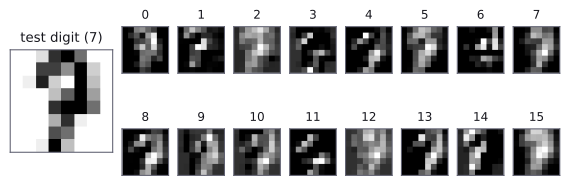
Slicing an nn.Sequential with [:2] gives a smaller nn.Sequential with its first two layers, a handy way to look inside a model. Each feature map is the digit as seen through one learned kernel, and each lights up a different part of it: a few pixels of the top stroke, the right-hand edge of the downward stroke, or most of the digit. On images of 8 × 8 pixels the maps are coarse, but the idea is the one from Real kernels on a real photo: nobody designed these kernels; they were learned because they help to tell the digits apart. The second block combines these maps into responses to larger shapes, and the classifier head turns those into a decision.
As in A Simple MLP in PyTorch, save the best weights to a file with torch.save(best_state, "digit_cnn.pt") so that a crashed notebook does not lose them.
Common mistakes
The messages are exactly what PyTorch prints.
| Mistake | What you see | Fix |
|---|---|---|
| Giving a CNN flat rows of pixels | RuntimeError: Expected 3D (unbatched) or 4D (batched) input to conv2d, but got input of size: [32, 64] |
Reshape to (N, C, H, W), here with reshape(-1, 1, 8, 8). |
The wrong input size for the first nn.Linear |
RuntimeError: mat1 and mat2 shapes cannot be multiplied (32x128 and 512x64) |
Trace the shapes and use channels × height × width of the last feature map. |
| Too many pooling layers for small images | RuntimeError: Given input size: (32x1x1). Calculated output size: (32x0x0). Output size is too small |
Each 2 × 2 pooling halves the size; 8 × 8 images allow at most three. |
Images left as float64 (NumPy's default) |
RuntimeError: Input type (double) and bias type (float) should be the same |
Create the tensors with dtype=torch.float32. |
| No ReLU between the convolutions | No error, but the network is weaker: stacked convolutions without activations collapse into one, as in Multi-Layer Perceptrons | Put nn.ReLU() after every convolution. |
| Judging a model by one training run | No error, but a lucky or unlucky seed decides your conclusion | Compare several seeds, on the same split, against a baseline. |
How to practise
There is no CNN section on CodeChef or HackerRank. CS50's Introduction to Artificial Intelligence with Python has a CNN project:
- Traffic, project 5 of CS50 AI, asks you to classify photos of 43 kinds of German road signs, stored as one numbered subfolder per class. The project is written for TensorFlow, which the contest machines do not have, so do it in PyTorch instead: load the folders with
ImageFolderfrom Loading Images into Tensors with Torchvision and train a network like the one on this page. One trap:ImageFoldersorts the folder names as text, so folder10comes before folder2, and the class numbers it assigns differ from the folder names. Checkclass_to_idx. - Do the exercises at the end of 03. PyTorch Computer Vision.
- Change the digit CNN one thing at a time and compare with five seeds each time: 8 and 16 channels instead of 16 and 32; a third conv block; no pooling (and a larger
nn.Linear);nn.Dropoutin the head. - Add data augmentation to the digit training images, for example
v2.RandomAffine(degrees=10, translate=(0.1, 0.1)), applied to each image in a small custom Dataset. Does it change the test accuracy or the test loss?
Check yourself
What comes next
- MNIST: a complete project on 60,000 larger digits, where the CNN and the MLP are compared again, ending with a submission file.
- Loading Images into Tensors with Torchvision: if you skipped it, the pipeline that feeds a CNN from image files instead of from scikit-learn.
Resources
| Source | Title | Why read it |
|---|---|---|
| Daniel Bourke | 03. PyTorch Computer Vision | Our recommended starting point: a baseline, an MLP and a CNN trained and compared on small clothing images. |
| Dive into Deep Learning | 7.6 Convolutional Neural Networks (LeNet) | LeNet, one of the first CNNs, built and trained in PyTorch, with its shapes traced layer by layer. |
| Polo Club, Georgia Tech | CNN Explainer | An interactive view of every layer of a small trained CNN. |
| StatQuest with Josh Starmer | Neural Networks Part 8: Image Classification with Convolutional Neural Networks (CNNs) | A slow, clear video walk-through of a tiny CNN, from filter to prediction. |
| Stanford CS231n | Convolutional Neural Networks: ConvNet Architectures | Common layer patterns and how to size each layer. |
| CS50's Introduction to Artificial Intelligence with Python | Project 5: Traffic | A practice project: classify 43 kinds of road sign with a CNN. Written for TensorFlow; do it in PyTorch. |
Finished this module? Mark it done.
Comments
Stuck on something, spotted a mistake, or found a resource that helped you? Tell us below.
Loading comments