8Audio 8.2Librosa
8.2.2 Audio Feature Extraction with Librosa
Compute spectrograms, mel spectrograms, MFCCs and simple features with librosa and torchaudio, turn clips of any length into fixed-length vectors, and train an honest spoken-digit classifier tested on speakers it has never heard.
Why extract features with a library?
In Loading Audio with Librosa, we turned a folder of audio files into arrays with one sampling rate and one channel. In Theory of Audio Features, we built spectrograms, mel spectrograms and MFCCs by hand with NumPy, to see what each step does. This module does the same work with one function call per feature, as you will in practice, and then uses the features for a real task: recognising which digit a person says.
The task is small, but it teaches a central lesson of audio classification. A model can look excellent when it is tested on the same voices it was trained on, and much weaker on new voices. In a contest, the test recordings usually come from people the model has never heard, so we will measure exactly that, and compare every model with a simple baseline.
As in the previous module, each step is shown with librosa and with torchaudio. librosa was added to the IOAI 2026 library list shortly before the contest, after the Technical Appendix was published, so it is worth knowing both.
What you need to know
By the end of this module, you should be comfortable with these ideas:
| Idea | In one line |
|---|---|
librosa.stft and amplitude_to_db |
The spectrogram as complex numbers, and its magnitudes in decibels. |
librosa.feature.melspectrogram and power_to_db |
The mel spectrogram as power, and in decibels. |
librosa.feature.mfcc |
MFCCs, one column of coefficients per frame. |
rms, zero_crossing_rate, spectral_centroid |
One value per frame for loudness, noisiness and brightness. |
n_fft, hop_length, n_mels |
The frame length, the hop and the number of mel bands; choose them once and keep them. |
| Fixed-length vectors | The mean and standard deviation of each feature over time. |
| Splitting by speaker | Test on speakers the model never saw, with LeaveOneGroupOut. |
| torchaudio transforms | MelSpectrogram, AmplitudeToDB and MFCC: the same features without librosa. |
Learn it properly
Each library call on this page stands for several steps of the previous module. If a call seems like magic, go back to Theory of Audio Features and find the step it replaces.
Pick one main course
Choose one main resource and finish it; the others are there if something does not click.
Our pick: Valerio Velardo's feature-extraction videos
Valerio Velardo's series Audio Signal Processing for Machine Learning has one short video per feature, each written as a notebook with librosa. Watch these five, in this order: How to Extract Root-Mean Square Energy and Zero-Crossing Rate from Audio, How to Extract Spectrograms from Audio with Python, Extracting Mel Spectrograms with Python, Extracting Mel-Frequency Cepstral Coefficients with Python and Extracting Spectral Centroid and Bandwidth with Python and Librosa. The notebooks are in his GitHub repository. The videos use music examples and librosa's default rate of 22,050 Hz; this page uses speech at 8,000 Hz, so its settings differ.
If you prefer something else
- Without librosa: PyTorch's tutorial Audio Feature Extractions shows torchaudio's
Spectrogram,MelSpectrogramandMFCCtransforms. It loads its example withtorchaudio.load, which needs TorchCodec in recent versions, as Loading Audio with Librosa explains; the transforms themselves work without it. - The reference: librosa's page for
librosa.feature.mfcclists its arguments, including the ones it passes on to the mel spectrogram.
A quick tour
The rest of this page computes every feature for one recording, then for 3,000, and trains a classifier on them. Go through your chosen course first, then run each cell in a notebook as you read.
The data: spoken digits
The Free Spoken Digit Dataset (Zohar Jackson and contributors, licensed CC BY-SA 4.0) contains 3,000 short WAV recordings of the digits 0 to 9: six speakers, each saying each digit 50 times, at 8,000 Hz. At home, the code below downloads version 1.0.10 from GitHub (about 16 MB) and unpacks it. In a contest, the data comes as files on the machine, and you would start from the folder.
import urllib.request
import zipfile
from pathlib import Path

URL = ("https://github.com/Jakobovski/free-spoken-digit-dataset/"
       "archive/refs/tags/v1.0.10.zip")
folder = Path("fsdd/free-spoken-digit-dataset-1.0.10/recordings")

if not folder.exists():
    urllib.request.urlretrieve(URL, "fsdd.zip")
    with zipfile.ZipFile("fsdd.zip") as archive:
        archive.extractall("fsdd")

paths = sorted(folder.glob("*.wav"))
print(len(paths), paths[0].name)3000 0_george_0.wavEach file name has the form digit_speaker_take.wav, so the labels come from the names. We split each name at the underscores and keep the parts in a table:
import numpy as np
import pandas as pd

rows = []
for path in paths:
    digit, speaker, take = path.stem.split("_")
    rows.append({"digit": int(digit), "speaker": speaker,
                 "take": int(take)})

recordings = pd.DataFrame(rows)
recordings.head(3)| digit | speaker | take | |
|---|---|---|---|
| 0 | 0 | george | 0 |
| 1 | 0 | george | 1 |
| 2 | 0 | george | 10 |
The files are sorted by name, so take 10 comes straight after take 1. How many recordings does each speaker have?
counts = recordings["speaker"].value_counts()
print(counts.to_dict()){'george': 500, 'jackson': 500, 'lucas': 500, 'nicolas': 500, 'theo': 500, 'yweweler': 500}path.stem is the file name without .wav. Every speaker has exactly 500 recordings, 50 of each digit. That the speakers are known will matter a lot later.
One recording, step by step
We start with one recording, the "seven" from the earlier modules, loaded at its own rate of 8,000 Hz. Three settings control every feature below, so we fix them once:
import librosa

N_FFT = 256        # frame length: 256 samples = 32 ms at 8,000 Hz
HOP = 128          # hop: 128 samples = 16 ms
N_MELS = 40        # mel bands

speech, rate = librosa.load(folder / "7_jackson_0.wav", sr=None)
print(speech.shape, rate)(3457,) 8000librosa's documentation describes its default n_fft=2048 (93 milliseconds at 22,050 Hz) as well suited to music, and recommends 512 samples (23 milliseconds at 22,050 Hz) for speech. At 8,000 Hz, 2,048 samples would last 256 milliseconds, more than half of this whole word, so we choose 256 samples, 32 milliseconds; see The spectrogram for the trade-off.
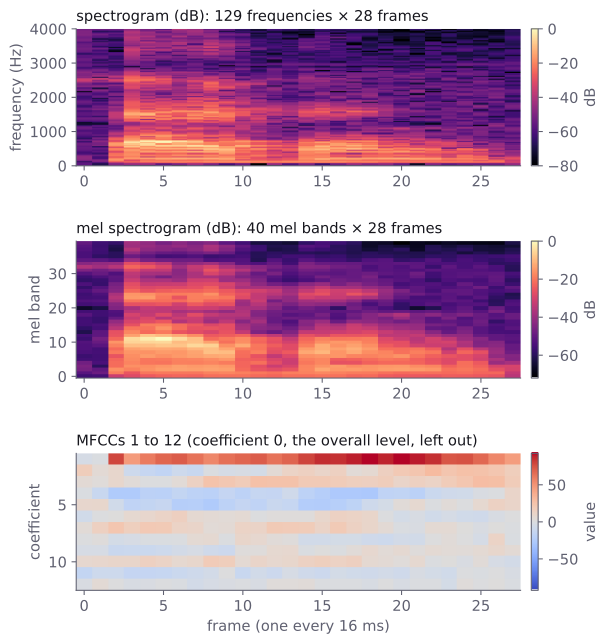
The spectrogram. librosa.stft cuts the frames, applies a Hann window and takes the FFT of each frame, all in one call:
stft = librosa.stft(speech, n_fft=N_FFT, hop_length=HOP)
magnitude = np.abs(stft)
spectrogram_db = librosa.amplitude_to_db(magnitude, ref=np.max)

print(stft.shape, stft.dtype)
print(spectrogram_db.min(), spectrogram_db.max())(129, 28) complex64
-80.0 0.0The result has frequency rows and 28 frames, and holds complex numbers, so we take np.abs for the magnitudes. amplitude_to_db with ref=np.max measures everything relative to the loudest point, so the top is 0 dB, and it cuts off everything more than 80 dB below it: exactly the to_decibels function we wrote in Spectrograms in decibels.
Why 28 frames? would be 26. librosa pads the signal by half a frame at each end (center=True), so that each frame is centred on a multiple of the hop. The count is then .
The mel spectrogram. librosa.feature.melspectrogram computes the power spectrogram and applies a mel filter bank, the two steps of The mel scale and the mel spectrogram. Its result is power, so it goes into decibels with power_to_db:
mel = librosa.feature.melspectrogram(
    y=speech, sr=rate, n_fft=N_FFT, hop_length=HOP, n_mels=N_MELS)
mel_db = librosa.power_to_db(mel, ref=np.max)
print(mel.shape, mel_db.min(), mel_db.max())(40, 28) -72.010056 0.0The 129 frequency rows have become 40 mel bands, with the same 28 frames. Note the pairing: amplitude_to_db for magnitudes, power_to_db for power. Using the wrong one gives no error, only decibel values that are twice or half as large as they should be.
MFCCs. librosa.feature.mfcc runs the whole chain from samples to coefficients: mel spectrogram, decibels, then the discrete cosine transform. Arguments it does not use itself, such as n_fft, hop_length and n_mels, are passed on to the mel spectrogram:
mfcc = librosa.feature.mfcc(
    y=speech, sr=rate, n_mfcc=13,
    n_fft=N_FFT, hop_length=HOP, n_mels=N_MELS)
print(mfcc.shape)
print(mfcc[:3, :4].round(1))(13, 28)
[[-322.7 -322.7 -228.1 -142.9]
[ -5.5 -2.4 77.4 45. ]
[ 16.1 3.8 8.2 -10.3]]Thirteen coefficients per frame, 28 frames. The first row is the overall level of each frame, as we saw in MFCCs: very negative during the near-silence at the start of the recording.
Simple features. RMS energy, the zero-crossing rate and the spectral centroid each give one value per frame. They take the same frame settings; for rms and zero_crossing_rate, the frame length is called frame_length:
rms = librosa.feature.rms(
    y=speech, frame_length=N_FFT, hop_length=HOP)
zcr = librosa.feature.zero_crossing_rate(
    speech, frame_length=N_FFT, hop_length=HOP)
centroid = librosa.feature.spectral_centroid(
    y=speech, sr=rate, n_fft=N_FFT, hop_length=HOP)
print(rms.shape, zcr.shape, centroid.shape)
print("rms:     ", rms[0, :5].round(3))
print("zcr:     ", zcr[0, :5].round(2))
print("centroid:", centroid[0, :5].round())(1, 28) (1, 28) (1, 28)
rms: [0.003 0.003 0.036 0.094 0.122]
zcr: [0.3 0.54 0.3 0.16 0.18]
centroid: [2203. 2016. 693. 1094. 946.]Each comes back with shape (1, 28): one row, one value per frame, so that all librosa features share the layout features × frames. The first five frames tell a story. Frames 0 and 1 are almost silent (RMS 0.003) but have many zero crossings and the highest centroids, above 2,000 Hz: a faint, noise-like sound, consistent with the soft "s" at the start of "seven". From frame 2 the voice starts: the RMS jumps, and the centroid drops below 1,100 Hz.
One vector per recording
The recordings have different lengths, from about 0.14 to 2.3 seconds, so they have different numbers of frames. For a classical model, each recording must become one row of the same length. As in From features to a model, we take the mean and the standard deviation of each MFCC over all frames:
def mfcc_vector(path):
    samples, rate = librosa.load(path, sr=None)
    mfcc = librosa.feature.mfcc(
        y=samples, sr=rate, n_mfcc=13,
        n_fft=N_FFT, hop_length=HOP, n_mels=N_MELS)
    means = mfcc.mean(axis=1)          # one value per coefficient
    stds = mfcc.std(axis=1)
    return np.concatenate([means, stds])

X = np.array([mfcc_vector(path) for path in paths])
y = recordings["digit"].to_numpy()
speakers = recordings["speaker"].to_numpy()
print(X.shape, y.shape)(3000, 26) (3000,)Every recording is now 26 numbers: 13 means and 13 standard deviations. The loop over 3,000 files takes a few seconds on a laptop. X is an ordinary feature table, and everything from Scikit-learn Basics applies to it.
A first classifier, and a baseline
Let us start the way many tutorials do: split the recordings at random into 80% for training and 20% for testing, keeping the ten digits in equal proportions. We train logistic regression and k-nearest neighbours, each after a StandardScaler in a pipeline, and a DummyClassifier that always predicts the most common digit, as a baseline:
from sklearn.model_selection import train_test_split
from sklearn.pipeline import make_pipeline
from sklearn.preprocessing import StandardScaler
from sklearn.linear_model import LogisticRegression
from sklearn.neighbors import KNeighborsClassifier
from sklearn.dummy import DummyClassifier

models = {
    "baseline": DummyClassifier(strategy="most_frequent"),
    "logistic": make_pipeline(StandardScaler(),
                              LogisticRegression(max_iter=3000)),
    "k-NN": make_pipeline(StandardScaler(),
                          KNeighborsClassifier(n_neighbors=5)),
}

X_train, X_test, y_train, y_test = train_test_split(
    X, y, test_size=0.2, stratify=y, random_state=0)
for name, model in models.items():
    model.fit(X_train, y_train)
print(f"{name:9} {model.score(X_test, y_test):.3f}")baseline 0.100
logistic 0.935
k-NN 0.987The baseline gets 10%, as expected with ten equally common digits. k-NN gets almost every test recording right. It looks as if spoken digits are solved with 26 numbers per recording.
They are not, and the reason is the split. Each speaker said each digit 50 times, so for almost every test recording, the training set contains 40 or so recordings of the same person saying the same digit. k-NN finds those near-copies of the voice and copies their label. That measures how well the model recognises voices it has already heard, which is not what a contest asks.
Testing on new speakers
To measure what we care about, the test recordings must come from speakers the model never heard. With six speakers, the fairest way is to hold out each speaker in turn: train on five, test on the sixth, and repeat six times. This is cross-validation with groups, and scikit-learn's LeaveOneGroupOut makes the splits from a list of group names, one per row:
from sklearn.model_selection import LeaveOneGroupOut
from sklearn.model_selection import cross_val_score

by_speaker = LeaveOneGroupOut()
names = sorted(set(speakers))
print(names)

for name, model in models.items():
    scores = cross_val_score(model, X, y, groups=speakers,
                             cv=by_speaker)
print(f"{name:9} {scores.round(2)} mean {scores.mean():.3f}")['george', 'jackson', 'lucas', 'nicolas', 'theo', 'yweweler']
baseline [0.1 0.1 0.1 0.1 0.1 0.1] mean 0.100
logistic [0.36 0.56 0.54 0.49 0.66 0.69] mean 0.551
k-NN [0.31 0.63 0.61 0.28 0.63 0.43] mean 0.483Each list shows the accuracy on one held-out speaker, in the order of names. The picture is completely different:
- Logistic regression drops from 0.935 to an average of 0.551, and k-NN from 0.987 to 0.483. k-NN, the best model on the random split, is now the worse one, because its strength was finding the same voice.
- The scores vary a lot between speakers: from 0.36 on george to 0.69 on yweweler for logistic regression. With only five training voices, some new voices are simply far from all of them. (The quiet recordings of theo, which we saw in Loading Audio with Librosa, are not the hardest.)
- Both models are still far above the baseline of 0.1, so the features do carry information about the digit.
This is a key habit for audio tasks: split by speaker (or by recording session, or by device, whatever the test data will differ in), never by individual recordings. The same applies to any data where several rows come from one source, such as several measurements of one patient; Cross-Validation shows GroupKFold for it. If the task's test set contains new speakers, only the speaker-split score predicts your result.
Keeping a little of the order
The mean and standard deviation over time throw away the order of events, as the previous module warned. For digits that matters: "six" and "seven" both start with a hiss, but what follows is different. A simple way to keep some order is to split each recording's frames into three equal parts, beginning, middle and end, and take the mean of each part separately:
def mfcc_thirds(path):
    samples, rate = librosa.load(path, sr=None)
    mfcc = librosa.feature.mfcc(
        y=samples, sr=rate, n_mfcc=13,
        n_fft=N_FFT, hop_length=HOP, n_mels=N_MELS)
    parts = np.array_split(mfcc, 3, axis=1)    # along time
    part_means = [part.mean(axis=1) for part in parts]
    return np.concatenate(part_means + [mfcc.std(axis=1)])

X_thirds = np.array([mfcc_thirds(path) for path in paths])
scores = cross_val_score(models["logistic"], X_thirds, y,
                         groups=speakers, cv=by_speaker)
print(X_thirds.shape, scores.round(2), f"mean {scores.mean():.3f}")(3000, 52) [0.46 0.82 0.62 0.63 0.79 0.87] mean 0.701np.array_split cuts the 13 × frames table into three tables of nearly equal width along the time axis, even when the number of frames does not divide by three. Each recording now has 52 numbers: three sets of 13 means, and the 13 standard deviations. On new speakers, logistic regression improves from 0.551 to 0.701, and on every one of the six speakers.
To be honest about how we got here: we tried a few other ideas on the same six splits, such as 20 MFCCs instead of 13, dropping the first coefficient, scaling every recording to the same peak, and adding librosa's delta features (the change of each MFCC from frame to frame). Each of them helped a little, reaching averages between 0.58 and 0.63, and the three parts helped most. Trying several ideas on the same validation splits makes the winner's score slightly optimistic, which is why a contest's hidden test set often scores a bit lower than your own validation.
The same features with torchaudio
Without librosa, torchaudio provides the same features as transforms: objects that you create once with your settings and then call on a waveform tensor, like a layer in PyTorch. We read the file with SciPy, as in Loading Audio with Librosa, and convert it to a float tensor:
import torch
import torchaudio
from scipy.io import wavfile

mel_transform = torchaudio.transforms.MelSpectrogram(
    sample_rate=8000, n_fft=N_FFT, hop_length=HOP, n_mels=N_MELS)
to_db = torchaudio.transforms.AmplitudeToDB(stype="power", top_db=80)
mfcc_transform = torchaudio.transforms.MFCC(
    sample_rate=8000, n_mfcc=13,
    melkwargs={"n_fft": N_FFT, "hop_length": HOP, "n_mels": N_MELS})

rate, samples = wavfile.read(folder / "7_jackson_0.wav")
waveform = torch.from_numpy(samples.astype(np.float32) / 32768)

mel_torch = to_db(mel_transform(waveform))
mfcc_torch = mfcc_transform(waveform)
print(mel_torch.shape, mfcc_torch.shape)torch.Size([40, 28]) torch.Size([13, 28])The shapes match librosa's: 40 mel bands and 13 coefficients, by 28 frames. The numbers do not match exactly, because the two libraries make different default choices: torchaudio uses a slightly different formula for the mel scale and does not scale its filters the way librosa does, pads the signal differently at the ends, and leaves AmplitudeToDB without the 80 dB floor unless you set top_db, as we did. Two of torchaudio's defaults are worth knowing because they can hurt silently: sample_rate is 16,000 and n_mels is 128. Always pass the real sampling rate, and choose n_mels yourself.
Do the differences matter for a model? Let us build the three-part features with torchaudio and test them on new speakers in the same way:
def mfcc_thirds_torch(path):
    rate, samples = wavfile.read(path)
    waveform = torch.from_numpy(samples.astype(np.float32) / 32768)
    mfcc = mfcc_transform(waveform).numpy()
    parts = np.array_split(mfcc, 3, axis=1)
    part_means = [part.mean(axis=1) for part in parts]
    return np.concatenate(part_means + [mfcc.std(axis=1)])

X_torch = np.array([mfcc_thirds_torch(path) for path in paths])
scores = cross_val_score(models["logistic"], X_torch, y,
                         groups=speakers, cv=by_speaker)
print(scores.round(2), f"mean {scores.mean():.3f}")[0.5 0.82 0.64 0.4 0.85 0.89] mean 0.684An average of 0.684 against librosa's 0.701. Most speakers score about the same with either library, though nicolas drops from 0.63 to 0.40, a reminder of how much a score on a single speaker can move. Overall, the choice of library matters far less than the choice of split and of how to summarise time. In a contest without librosa, nothing is lost by using torchaudio; what matters is to compute training and test features with the same code.
Spectrograms for a CNN
Summary statistics suit classical models. A neural network can instead read the whole log-mel spectrogram as a one-channel image, as From features to a model described. The only extra step is to give every recording the same number of frames, by padding short ones and cutting long ones:
N_FRAMES = 64           # about 1 second at a hop of 16 ms

def fixed_width(mel_db, n_frames=N_FRAMES):
    mel_db = mel_db[:, :n_frames]                    # cut
    missing = n_frames - mel_db.shape[1]
    return np.pad(mel_db, ((0, 0), (0, missing)),    # pad
                  constant_values=mel_db.min())

image = fixed_width(mel_db)[np.newaxis]   # add a channel axis
batch = torch.tensor(np.stack([image, image]))
print(image.shape, batch.shape)(1, 40, 64) torch.Size([2, 1, 40, 64])A batch of such spectrograms has the shape batch × channels × height × width, exactly like a batch of greyscale images, so the network from Convolutional Neural Networks can train on it with in_channels=1. With 3,000 short recordings, a small CNN on log-mel spectrograms is a natural next experiment once the classical baseline above is in place; split by speaker for it too, or its score will mislead you in the same way.
Common mistakes
The messages are exactly what the libraries print.
| Mistake | What you see | Fix |
|---|---|---|
| Splitting recordings at random when the test data has new speakers | No error, but a score far too high: 0.987 instead of about 0.5 here | Split by speaker with LeaveOneGroupOut or GroupKFold. |
librosa's default n_fft=2048 on 8,000 Hz speech |
No error, but each frame lasts 256 ms and blurs whole syllables together | Choose frames of 20 to 40 ms: n_fft=256 at 8,000 Hz, 512 at 16,000 Hz. |
Leaving out sample_rate in a torchaudio transform |
No error, but torchaudio assumes 16,000 Hz and places the mel bands at the wrong frequencies | Always pass sample_rate= the real rate. |
torchaudio's default n_mels=128 with a short frame |
UserWarning: At least one mel filterbank has all zero values. The value for `n_mels` (128) may be set too high. Or, the value for `n_freqs` (129) may be set too low. |
Use fewer mel bands, such as 40, or a longer frame. |
power_to_db on magnitudes, or amplitude_to_db on power |
No error, but decibel values twice or half as large as they should be | amplitude_to_db(np.abs(stft)), power_to_db(melspectrogram). |
Forgetting np.abs after librosa.stft |
Complex numbers in your features, and errors later in plotting or scikit-learn | Take np.abs for magnitudes, and square for power. |
| Different settings for training and test features | No error, but the model sees features unlike anything it was trained on | Keep N_FFT, HOP, N_MELS and the sampling rate as constants at the top of the notebook. |
How to practise
There is no audio section on the practice sites we use (CodeChef, CS50 and HackerRank), so practise on the spoken-digit data with the code on this page:
- Split each recording into four or five parts instead of three. Does the speaker-split score keep improving?
- Add the means and standard deviations of RMS, zero-crossing rate and spectral centroid to the MFCC vector. Do they help on new speakers?
- Train the small CNN from Convolutional Neural Networks on fixed-width log-mel spectrograms, with one speaker held out for validation. Does it beat 0.701 on that speaker?
- Look at the confusion matrix for one held-out speaker. Which digits does the model mix up, and do they sound alike?
Check yourself
What comes next
- Convolutional Neural Networks: the network to try next on log-mel spectrograms, treated as one-channel images.
- Cross-Validation: more on splitting data honestly, including group splits like the one on this page.
- Approaching a Typical Classical Machine Learning Problem: the full route from task statement to submission, which an audio task follows too once its features are a table.
Resources
| Source | Title | Why read it |
|---|---|---|
| Valerio Velardo, The Sound of AI | Extracting Mel-Frequency Cepstral Coefficients with Python | Part of our recommended set of videos: MFCCs and their deltas with librosa, in a notebook. |
| Valerio Velardo, The Sound of AI | Extracting Mel Spectrograms with Python | Mel filter banks and mel spectrograms with librosa. |
| PyTorch | Audio Feature Extractions | Spectrogram, MelSpectrogram and MFCC in torchaudio, which is on the official IOAI library list. |
| librosa | librosa.feature.mfcc | The reference for MFCCs, with the arguments passed on to the mel spectrogram. |
| scikit-learn | LeaveOneGroupOut | The cross-validation splitter used on this page to test on unseen speakers. |
| Zohar Jackson and others | Free Spoken Digit Dataset | 3,000 recordings of the digits 0 to 9 by six speakers, CC BY-SA 4.0. The dataset of this page. |
Finished this module? Mark it done.
Comments
Stuck on something, spotted a mistake, or found a resource that helped you? Tell us below.
Loading comments