8Audio 8.1Audio Modality Basics
8.1.1 Waveforms, Sampling Rate, Duration, Amplitude, and Channels
What a sound file actually contains: a list of samples taken many times a second, with a sampling rate, an amplitude, a bit depth and one or more channels, and what goes wrong when the rate is too low.
Why learn how audio is stored?
In Vector Embeddings of Simple Text Features, we finished turning text into numbers a model can use. Audio is the third kind of data in this guide, after images and text, and it is the simplest of the three to store: a sound file is one long list of numbers. Each number says how far the air was pushed at one instant, and there are thousands of them for every second of sound.
Before you build features or train a model on audio, you need to read that list correctly: how many numbers there are per second, whether they are whole numbers or decimals, and whether there is one list or one per speaker. Get one of these wrong and nothing fails loudly; the model simply trains on the wrong thing. This module answers each question with small sounds we generate ourselves, so every number on the page can be checked.
You do not need any audio library yet. Everything here uses NumPy, and SciPy to save files. Loading Audio with Librosa covers reading real files in code.
What you need to know
By the end of this module, you should be comfortable with these ideas:
| Idea | In one line |
|---|---|
| Sound | Small, fast changes in air pressure that travel to your ear. |
| Waveform | The pressure over time, stored as a list of numbers called samples. |
| Frequency | How many times a wave repeats per second, in hertz (Hz); higher means a higher pitch. |
| Sampling rate | How many samples are stored per second, such as 16,000 Hz. |
| Duration | Number of samples divided by the sampling rate. |
| Nyquist limit | A sampling rate can only capture frequencies below half its value. |
| Aliasing | A frequency above that limit shows up as a false, lower one. |
| Amplitude and decibels | How far the samples swing from zero, and the same on a logarithmic scale. |
| Bit depth | How finely each sample is stored: 16-bit whole numbers, or decimals between −1 and 1. |
| Channels | One list of samples per speaker: mono has one, stereo has two. |
Learn it properly
This page shows each idea with code and real numbers. A short course explains the same ideas with pictures and sound, so read it first or alongside.
Pick one main course
Choose one main resource and finish it; the others are there if something does not click.
Our pick: Hugging Face Audio Course, Unit 1
Read the first half of Introduction to audio data, from the start to the end of the section "Audio as a waveform". It covers sampling and the sampling rate, amplitude and bit depth, and how to read a waveform, in a few minutes of reading. The second half of the same page, on spectrums and spectrograms, belongs to the next module. The course uses librosa for its examples; you can read them without running them for now.
If you prefer something else
- Videos: Valerio Velardo's series on audio signal processing for machine learning starts with Sound and Waveforms, then Intensity, Loudness, and Timbre and Understanding Audio Signals for Machine Learning. The third video covers sampling, the Nyquist frequency and quantisation, which are the core of this page.
- The reference: SciPy's page for
scipy.io.wavfile.writehas a table of which NumPy types become which kinds of WAV file.
A quick tour
The rest of this page builds sounds from scratch and looks at the numbers inside them. Go through your chosen course first, then run each cell in a notebook as you read. Where a cell saves a sound, the page has a player so you can hear it.
Sound is changing air pressure
When a guitar string vibrates, it pushes the air next to it back and forth. The air is squeezed together, then spread apart, again and again, and these small changes in air pressure travel outwards until they reach your ear. A microphone works like an ear: a thin surface moves with the pressure, and the microphone turns that movement into a voltage that rises and falls with it.
Plot the pressure against time and you get the sound's waveform. A pure tone, the simplest possible sound, has the shape of a sine wave:
Here is the time in seconds, is the amplitude (how far the wave swings from zero) and is the frequency: how many complete cycles the wave makes per second, measured in hertz (Hz). The frequency decides the pitch you hear. The note A that orchestras tune to is 440 Hz, and people with young ears hear from about 20 Hz up to about 20,000 Hz.
Real sounds, such as speech or music, are not single sine waves. They are many frequencies mixed together and changing over time, which is what the next module takes apart.
A waveform is a list of samples
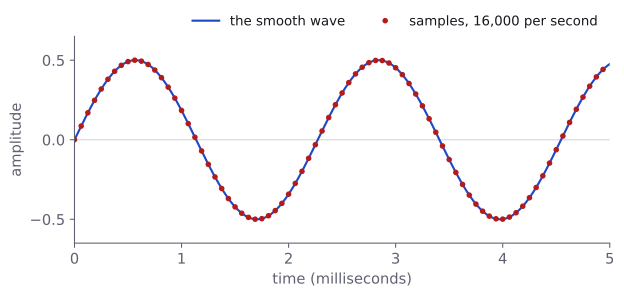
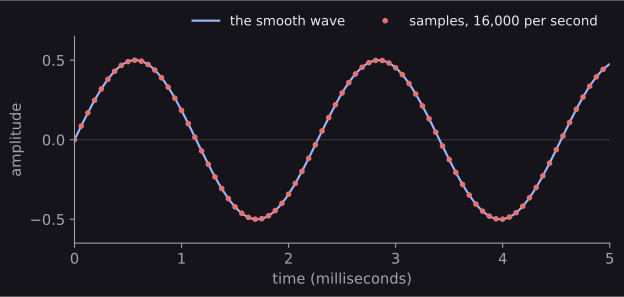
A computer cannot store a smooth curve. Instead, it measures the curve at regular moments and keeps only those measurements, called samples. This is sampling. Let us make one second of a 440 Hz tone, measured 16,000 times a second:
import numpy as np

sample_rate = 16000        # samples per second
frequency = 440            # cycles per second (Hz)
amplitude = 0.5

n_samples = sample_rate * 1                # one second
times = np.arange(n_samples) / sample_rate
tone = amplitude * np.sin(2 * np.pi * frequency * times)

print(tone.shape, tone.dtype)
print(times[:4])
print(tone[:4].round(4))(16000,) float64
[0.000e+00 6.250e-05 1.250e-04 1.875e-04]
[0. 0.086 0.1694 0.2477]times holds the moment of each sample: 0, then 1/16,000 of a second (printed as 6.250e-05), and so on. tone holds the wave's value at each moment. The tone is now a NumPy array of 16,000 numbers, and that is all a sound file contains: an array of samples, plus a note of how fast they were taken.
The sampling rate
The number of samples per second is the sampling rate (or sample rate), also measured in hertz. It is fixed for a whole file and stored in the file's header, separately from the samples. You will meet a few rates again and again:
| Sampling rate | Where you meet it |
|---|---|
| 8,000 Hz | Telephone speech, and the spoken-digit recordings used in this part |
| 16,000 Hz | Many speech datasets and speech models |
| 22,050 Hz | The rate librosa converts audio to unless told otherwise |
| 44,100 Hz | Music on CDs and many music files |
| 48,000 Hz | Audio recorded with video |
A higher rate captures higher frequencies, as the section after next explains, but costs more numbers per second.
Duration
The samples carry no times of their own, so the length of a clip in seconds comes from the sampling rate:
duration = len(tone) / sample_rate
print(duration)

# the same 3,457 samples, played at three different rates
for rate in [8000, 16000, 44100]:
print(rate, round(3457 / rate, 3))1.0
8000 0.432
16000 0.216
44100 0.078The second part is a warning. 3,457 samples last 0.432 seconds at 8,000 Hz, but played at 44,100 Hz the same numbers last less than a tenth of a second and sound much higher, like a sped-up tape. The samples alone do not tell you the rate, so every function that loads audio returns the rate together with the samples, and you must keep the two together.
The Nyquist limit and aliasing
How fast must we sample? A wave goes up and down once per cycle, so to capture it we need more than two samples per cycle. This gives a central rule of digital audio, the Nyquist limit: a sampling rate can only capture frequencies below . At 16,000 Hz that limit is 8,000 Hz; at 44,100 Hz it is 22,050 Hz, just above the highest pitch people hear, which is why CDs use that rate.
What happens to a frequency above the limit is worse than being lost: it turns into a different, lower frequency that was never there. This is aliasing. The figure follows it step by step, with a sampling rate of 8,000 Hz and so a limit of 4,000 Hz:
We can check the figure's claim in code. Here are the first 8 of 16 samples from both tones, taken at the same moments:
rate = 8000
sample_times = np.arange(16) / rate          # 16 samples: 2 ms
low = np.cos(2 * np.pi * 1000 * sample_times)
high = np.cos(2 * np.pi * 7000 * sample_times)

print(low[:8].round(3))
print(high[:8].round(3))
print(np.allclose(low, high))[ 1. 0.707 0. -0.707 -1. -0.707 -0. 0.707]
[ 1. 0.707 -0. -0.707 -1. -0.707 -0. 0.707]
TrueWe used a cosine here, which is the same wave as a sine but starting at its peak, so that the two lists come out exactly equal. (With sines, the 7,000 Hz samples would be the 1,000 Hz samples upside down, which sounds the same.) np.allclose checks that two arrays are equal up to tiny rounding errors, and they are; the -0. values are zeros that came out a hair below zero. After sampling, nothing in the numbers says which tone they came from. In general, a frequency between and comes out as ; here, .
You can hear it in the three files below, made by the code in Saving a sound to a file.
Aliasing matters most when you lower a sampling rate, for example to make a dataset smaller. Keeping every second sample halves the rate, and any frequency above the new limit becomes an alias:
tone_5000 = np.cos(2 * np.pi * 5000 * times)   # at 16,000 Hz
every_other = tone_5000[::2]                    # now 8,000 Hz

times_8000 = np.arange(len(every_other)) / 8000
alias = np.cos(2 * np.pi * 3000 * times_8000)
print(len(every_other), np.allclose(every_other, alias))8000 TrueThe 5,000 Hz tone was fine at 16,000 Hz, but at 8,000 Hz it is above the 4,000 Hz limit and has become a 3,000 Hz tone. A proper resampling function first removes everything above the new limit, with a low-pass filter (a calculation that lets low frequencies through and blocks high ones), and only then keeps fewer samples. So never resample with [::2]; use the resampling functions shown in Loading Audio with Librosa.
Amplitude and decibels
Each sample says how far the pressure is from its resting value at that moment. In the form most libraries hand you, samples are decimals between −1 and 1, where 1 is full scale: the largest value the file can store. The peak amplitude of a clip is its largest sample, ignoring the sign. A bigger amplitude means a stronger pressure wave and a louder sound.
People hear ratios rather than differences: going from amplitude 0.1 to 0.2 sounds like about as big a step as going from 0.4 to 0.8. So levels are usually measured on a logarithmic scale, in decibels (dB):
is a reference amplitude. In digital audio it is usually full scale, 1, and the unit is then written dBFS (decibels relative to full scale). Full scale is 0 dB, and every quieter sound has a negative level:
for peak in [1.0, 0.5, 0.1, 0.01, 0.001]:
    wave = peak * np.sin(2 * np.pi * 440 * times)
    measured_peak = np.abs(wave).max()
    level = 20 * np.log10(measured_peak / 1.0)
print(peak, round(measured_peak, 4), round(level, 1))1.0 1.0 0.0
0.5 0.5 -6.0
0.1 0.1 -20.0
0.01 0.01 -40.0
0.001 0.001 -60.0Two numbers are worth remembering: halving the amplitude lowers the level by about 6 dB, and dividing it by 10 lowers it by 20 dB. Amplitudes from 1 down to 0.001 become a manageable range from 0 to −60 dB, which is why the next module shows spectrograms in decibels.
Loudness, how loud a sound seems, is not quite the same thing: our ears are more sensitive to some frequencies than others. For a model, amplitude and decibels are what count.
Samples cannot go beyond full scale. If a calculation produces values above 1 or below −1, they are cut off at the limit when the sound is saved, which flattens the tops of the wave and adds a harsh buzz. This is clipping:
too_loud = 1.5 * np.sin(2 * np.pi * 440 * times)
clipped = np.clip(too_loud, -1.0, 1.0)
share = np.mean(np.abs(too_loud) > 1.0)
print(round(share, 3))0.535np.clip cuts every value to lie between the two limits, as a sound card or a file would. Here about half of all samples were cut off. If you ever make a sound louder in code, check its peak first.
Bit depth
Each sample is stored with a fixed number of bits, the bit depth. Most WAV files use 16 bits per sample: whole numbers from −32,768 to 32,767, so possible levels. Higher-quality recordings use 24 bits (16,777,216 levels), and files can also store 32-bit floating-point decimals directly.
Rounding each sample to the nearest available level is called quantisation. NumPy can tell us the range of a 16-bit integer, and we can convert our tone to it:
info = np.iinfo(np.int16)
print(info.min, info.max)

tone_int16 = np.round(tone * 32767).astype(np.int16)
print(tone[:4].round(4))
print(tone_int16[:4])-32768 32767
[0. 0.086 0.1694 0.2477]
[ 0 2817 5550 8117]Multiplying by 32,767 stretches the range −1 to 1 over the integers, and .astype(np.int16) stores the result as 16-bit integers. The opposite direction divides by 32,768, the size of the negative half of the range, and gives decimals again, but not exactly the ones we started with:
back = tone_int16.astype(np.float32) / 32768
error = np.abs(back - tone).max()
print(back[:4].round(4))
print(f"largest error: {error:.6f}")[0. 0.086 0.1694 0.2477]
largest error: 0.000030The error is tiny, a small fraction of a percent of full scale, which is why 16 bits are enough for almost any recording. What matters in practice is that the same sound can arrive in two forms: as 16-bit integers in the thousands, or as decimals between −1 and 1. The code you write must know which one it has. Loading Audio with Librosa shows which loader gives which.
Saving a sound to a file
The common file format for raw samples is WAV: a short header that records the sampling rate, the bit depth and the number of channels, followed by the samples themselves. SciPy can write it with scipy.io.wavfile.write. SciPy is one of the libraries on the IOAI contest machines; Loading Audio with Librosa compares it with the audio libraries.
We write a small function that turns decimals into 16-bit integers safely, clipping first, and then save the tone:
from scipy.io import wavfile

def to_int16(signal):
    clipped = np.clip(signal, -1.0, 1.0)
    return np.round(clipped * 32767).astype(np.int16)

wavfile.write("tone-440.wav", sample_rate, to_int16(tone))Reading it back gives the sampling rate and the samples, exactly as we stored them:
import os

rate, samples = wavfile.read("tone-440.wav")
print(rate, samples.dtype, samples.shape)
print(samples[:4])
print(os.path.getsize("tone-440.wav"), "bytes")16000 int16 (16000,)
[ 0 2817 5550 8117]
32044 bytesThe size checks out: 16,000 samples of 2 bytes each is 32,000 bytes, and the header adds 44 more.
The three tones in the aliasing section were saved the same way. Each lasts one second, so it has as many samples as its sampling rate:
for freq, rate in [(7000, 44100), (7000, 8000), (1000, 8000)]:
    t = np.arange(rate) / rate
    wave = 0.3 * np.cos(2 * np.pi * freq * t)
    wavfile.write(f"tone-{freq}-at-{rate}.wav", rate, to_int16(wave))
Mono and stereo channels
A recording made with one microphone has one list of samples: it is mono. A stereo recording has two lists recorded side by side, one for the left speaker and one for the right, and each list is a channel. Both channels share the same sampling rate and the same length.
As an array, a stereo clip is two-dimensional. Let us make one where a tone moves from the left speaker to the right over two seconds: the left channel fades out while the right one fades in.
pan_times = np.arange(sample_rate * 2) / sample_rate   # 2 seconds
wave = 0.5 * np.sin(2 * np.pi * 440 * pan_times)
right_share = pan_times / 2        # from 0 at the start to 1 at the end

left = wave * (1 - right_share)
right = wave * right_share
stereo = np.stack([left, right], axis=1)
print(stereo.shape)

wavfile.write("stereo-pan.wav", sample_rate, to_int16(stereo))(32000, 2)The shape (32000, 2) means 32,000 samples (two seconds at 16,000 Hz), each with 2 channels. This is the samples-first layout, used by scipy.io.wavfile and by the soundfile library. librosa and torchaudio use the channels-first layout instead, (2, 32000), which is the same array transposed. Always print the shape and check which axis is which before you do anything else with a stereo file.
Most models expect mono input. To turn stereo into mono, average the channels, which is also what librosa does when it loads a stereo file:
channels_first = stereo.T
print(channels_first.shape)

mono = stereo.mean(axis=1)        # average over the channel axis
print(mono.shape, round(np.abs(mono).max(), 3))(2, 32000)
(32000,) 0.25Average over the channel axis: axis=1 for samples-first, axis=0 for channels-first. The wrong axis gives an array of length 2, with no error. Notice that the mono version peaks at 0.25, half the original 0.5: at every moment the two channels add up to the full tone, and averaging divides that by two.
A real recording
Real sounds look different. Here is a person saying the digit seven, from the Free Spoken Digit Dataset, which we use again in Audio Feature Extraction with Librosa:
It is a WAV file, so we can read it in the same way:
rate, speech = wavfile.read("7_jackson_0.wav")
print(rate, speech.dtype, speech.shape)
print(round(len(speech) / rate, 3), "seconds")
print(speech.min(), speech.max())8000 int16 (3457,)
0.432 seconds
-11128 11207The file is mono (one dimension), recorded at 8,000 Hz, so it captures frequencies up to 4,000 Hz. Its 3,457 samples last 0.432 seconds. They are 16-bit integers, and the loudest, 11,207, is about a third of full scale.
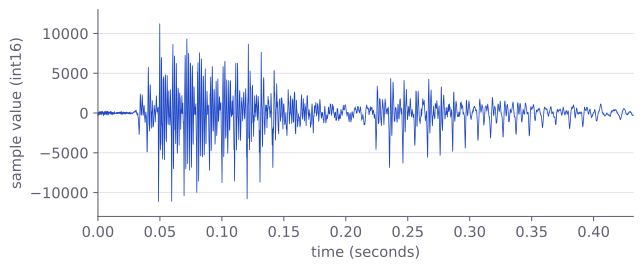
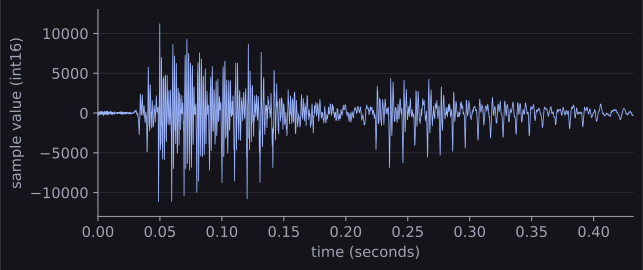
Unlike the tone, the waveform has no single repeating shape. You can see when the sound is loud and when it is quiet, but not which frequencies it contains, and two people saying "seven" produce very different lists of samples. Finding the frequencies, and turning them into features a model can use, is the subject of the next module.
Common mistakes
Most audio mistakes give no error at all. Where there is a message, it is exactly what NumPy or SciPy prints.
| Mistake | What you see | Fix |
|---|---|---|
| Saving with the wrong rate | No error, but 16,000 Hz samples saved as 8,000 Hz play at half speed and an octave lower | Save with the rate the samples were made or loaded at. |
A decimal sampling rate, such as 44100 / 2, in wavfile.write |
struct.error: required argument is not an integer |
Use whole numbers: 44100 // 2 or int(rate). |
Converting to int16 without clipping |
No error, but 1.5 becomes −16,386: the value wraps around and you hear loud clicks | Clip to between −1 and 1 first, as to_int16 does. |
Doing maths on int16 samples |
No error, but speech ** 2 overflows: for the "seven" recording, np.sqrt(np.mean(speech ** 2)) gives 30 instead of 1,889 |
Convert first: speech.astype(np.float32) / 32768. |
| Taking the decibels of silence | RuntimeWarning: divide by zero encountered in log10, and the result is -inf |
Add a tiny floor: np.log10(np.maximum(value, 1e-10)). |
Halving the rate with [::2] |
No error, but frequencies above the new Nyquist limit come back as aliases | Use a proper resampling function. |
| Averaging a stereo array over the wrong axis | No error, but an array of length 2 instead of a mono signal | Check the shape first; average over the channel axis. |
How to practise
There is no audio section on the practice sites we use (CodeChef, CS50 and HackerRank), so practise by making and changing sounds with the code on this page:
- Make the notes of a scale and save them as one file: starting from 440 Hz, each next semitone is the previous frequency times . Play it and check the duration from the number of samples.
- Find the aliases: at a sampling rate of 8,000 Hz, predict which frequency you will hear for tones of 5,000, 6,000 and 7,500 Hz, then generate them, save them and listen.
- Make two tones, one at amplitude 0.5 and one 12 dB quieter. What amplitude does the second need? Check with the decibel formula.
Check yourself
What comes next
- Theory of Audio Features: the Fourier transform, spectrograms, the mel scale and MFCCs, which turn a list of samples into something a model can learn from.
- Loading Audio with Librosa: reading real audio files in code, resampling them properly and saving them, with librosa and with the libraries on the contest machines.
Resources
| Source | Title | Why read it |
|---|---|---|
| Hugging Face Audio Course | Introduction to audio data | Our recommended starting point: sampling, sampling rate, amplitude, bit depth and waveforms on one short page. |
| Valerio Velardo, The Sound of AI | Sound and Waveforms | A video on sound as pressure waves, frequency, amplitude and pitch. |
| Valerio Velardo, The Sound of AI | Understanding Audio Signals for Machine Learning | How a sound becomes a digital signal: sampling, the Nyquist frequency, aliasing and quantisation. |
| Valerio Velardo, The Sound of AI | Intensity, Loudness, and Timbre | Decibels, and why loudness is not the same as amplitude. |
| SciPy | scipy.io.wavfile.write | The function used on this page to save WAV files, with its table of sample types. |
| Zohar Jackson and others | Free Spoken Digit Dataset | Short recordings of spoken digits, CC BY-SA 4.0. The real recording on this page comes from it. |
Finished this module? Mark it done.
Comments
Stuck on something, spotted a mistake, or found a resource that helped you? Tell us below.
Loading comments