6Computer Vision 6.3Raw Image Processing
6.3.2 Loading Images into Tensors with Torchvision
Turn image files into batches of shape (N, C, H, W): torchvision transforms, normalisation, ImageFolder and a custom Dataset for images listed in a CSV file.
Why learn torchvision's image tools?
In Reading and Manipulating Images with Pillow, we opened, converted and resized image files and stacked a folder of them into one NumPy array. A network needs one more set of steps: float tensors with the channels first, values on a sensible scale, and, for training, batches that are loaded a few at a time instead of all at once.
torchvision is PyTorch's library for images, and it is on the 2026 contest machines. Its transforms turn images into tensors and bring them to a consistent size and scale. Together with the Dataset and DataLoader from Dataset and DataLoader, they take you from files on disk to batches of shape (N, C, H, W) ready for a model.
It is worth learning the two common ways those files are organised. Sometimes each class has its own folder, so the folder name tells you the label. Other times all images sit together and a CSV file pairs each file name with its label; a test CSV may list only the names. You need to recognise both layouts so you can load the right image with the right label, keep validation data separate, and later match each prediction back to the right test file. We will turn each layout into the same kind of PyTorch Dataset.
What you need to know
By the end of this module, you should be comfortable with these ideas:
| Idea | In one line |
|---|---|
transforms.v2 |
torchvision's transforms; v2.Compose chains them into one pipeline. |
ToImage and ToDtype |
Pillow image to a (C, H, W) tensor, then to float32 between 0 and 1 with scale=True. |
Resize and CenterCrop |
Bring every image to one size; sizes here are (height, width). |
Normalize |
Subtract a mean and divide by a standard deviation, per channel. |
| Where mean and std come from | From your training images, or ImageNet's numbers when you use a model trained on ImageNet. |
ImageFolder |
A ready-made Dataset for a folder with one subfolder per class. |
| A custom image Dataset | Reads image files listed in a CSV, the usual contest format. |
| The batch | A DataLoader stacks images into (N, C, H, W) and labels into (N,). |
Learn it properly
The tools on this page are easy to use and easy to use slightly wrongly. Work through a course that builds an image pipeline on real photos, then use this page to check each step's shapes and numbers.
Pick one main course
Our pick: Learn PyTorch for Deep Learning, chapter 04
Work through the parts on loading images, transforms, ImageFolder and custom Datasets in 04. PyTorch Custom Datasets from Daniel Bourke's free course. It downloads a small dataset of pizza, steak and sushi photos (do that at home), looks at the images, turns them into tensors, and shows both ways of building a Dataset. You can leave its later training material until after Convolutional Neural Networks.
The course uses the older transforms API, torchvision.transforms with ToTensor. The ideas are identical. In the newer torchvision.transforms.v2 used on this page and recommended by torchvision, ToTensor() becomes the pair ToImage() and ToDtype(torch.float32, scale=True).
If you prefer something else
- The official introduction: torchvision's Getting started with transforms v2 introduces the transforms used on this page.
- The basics tutorial: Transforms, from PyTorch's Learn the Basics series, is a two-minute read on
ToImageandToDtype, and follows the Datasets & DataLoaders tutorial recommended in Dataset and DataLoader.
A quick tour
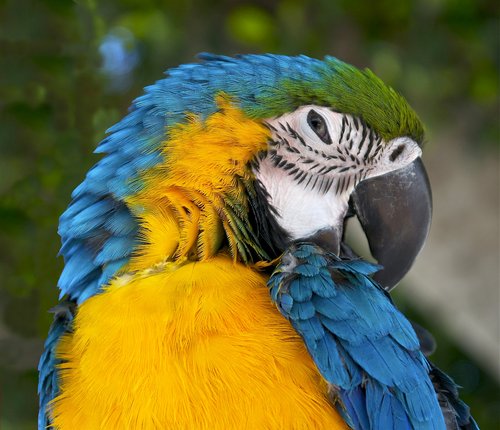
The rest of this page turns the macaw photo (download macaw.jpg) into a tensor, then loads two small datasets of drawn shapes, which the code makes itself: first from class folders with ImageFolder, then from file names and labels in a CSV. Go through your chosen course first, then run each cell in a notebook as you read.
From a Pillow image to a tensor
A transform is an object that you call on an image and that returns a changed image, and v2.Compose chains several into one. The two transforms that every image pipeline starts with turn a Pillow image into the tensor a network wants:
import torch
from PIL import Image
from torchvision.transforms import v2

to_tensor = v2.Compose([
    v2.ToImage(),                           # Pillow -> (C, H, W) uint8
    v2.ToDtype(torch.float32, scale=True),  # -> float32 from 0 to 1
])

photo = Image.open("macaw.jpg").convert("RGB")
image = to_tensor(photo)
print(image.shape, image.dtype)
print(image.min().item(), image.max().item())torch.Size([3, 430, 500]) torch.float32
0.0 1.0These are the steps from Basic Image Terminology, done for us. ToImage moves the channels first, turning (430, 500, 3) into (3, 430, 500), and keeps the uint8 values. ToDtype(torch.float32, scale=True) converts to floats and, because of scale=True, divides by 255 so the values run from 0 to 1. Without scale=True you would get floats from 0 to 255, with no error to warn you.
The result is a torchvision Image, which is an ordinary PyTorch tensor with a label saying that it holds an image. You can use it anywhere you would use a tensor.
Resizing and cropping
v2.Resize and v2.CenterCrop bring images to one size, like resize and crop in Pillow. One detail is different and important: torchvision sizes are (height, width), the same order as the tensor's shape and the opposite of Pillow's (width, height).
print(v2.Resize((100, 200))(image).shape)    # height 100, width 200
print(v2.Resize(224)(image).shape)           # shorter side to 224
print(v2.CenterCrop(224)(v2.Resize(224)(image)).shape)torch.Size([3, 100, 200])
torch.Size([3, 224, 260])
torch.Size([3, 224, 224])Given a single number, Resize makes the shorter side that long and keeps the shape: the height of 430 became 224, and the width shrank in proportion to 260. CenterCrop(224) then cuts the middle 224 × 224 square. Resize to a number, then centre-crop, is the usual way to get square images without squashing them.
Normalising with a mean and a standard deviation
After scaling, every channel lies between 0 and 1, but its average is not 0. Many networks train a little more easily when each channel has mean 0 and standard deviation 1, for the reasons in Gradient Descent; it is the same idea as a StandardScaler, applied per colour channel. v2.Normalize(mean, std) computes for each channel, with one mean and one standard deviation per channel.
Where do those six numbers come from? There are two cases:
- You train a model from scratch. Compute the mean and standard deviation of each channel over your training images, as we do for the shapes dataset below. As always, use the training data only, so nothing leaks from the validation or test images (Approaching a Typical Problem explains why).
- You use a model that was already trained on ImageNet, the large photo dataset that most pretrained image models learned from. Such a model expects inputs normalised exactly as during its training, with the mean and standard deviation of ImageNet's photos:
mean=[0.485, 0.456, 0.406]andstd=[0.229, 0.224, 0.225]. These numbers appear in torchvision's own examples and in a great deal of code, and now you know what they are.
Here is the second set applied to the photo:
normalize = v2.Normalize(mean=[0.485, 0.456, 0.406],
                         std=[0.229, 0.224, 0.225])
normalized = normalize(image)
for channel in range(3):
    values = normalized[channel]
print(round(values.mean().item(), 2), round(values.std().item(), 2))-0.28 1.34
-0.17 0.87
-0.75 1.1The values are now centred near 0 instead of around 0.4, but not exactly 0 with a spread of 1: these are ImageNet's averages, not this photo's. The blue channel is the furthest off, because a yellow-and-blue bird on green leaves has less blue in it than the average photo. That is expected and fine. What matters is that every image is normalised with the same numbers, at training time and at prediction time.
OptionalReading images with torchvision.io
torchvision.io.decode_image("macaw.jpg") reads a file straight into a uint8 tensor of shape (3, 430, 500), without Pillow, and read_image is an older name for the same thing. Its mode argument (for example torchvision.io.ImageReadMode.RGB) forces a number of channels.
Since torchvision 0.29, these functions are marked as deprecated: torchvision's documentation says they will be removed in a future release and points to a separate library, TorchCodec, which is not on the list of libraries for the 2026 contest machines. Pillow is on that list and will keep working, so this guide opens images with Pillow, as in Reading and Manipulating Images with Pillow, and converts them with ToImage.
A folder per class: ImageFolder
Image datasets are often stored with one subfolder per class: every circle in circle/, every square in square/. The path itself tells us the answer for each image, so we do not need a separate label table. torchvision's ImageFolder reads exactly that layout and makes the (image, label) pairs a DataLoader expects. To have such a folder without downloading anything, we draw one: 20 small images of each of three shapes, in random colours, sizes and positions.
import os
import random
from PIL import ImageDraw

def draw_shape(kind, rng):
    image = Image.new("RGB", (32, 32), "white")
    pen = ImageDraw.Draw(image)
    size = rng.randint(12, 24)
    left = rng.randint(2, 30 - size)
    top = rng.randint(2, 30 - size)
    right, bottom = left + size, top + size
    colour = (rng.randint(0, 200), rng.randint(0, 200),
              rng.randint(0, 200))
    if kind == "circle":
        pen.ellipse((left, top, right, bottom), fill=colour)
    elif kind == "square":
        pen.rectangle((left, top, right, bottom), fill=colour)
    else:
        corners = [(left, bottom), (right, bottom),
                   ((left + right) // 2, top)]
        pen.polygon(corners, fill=colour)
    return image

rng = random.Random(0)
for kind in ["circle", "square", "triangle"]:
    os.makedirs(f"shapes/{kind}", exist_ok=True)
    for number in range(20):
        draw_shape(kind, rng).save(f"shapes/{kind}/{number:02d}.png")
sorted(os.listdir("shapes"))['circle', 'square', 'triangle']Now ImageFolder turns the folder into a Dataset. The class names come from the subfolder names, in alphabetical order, and each class gets a number from 0:
from torchvision import datasets

shape_dataset = datasets.ImageFolder("shapes", transform=to_tensor)
print(len(shape_dataset))
print(shape_dataset.classes)
print(shape_dataset.class_to_idx)

first_image, first_label = shape_dataset[0]
print(first_image.shape, first_label)60
['circle', 'square', 'triangle']
{'circle': 0, 'square': 1, 'triangle': 2}
torch.Size([3, 32, 32]) 0Each sample is an (image, label) pair, just like the Datasets in Dataset and DataLoader. The transform argument is applied to every image as it is loaded, so to_tensor turned each file into a (3, 32, 32) float tensor. ImageFolder opens files with Pillow and converts them to RGB for you.
Computing the mean and standard deviation
As promised, here are the per-channel statistics of these images. With only 60 small images, we can stack them all into one tensor and average over everything except the channel dimension:
shape_images = []
for shape_image, label in shape_dataset:
    shape_images.append(shape_image)
all_shapes = torch.stack(shape_images)
print(all_shapes.shape)                      # (N, C, H, W)
shape_mean = all_shapes.mean(dim=(0, 2, 3))  # one value per channel
shape_std = all_shapes.std(dim=(0, 2, 3))
print(shape_mean)
print(shape_std)torch.Size([60, 3, 32, 32])
tensor([0.8204, 0.8271, 0.8393])
tensor([0.3155, 0.3087, 0.2838])The means are high because most of each image is white background. In a real task, compute them on the training images only, after the split; for a dataset too large to stack at once, add up the sums batch by batch with a DataLoader. v2.Normalize(mean=shape_mean.tolist(), std=shape_std.tolist()) would then go at the end of the pipeline.
Batches of images
A DataLoader stacks the samples of a batch, so a batch of images has shape (N, C, H, W) and its labels shape (N,):
from torch.utils.data import DataLoader

torch.manual_seed(0)
shape_loader = DataLoader(shape_dataset, batch_size=16, shuffle=True)
image_batch, label_batch = next(iter(shape_loader))
print(image_batch.shape, image_batch.dtype)
print(label_batch)torch.Size([16, 3, 32, 32]) torch.float32
tensor([0, 1, 0, 2, 0, 2, 0, 0, 1, 0, 2, 0, 1, 0, 2, 0])16 images with 3 channels of 32 × 32 pixels, and 16 class numbers: exactly what a convolutional network takes. Stacking only works if every image has the same size, which is why a pipeline always contains a Resize (and a crop) when the files come in different sizes.
Images listed in a CSV file
ImageFolder is convenient, but contest data rarely comes in that layout. The usual format is one folder of images plus a CSV file with one row per image: its file name and, for the training data, its label. A test CSV has the file names only. Here the label lives in the table rather than the folder name, so ImageFolder cannot pair the images with their answers. Reading the CSV also lets us keep each file name attached to its image, which matters when we write predictions for a test set. Let us make a small task in that format, with 90 new shapes in one folder:
import pandas as pd

os.makedirs("task/images", exist_ok=True)
kinds = ["circle", "square", "triangle"]
rng = random.Random(1)
rows = []
for number in range(90):
    label = number % 3
    file_name = f"img_{number:03d}.png"
    shape = draw_shape(kinds[label], rng)
    shape.save(f"task/images/{file_name}")
    rows.append({"image": file_name, "label": label})

train_table = pd.DataFrame(rows)
train_table.to_csv("task/train.csv", index=False)
train_table.head()| image | label | |
|---|---|---|
| 0 | img_000.png | 0 |
| 1 | img_001.png | 1 |
| 2 | img_002.png | 2 |
| 3 | img_003.png | 0 |
| 4 | img_004.png | 1 |
For this kind of data, we write our own Dataset. It is the pattern from Writing your own Dataset, and, as promised there, __init__ stores the list of file names and __getitem__ opens one file and turns it into a tensor:
from torch.utils.data import Dataset

class ImageCSVDataset(Dataset):
    def __init__(self, table, image_folder, transform):
        self.file_names = table["image"].tolist()
        self.labels = table["label"].tolist()
        self.image_folder = image_folder
        self.transform = transform

    def __len__(self):
        return len(self.file_names)

    def __getitem__(self, index):
        path = os.path.join(self.image_folder, self.file_names[index])
        with Image.open(path) as image:
            image = image.convert("RGB")
        image = self.transform(image)
        return image, self.labels[index]
Only the file names live in memory; each image is read from disk when the DataLoader asks for it. That is what lets the same code handle a hundred images or a hundred thousand.
Training and validation loaders
Now we put everything together, the way a real task does. Split the table, not the images, with the labels in the same proportions in both parts. Each part uses the same fixed transform, so every image gets the same conversion and normalisation:
from sklearn.model_selection import train_test_split

train_part, val_part = train_test_split(
    train_table, test_size=0.2, stratify=train_table["label"],
    random_state=0)

normalize_shapes = v2.Normalize(mean=shape_mean.tolist(),
                                std=shape_std.tolist())
image_transform = v2.Compose([
    v2.ToImage(),
    v2.ToDtype(torch.float32, scale=True),
    normalize_shapes,
])

train_set = ImageCSVDataset(train_part, "task/images", image_transform)
val_set = ImageCSVDataset(val_part, "task/images", image_transform)
train_loader = DataLoader(train_set, batch_size=16, shuffle=True)
val_loader = DataLoader(val_set, batch_size=64)
print(len(train_set), len(val_set))72 18torch.manual_seed(0)
x_batch, y_batch = next(iter(train_loader))
print(x_batch.shape, x_batch.dtype)
print(y_batch.shape, y_batch.dtype)torch.Size([16, 3, 32, 32]) torch.float32
torch.Size([16]) torch.int64The batch has the shape (N, C, H, W) and the labels are int64, the whole-number type that CrossEntropyLoss expects. Both loaders apply the same transform; only the training loader shuffles its rows. We used the statistics of the separate shapes example above to keep this demonstration short. For a real task, calculate normalisation statistics from the training part after splitting, then reuse them for validation and test images. This loader can go straight into the train_one_epoch function of A Simple MLP in PyTorch; only the model changes, and that is the subject of Convolutional Neural Networks.
For the test images, which have no labels, use the same class with a small change: make __getitem__ return the file name in place of the label, so each prediction can be written next to its image. MNIST writes such a submission file.
Common mistakes
The messages are exactly what PyTorch and torchvision print.
| Mistake | What you see | Fix |
|---|---|---|
ToDtype(torch.float32) without scale=True |
No error, but pixels run from 0 to 255 instead of 0 to 1 | Add scale=True. |
Normalize before ToDtype |
TypeError: Input tensor should be a float tensor. Got torch.uint8. |
Put ToDtype(torch.float32, scale=True) first. |
Giving Resize a Pillow-style (width, height) |
No error, but images come out with height and width swapped | torchvision sizes are (height, width). |
| Images of different sizes in one batch | RuntimeError: stack expects each tensor to be equal size, but got [3, 40, 40] at entry 0 and [3, 32, 32] at entry 1 |
Add Resize (and CenterCrop) to the pipeline. |
| A grayscale file among colour ones | RuntimeError: stack expects each tensor to be equal size, but got [3, 32, 32] at entry 0 and [1, 32, 32] at entry 1 |
convert("RGB") in __getitem__. |
ImageFolder on a folder without class subfolders |
FileNotFoundError: Couldn't find any class folder in task/images. |
Use a custom Dataset with the CSV, or arrange one subfolder per class. |
Labels left as text, such as "circle" |
TypeError: cross_entropy_loss(): argument 'target' (position 2) must be Tensor, not tuple |
Map each class name to a number, from 0, before building the Dataset. |
| Normalising with statistics from all the data | No error, but a small leak from the validation data | Compute the mean and standard deviation on the training part only. |
How to practise
There is no section on image pipelines on the practice sites we use (CodeChef, CS50 and HackerRank), so practise by building them:
- Do section 5 of 04. PyTorch Custom Datasets with
transforms.v2: write the custom Dataset yourself and check that it gives the same tensors asImageFolder. - Make a folder of 20 of your own photos of different sizes. Write a CSV listing them with made-up labels, and load them with
ImageCSVDataset, addingResizeandCenterCropto make every image 128 × 128. Show one batch in a grid. - Compute the mean and standard deviation of the shapes dataset batch by batch with a DataLoader, without stacking all the images, and check that you get the numbers above.
Check yourself
What comes next
- Convolutional Neural Networks: a network built from convolution, ReLU and pooling, trained on batches like these.
- MNIST: a complete image project, from the data to a submission file.
Resources
| Source | Title | Why read it |
|---|---|---|
| Daniel Bourke | 04. PyTorch Custom Datasets | Our recommended starting point: transforms, ImageFolder and a custom image Dataset, on a small dataset of food photos. |
| torchvision | Getting started with transforms v2 | The official introduction to the transforms used on this page. |
| PyTorch | Transforms | The short Learn the Basics page on ToImage and ToDtype. |
| torchvision | ImageFolder | The reference page for loading a folder with one subfolder per class. |
| Wikimedia Commons | Ara ararauna portrait Rhodes.jpg | The photograph used on this page, by Jebulon, released under CC0 (public domain dedication). |

Finished this module? Mark it done.
Comments
Stuck on something, spotted a mistake, or found a resource that helped you? Tell us below.
Loading comments