6Computer Vision 6.4Computer Vision Models
6.4.2 MNIST
A complete image project on the classic MNIST digits: look at the data, split it, train an MLP baseline and a CNN, study the mistakes, and write a checked submission file.
Why work through MNIST?
In Convolutional Neural Networks, a CNN and an MLP turned out about equally accurate on scikit-learn's tiny 8 × 8 digits, and we expected the CNN to pull ahead on larger images. MNIST is where to test that. It is a dataset of 70,000 handwritten digits, each a grayscale image of 28 × 28 pixels, split into 60,000 for training and 10,000 for testing. It was built in the early 1990s from handwriting collected by the US National Institute of Standards and Technology (NIST), from Census Bureau employees and high-school students, and it has been a standard first dataset in machine learning courses ever since.
This page is a complete project, from the raw data to a submission file, in the order you would work in a contest: look at the data, split off a validation set, train a simple baseline, train a better model, look at its mistakes, save it, and write and check the predictions. Every step reuses something from an earlier module, and the links say where.
What you need to know
By the end of this module, you should be comfortable with these ideas:
| Idea | In one line |
|---|---|
| MNIST | 60,000 training and 10,000 test images of digits, 28 × 28 grayscale, ten classes. |
| Contest data | Comes as files; downloading a dataset by name is something you do at home. |
| Looking first | Check shapes, value ranges, class counts and a few images before any model. |
| A validation split | Taken from the training data; the test set is used once, at the end. |
| Normalising | Scale to 0–1, then subtract the training mean and divide by the training standard deviation. |
| A baseline first | An MLP gives a score to beat in a few seconds. |
| Error counts | At high accuracy, compare the number of mistakes, not just the percentages. |
| Looking at mistakes | Shows what the model finds hard, and whether the labels themselves are doubtful. |
| A submission file | One row per test image, read back and checked before you submit. |
A quick tour
Everything on this page has appeared in earlier modules; what is new is doing all of it in one notebook, on a larger dataset. Run each cell in order and treat this as a complete practice project. If you want to compare your finished notebook with another implementation, PyTorch's Basic MNIST Example puts a CNN training run in one script. On a laptop CPU, the two trainings here take about a minute and a half together; on a GPU, much less.
The data
torchvision can download MNIST by name. At home, the first run fetches about 12 MB of compressed files into the folder you give (here data) and unpacks them; later runs find them there.
import torch
from torchvision import datasets

train_full = datasets.MNIST("data", train=True, download=True)
test_data = datasets.MNIST("data", train=False, download=True)
print(len(train_full), len(test_data))

image, label = train_full[0]
print(image.size, image.mode, label)60000 10000
(28, 28) L 5Each sample is a Pillow image of 28 × 28 pixels in mode L (grayscale), with its label. In a contest, there is no download: the organisers give you files, typically a folder of image files with a CSV listing names and labels, or arrays saved with NumPy. You would then load them with the ImageCSVDataset from Loading Images into Tensors with Torchvision, and everything from the next section on stays the same.
Look at the data first
The dataset object also keeps all the images in one uint8 tensor, train_full.data, and the labels in train_full.targets. That makes the first checks quick:
all_images = train_full.data            # (60000, 28, 28), uint8
all_labels = train_full.targets         # (60000,)
print(all_images.shape, all_images.dtype)
print(all_images.min().item(), all_images.max().item())
print(torch.bincount(all_labels))torch.Size([60000, 28, 28]) torch.uint8
0 255
tensor([5923, 6742, 5958, 6131, 5842, 5421, 5918, 6265, 5851, 5949])Pixels go from 0 to 255, and there are between about 5,400 and 6,700 examples of each digit: not perfectly balanced, but close enough that accuracy is a fair measure. torch.bincount counts how often each whole number appears. Here are the first 20 training images:
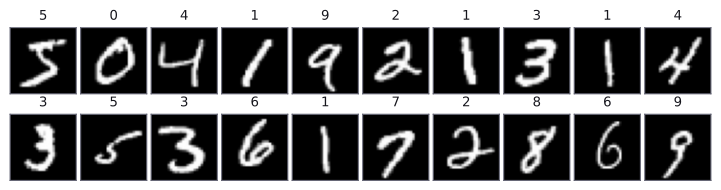
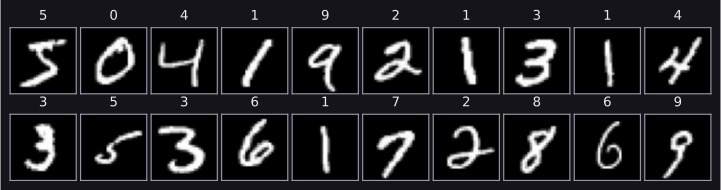
The digits are white on black, centred in the image, and roughly the same size: the makers of MNIST centred and scaled every digit. That preparation is one reason MNIST is easier than most real image tasks.
Training, validation and test sets
The 10,000 test images are kept aside for the very end. For decisions along the way, such as which epoch to keep, we split 6,000 validation images off the training set, keeping the classes in the same proportions. Splitting a list of positions with scikit-learn, as in Split before training, works for any kind of data:
import numpy as np
from sklearn.model_selection import train_test_split

positions = np.arange(len(all_labels))
train_positions, val_positions = train_test_split(
    positions, test_size=6000, stratify=all_labels.numpy(),
    random_state=0)
len(train_positions), len(val_positions)(54000, 6000)Tensors and normalisation
MNIST is small enough to keep in memory, so instead of transforming each Pillow image on every epoch, we convert all the images once: floats from 0 to 1, with a channel dimension, as in Basic Image Terminology.
images = all_images.float().unsqueeze(1) / 255     # (60000, 1, 28, 28)
train_images = images[train_positions]
val_images = images[val_positions]
train_labels = all_labels[train_positions]
val_labels = all_labels[val_positions]

pixel_mean = train_images.mean().item()
pixel_std = train_images.std().item()
print(round(pixel_mean, 4), round(pixel_std, 4))0.1306 0.308The mean and standard deviation come from the training images only, as Loading Images into Tensors with Torchvision recommends. You will often see Normalize((0.1307,), (0.3081,)) in MNIST code, including PyTorch's own example: those are the same two statistics computed on all 60,000 training images, very close to ours. Now we normalise all three parts with them and build the loaders:
from torch.utils.data import TensorDataset, DataLoader

def normalize(batch):
    return (batch - pixel_mean) / pixel_std

test_images = test_data.data.float().unsqueeze(1) / 255
train_set = TensorDataset(normalize(train_images), train_labels)
val_set = TensorDataset(normalize(val_images), val_labels)
test_set = TensorDataset(normalize(test_images), test_data.targets)

train_loader = DataLoader(train_set, batch_size=64, shuffle=True)
val_loader = DataLoader(val_set, batch_size=1000)
test_loader = DataLoader(test_set, batch_size=1000)
x_batch, y_batch = next(iter(train_loader))
x_batch.shape, y_batch.shape(torch.Size([64, 1, 28, 28]), torch.Size([64]))Batches of shape (N, C, H, W) and labels of shape (N,), as in every image task.
The training functions
train_one_epoch and evaluate are the functions from A Simple MLP in PyTorch, unchanged. Since we will train two models, we also wrap the main loop from that page in a function, fit, which trains for a number of epochs, prints the progress, and loads the weights from the epoch with the lowest validation loss before it returns:
import copy
from torch import nn

device = "cuda" if torch.cuda.is_available() else "cpu"
loss_fn = nn.CrossEntropyLoss()

def train_one_epoch(model, loader, loss_fn, optimizer):
    model.train()
    total_loss = 0.0
    for x_batch, y_batch in loader:
        x_batch = x_batch.to(device)
        y_batch = y_batch.to(device)
        logits = model(x_batch)
        loss = loss_fn(logits, y_batch)
        optimizer.zero_grad()
        loss.backward()
        optimizer.step()
        total_loss += loss.item() * len(y_batch)
    return total_loss / len(loader.dataset)

def evaluate(model, loader, loss_fn):
    model.eval()
    total_loss = 0.0
    correct = 0
    with torch.no_grad():
        for x_batch, y_batch in loader:
            x_batch = x_batch.to(device)
            y_batch = y_batch.to(device)
            logits = model(x_batch)
            loss = loss_fn(logits, y_batch)
            total_loss += loss.item() * len(y_batch)
            predictions = logits.argmax(dim=1)
            correct += (predictions == y_batch).sum().item()
    n_samples = len(loader.dataset)
    return total_loss / n_samples, correct / n_samples

def fit(model, n_epochs):
    optimizer = torch.optim.Adam(model.parameters(), lr=0.001)
    best_val_loss = float("inf")
    for epoch in range(1, n_epochs + 1):
        train_loss = train_one_epoch(model, train_loader, loss_fn,
                                     optimizer)
        val_loss, val_accuracy = evaluate(model, val_loader, loss_fn)
        print(epoch, round(train_loss, 4), round(val_loss, 4),
              round(val_accuracy, 4))
        if val_loss < best_val_loss:
            best_val_loss = val_loss
            best_state = copy.deepcopy(model.state_dict())
    model.load_state_dict(best_state)
    return best_state
A baseline: the MLP
The first model is the MLP from A Simple MLP in PyTorch, with two hidden layers of 128 neurons. It starts with nn.Flatten() to turn each (1, 28, 28) image into 784 numbers. Five epochs are enough to see where it levels off:
torch.manual_seed(0)
mlp = nn.Sequential(
    nn.Flatten(),                 # (N, 1, 28, 28) -> (N, 784)
    nn.Linear(784, 128), nn.ReLU(),
    nn.Linear(128, 128), nn.ReLU(),
    nn.Linear(128, 10),
).to(device)
mlp_state = fit(mlp, n_epochs=5)1 0.2677 0.1662 0.9515
2 0.1156 0.1142 0.9658
3 0.0802 0.0958 0.9753
4 0.0603 0.0848 0.973
5 0.0495 0.1003 0.9715The columns are the epoch, the training loss, the validation loss and the validation accuracy. The validation loss is lowest at epoch 4, so fit kept those weights. That is our baseline.
The CNN
The CNN is the one from Convolutional Neural Networks, with one change for the larger images: after two pooling layers, the 28 × 28 maps are 7 × 7, so the first nn.Linear takes inputs.
class DigitCNN(nn.Module):
    def __init__(self, n_classes):
        super().__init__()
        self.features = nn.Sequential(
            nn.Conv2d(1, 16, kernel_size=3, padding=1),  # (16, 28, 28)
            nn.ReLU(),
            nn.MaxPool2d(2),                             # (16, 14, 14)
            nn.Conv2d(16, 32, kernel_size=3, padding=1), # (32, 14, 14)
            nn.ReLU(),
            nn.MaxPool2d(2),                             # (32, 7, 7)
        )
        self.classifier = nn.Sequential(
            nn.Flatten(),                                # 1568
            nn.Linear(32 * 7 * 7, 64),
            nn.ReLU(),
            nn.Linear(64, n_classes),
        )

    def forward(self, x):
        return self.classifier(self.features(x))

def count_parameters(model):
    total = 0
    for p in model.parameters():
        total += p.numel()
    return total

torch.manual_seed(0)
cnn = DigitCNN(n_classes=10).to(device)
print(count_parameters(mlp), count_parameters(cnn))118282 105866The two models have a similar number of parameters, about 118,000 and 106,000, so the comparison is fair in size. The CNN takes longer per epoch, because each convolution is applied at every position of the image:
cnn_state = fit(cnn, n_epochs=5)1 0.1883 0.0675 0.9773
2 0.059 0.0677 0.9788
3 0.041 0.0454 0.9858
4 0.0312 0.0402 0.9883
5 0.0254 0.0348 0.99The CNN's validation loss is lower than the MLP's after its very first epoch, and it is still falling at epoch 5, so more epochs would probably help a little. We stop here to keep the page quick.
The test scores
Both models are now at their best epoch. The test set is used once, for both:
mlp_loss, mlp_accuracy = evaluate(mlp, test_loader, loss_fn)
cnn_loss, cnn_accuracy = evaluate(cnn, test_loader, loss_fn)
n_test = len(test_set)
print("MLP", round(mlp_accuracy, 4), round((1 - mlp_accuracy) * n_test))
print("CNN", round(cnn_accuracy, 4), round((1 - cnn_accuracy) * n_test))MLP 0.9719 281
CNN 0.9901 99The columns are the test accuracy and the number of test images the model gets wrong. Both percentages look high, and "97% against 99%" sounds like a small gap. Counting mistakes shows it better: the CNN makes about a third as many. On MNIST, the useful comparison is always the error, because even simple models get most digits right.
This is the difference we did not see on the 8 × 8 digits in Convolutional Neural Networks. With 784 pixels per image and 60,000 examples, the CNN's shared kernels and its sense of neighbourhood pay off. With one run each, we cannot say exactly how large the gap is, but a gap of this size is far larger than the few-image differences that a change of seed produced on the earlier page.
Keep MNIST's reputation in mind when you read these numbers. It is a clean, centred, well-balanced dataset that has been studied for decades, and accuracies above 99% are routine for a small CNN. Real image tasks are usually harder: fewer examples, varied photos, unusual classes. Treat MNIST as a place to practise the workflow, not as a guide to the scores you should expect.
Looking at the mistakes
The numbers say how many mistakes the CNN makes; looking at them says which. We predict all test images and collect the wrong ones:
cnn.eval()
all_predictions = []
with torch.no_grad():
    for x_batch, y_batch in test_loader:
        logits = cnn(x_batch.to(device))
        all_predictions.append(logits.argmax(dim=1).cpu())
test_predictions = torch.cat(all_predictions)

wrong = torch.nonzero(test_predictions != test_data.targets)
wrong = wrong.squeeze(1)
print(len(wrong))
print(wrong[:12])99
tensor([ 18, 62, 115, 445, 449, 583, 674, 684, 726, 740, 813, 846])torch.cat joins the predictions of all batches into one tensor, and torch.nonzero gives the positions where the prediction differs from the label. Here are the first 12 of those images, with the true label and the CNN's prediction:
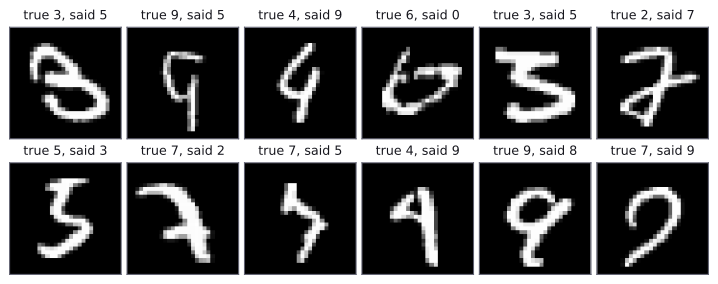
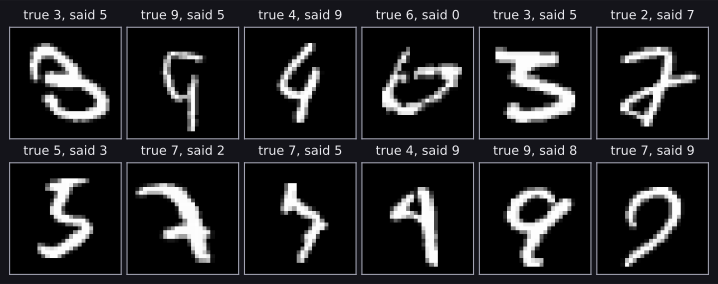
Most of the mistakes are digits that a person would also hesitate over: open loops, unusual strokes, digits that really do look like another digit. MNIST is also known to contain a few wrong labels. A few of the errors look easy, though, and those are where a better model or more training could still help. In a contest, looking at the mistakes like this is often the quickest way to an idea for the next improvement.
Saving the model
Save the best weights as soon as you have them, as in A Simple MLP in PyTorch:
torch.save(cnn_state, "mnist_cnn.pt")

restored = DigitCNN(n_classes=10).to(device)
restored.load_state_dict(torch.load("mnist_cnn.pt"))
restored_loss, restored_accuracy = evaluate(restored, test_loader,
                                            loss_fn)
round(restored_accuracy, 4)0.9901The restored model gives exactly the same test accuracy, so the file holds everything we need.
Writing the submission
The last step is the one from PyTorch Pipeline for a Simple Machine Learning Problem. In a contest, the test file names or ids come from a test CSV; MNIST has none, so we number the test images from 0. The predictions are already in the order of the test set, because the test loader does not shuffle.
import pandas as pd

test_ids = np.arange(len(test_data))      # in a contest: from test.csv
submission = pd.DataFrame({
    "id": test_ids,
    "label": test_predictions.numpy(),
})
submission.to_csv("submission.csv", index=False)

checked = pd.read_csv("submission.csv")
assert list(checked.columns) == ["id", "label"]
assert len(checked) == len(test_data)
assert (checked["id"] == test_ids).all()
assert checked["label"].between(0, 9).all()
checked.head()| id | label | |
|---|---|---|
| 0 | 0 | 7 |
| 1 | 1 | 2 |
| 2 | 2 | 1 |
| 3 | 3 | 0 |
| 4 | 4 | 4 |
No error, so all four checks passed: the right columns, one row per test image, the ids in order, and every label a digit. Here we know the true test labels, so we can play the grader and score the file as it was written:
from sklearn.metrics import accuracy_score

score = accuracy_score(test_data.targets.numpy(), checked["label"])
round(score, 4)0.9901The same 0.9901 as before, so nothing went wrong between the model and the file.
Common mistakes
The messages are exactly what PyTorch, torchvision and pandas print.
| Mistake | What you see | Fix |
|---|---|---|
Relying on download=True where there is no internet, or no copy of the data |
RuntimeError: Dataset not found. You can use download=True to download it (or a network error) |
Download at home; in a contest, load the files you are given with your own Dataset. |
| Normalising the training images but not the test images | No error, but worse predictions: for this CNN, 173 test mistakes instead of 99, and a test loss of 0.189 instead of 0.030 | Pass every part through the same normalize, with the training mean and standard deviation. |
| Computing the mean and standard deviation on all the images, including validation and test | No error, but a small leak | Compute them on the training part only. |
shuffle=True for the test loader |
No error, but the predictions no longer line up with the ids, and the submission scores about 10% | Never shuffle validation or test data. |
Writing the CSV without index=False |
An extra first column, Unnamed: 0, when the file is read back |
Pass index=False to to_csv. |
| Comparing models by accuracy alone at 97–99% | No error, but small-looking gaps hide large differences | Count the mistakes, or compare error rates. |
| Training many epochs without watching the validation loss | No error, but the final epoch may be past the best one | Keep the weights with the lowest validation loss, as fit does. |
How to practise
There is no MNIST section on the practice sites we use (CodeChef, CS50 and HackerRank), so practise on this project:
- Train the CNN for 15 epochs instead of 5. Does the validation loss keep falling? Does the test accuracy change by more than a few images?
- Add a third convolution and compare the number of test mistakes. Change one thing at a time.
- Save 1,000 test images as PNG files with Pillow and write a
test.csvlisting their names, as contest data would come. Load them with theImageCSVDatasetfrom Loading Images into Tensors with Torchvision, adapted to return the file name, and write a submission with the file names as ids. - Swap
datasets.MNISTfordatasets.FashionMNIST, small photos of clothing in exactly the same format, and run the whole page again. How do the MLP and the CNN compare there?
Check yourself
What comes next
- Text Modality Basics: the next part of the guide, on text as data.
- Convolutional Neural Networks: the comparison on small digits, to set beside the one on this page.
- Waveforms, Sampling Rate, Duration, Amplitude, and Channels: the start of the audio part, where a spectrogram of sound turns out to be an image too, so the CNNs from this part work on it.
Resources
| Source | Title | Why read it |
|---|---|---|
| PyTorch | Basic MNIST Example | A complete CNN training script to compare with this walkthrough after you finish it. |
Finished this module? Mark it done.
Comments
Stuck on something, spotted a mistake, or found a resource that helped you? Tell us below.
Loading comments