7Natural Language Processing 7.1Text Modality
7.1.1 Text Modality Basics
What text looks like as data: characters, documents, a corpus and a vocabulary; a first look at the SMS spam messages used through Part 7; why models need numbers; and the kinds of tasks NLP solves.
Why text as data?
In MNIST, every input was an image: a neat grid of 28 × 28 numbers, the same size every time, ready to go straight into a network. Text is messier. A text message, a product review or a sentence you want to translate is a string of characters, and two strings almost never have the same length. So before any model can learn from text, we first have to answer a question that images never asked us: how do we turn words into numbers?
That question is what natural language processing (NLP) is about: the part of AI that works with human language. It comes up in IOAI more often than you might expect, whether that is sorting messages, judging whether a review is positive, tagging words in a sentence, or using a pretrained language model. All of these start from the same raw material, so in this module we are going to slow down and get to know that material properly. We will learn a few words that every NLP course uses (document, corpus, vocabulary), open up a real dataset of text messages together, and see which kinds of problems NLP solves. There is not much code here, and nothing hard. Think of it as the foundation that the rest of Part 7 is built on.
What you need to know
Here is what I would like you to take away from this module. Don't worry if some of these words are new; we will meet each of them below.
| Idea | In one line |
|---|---|
| A string | Text in Python is a sequence of characters; len counts characters. |
| Encoding | Files store text as bytes; read them as UTF-8, or the text comes out garbled. |
| Document | One piece of text the model sees as one sample, such as one message. |
| Corpus | The whole collection of documents. |
| Vocabulary | The set of distinct words (or other units) that appear in the corpus. |
| Variable length | Documents have different lengths, but most models need inputs of a fixed size. |
| NLP task types | Classification, sentiment, tagging, translation and generation differ in what goes in and what comes out. |
Learn it properly
None of the ideas here are difficult, but it helps to see them explained once from a different angle. Read the course below first; then come back, and we will try everything on real data.
Pick one main course
Our pick: Speech and Language Processing, Chapter 2
Read section 2.1 (Words) of Chapter 2, Words and Tokens, from Dan Jurafsky and James H. Martin's free textbook Speech and Language Processing. It starts with a question that sounds silly at first: how many words are in a sentence? By the end of the section, you will see why the answer is not so obvious. This is the standard NLP textbook, and we will come back to later chapters of it in this guide. You can stop before section 2.4, on subword tokens; we will read that one together in Tokenization.
If you prefer something else
- If you want the big picture first: the section Natural Language Processing and Large Language Models of the Hugging Face LLM Course is a short, friendly read on the common NLP tasks and why language is hard for computers.
A quick tour
The rest of this page shows how Python sees text, and then we open a real dataset of text messages together. Go through your chosen course first. Then open a notebook and run each cell as you read: you will remember far more if you see the outputs appear yourself.
Text is a sequence of characters
Let us start small. In Python, text is a str, which is simply a sequence of characters. That means it behaves a lot like a list: it has a length, and we can pick out characters by their position.
message = "Win £100 now"
print(len(message))
print(message[0], message[4])
print(list(message[:7]))12
W £
['W', 'i', 'n', ' ', '£', '1', '0']The message has 12 characters. Notice that the spaces count, and so does the pound sign £: to Python, every one of them is just one more character.
How a computer stores text
Computers only store numbers, so underneath, every character is a number too. Unicode is the standard that gives every character of every writing system its own number, called its code point, and ord shows it to us. When text is saved to a file, those numbers are written as bytes using an encoding, which these days is almost always UTF-8:
word = "café"
print([ord(c) for c in word])
print(word.encode("utf-8"))[99, 97, 102, 233]
b'caf\xc3\xa9'English letters take one byte each, while é takes two (\xc3\xa9). The good news is that you will almost never deal with bytes yourself, because open(path, encoding="utf-8") and pd.read_csv take care of it. There is really only one thing worth remembering: if you ever see garbled text like café in a dataset, the file was read with the wrong encoding.
You might be wondering whether these code points could be our model's inputs. Sadly, no. They are names, not amounts: é (233) is not "more" than a (97) in any meaningful way. We need numbers that actually say something about the text, and finding those is what the rest of Part 7 is about. We will come back to bytes once more in Tokenization.
The data for Part 7: SMS spam
Now for some real data. From here on, all of Part 7 uses one dataset, so that we can compare every method on exactly the same messages and see which one really works better. The SMS Spam Collection is a set of English text messages, each labelled spam (unwanted advertising) or ham (a normal message). It was collected by Tiago A. Almeida and José María Gómez Hidalgo and is published by the UCI Machine Learning Repository under the CC BY 4.0 licence. The original file has 5,574 messages; 403 of them are exact repeats of another message, and we removed those, so that the same text cannot end up on both sides of a train/test split later. You can download sms.csv: two columns, label and text, with the messages exactly as collected.
These are real messages from real people, so they are informal and full of abbreviations ("u", "wif", "lar"). That makes them great practice, because real data is never tidy. Fair warning: a few of them contain rude words.
Let us load the file with pandas and see how big it is:
import pandas as pd

sms = pd.read_csv("sms.csv")
sms.shape(5171, 2)We have 5,171 messages in two columns. It is always worth reading a few rows before doing anything else, so here are the first five:
sms.head()| label | text | |
|---|---|---|
| 0 | ham | Go until jurong point, crazy.. Available only in bugis n great world la e buffet... Cine there got amore wat... |
| 1 | ham | Ok lar... Joking wif u oni... |
| 2 | spam | Free entry in 2 a wkly comp to win FA Cup final tkts 21st May 2005. Text FA to 87121 to receive entry question(std txt rate)T&C's apply 08452810075over18's |
| 3 | ham | U dun say so early hor... U c already then say... |
| 4 | ham | Nah I don't think he goes to usf, he lives around here though |
Documents, a corpus and a vocabulary
Before we go further, let us learn three words that you will see in every NLP course and paper. They describe any text dataset:
- A document is one piece of text that the model treats as one sample. Here, a document is one message. In other tasks it could be a sentence, a review or a whole article.
- A corpus is the whole collection of documents: here, all 5,171 messages.
- The vocabulary is the set of distinct words (or other units) that appear in the corpus.
How big is the vocabulary of our messages? Let us find a rough answer. We lowercase each message, cut it at the spaces with split(), and collect every distinct word in a set (a set keeps only one copy of each word):
vocabulary = set()
total_words = 0
for text in sms["text"]:
    words = text.lower().split()
    vocabulary.update(words)
    total_words += len(words)

print(total_words, len(vocabulary))79808 13627So the corpus has 79,808 words in total, but only 13,627 different ones. I called this a rough count for a reason, though. split() leaves punctuation stuck to the words, so crazy.. and crazy are counted as two different words. We will fix that soon: Text Preprocessing cleans the text, and Tokenization splits it properly and gives every word a number.
Look at the labels first
Whenever you get a classification dataset, the very first thing to check is how many examples each class has. It takes one line, and it can change how you judge every model you train later:
print(sms["label"].value_counts())
print(sms["label"].value_counts(normalize=True).round(3))label
ham 4518
spam 653
Name: count, dtype: int64
label
ham 0.874
spam 0.126
Name: proportion, dtype: float64Only 12.6% of the messages are spam. Think about what that means: a lazy "model" that calls every single message ham would be right 87.4% of the time, while catching no spam at all. So on this data, accuracy alone makes every spam filter look better than it is. That is why, from Bag of Words onwards, we will also check how much of the spam a model actually finds, using the metrics from Model Evaluation Metrics.
Look at the lengths
Here is a fun one. The length of a message, in characters, is the simplest number we can get out of a text. Does it tell us anything about spam?
lengths = sms["text"].str.len()
lengths.groupby(sms["label"]).describe().round(1)| count | mean | std | min | 25% | 50% | 75% | max | |
|---|---|---|---|---|---|---|---|---|
| ham | 4518.0 | 70.9 | 56.6 | 2.0 | 34.0 | 53.0 | 91.0 | 910.0 |
| spam | 653.0 | 137.7 | 29.8 | 13.0 | 132.0 | 148.0 | 157.0 | 223.0 |
Let us read that line by line. .str.len() applies len to every message, groupby(...).describe() summarises the lengths separately for each label, and .round(1) keeps one decimal place. The numbers already look different for the two classes, and a picture makes it even clearer:
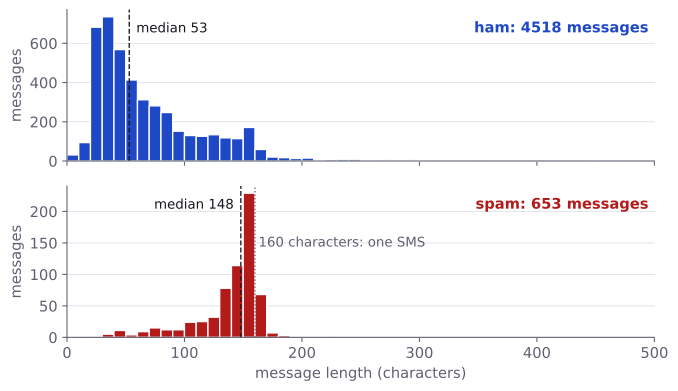
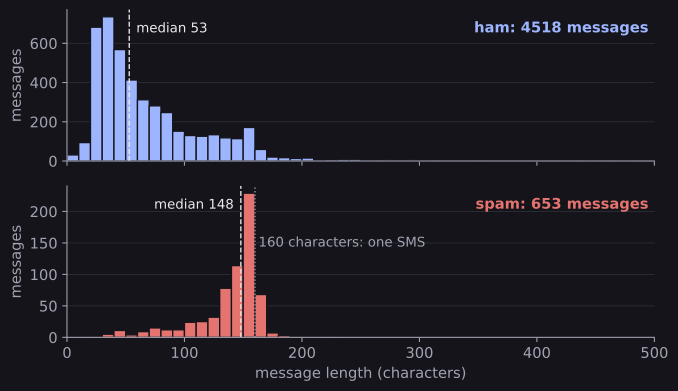
Most ham messages are short, with a few very long ones trailing off to the right. Spam messages, on the other hand, are packed just below 160 characters, which is the most that one standard SMS can hold. It makes sense when you think about it: spammers pay per message, so they fill every bit of space they pay for. So even the length on its own already says something about the label. There are two more things here that will matter for everything that follows:
- Lengths vary a lot. The shortest message is 2 characters (
Ok) and the longest is 910. A model that expects a fixed number of inputs has no way to take raw text of any length. - Even single characters can be clues. For example,
£appears in 213 of the 653 spam messages, but in only 5 of the 4,518 ham messages. You can check this yourself withsms["text"].str.contains("£")andpd.crosstab.
Why models need numbers, and why length is a problem
Now we can name the real problem. Every model we have met so far, from logistic regression to an MLP, wants the same number of numeric features for every sample: the 30 measurements of a tumour, or the 784 pixels of an MNIST digit. Text breaks both halves of that rule. It is made of symbols rather than numbers, and every document has its own length.
So how do we get around that? There are two classic ways, and Part 7 teaches you both:
- Summarise each document as a fixed-length vector. Fix a vocabulary of, say, 7,000 words, and describe each message by how often each word appears in it. Every message becomes a vector of the same 7,000 numbers, whatever its length. Word order is lost, but for a task like spam detection that matters surprisingly little. This is the bag of words, refined by n-grams and TF-IDF.
- Keep the sequence, and make it a fixed length. Turn each word into a number (its id in the vocabulary), then cut long sequences and fill short ones with a special padding id, so every document has, say, 40 ids. Neural networks then learn a vector for each id. This is the route of Tokenization and Vector Embeddings of Simple Text Features, and the starting point of every modern language model.
The kinds of NLP tasks
Spam detection is just one kind of NLP problem. The easiest way to tell the different kinds apart is to ask two questions: what goes in, and what comes out? Here are the main families:
| Task | Input → output | Example |
|---|---|---|
| Text classification | A document → one label | Is this message spam or ham? Which topic is this news article about? |
| Sentiment analysis | A document → positive, negative (or a score) | Is this film review positive? A special case of classification. |
| Token tagging | A sequence of words → one label per word | Mark each word as a noun, verb, and so on (part-of-speech tagging), or find the names of people and places (named entity recognition). |
| Translation and summarisation | A sequence → a different sequence | English to French; a long article to three sentences. |
| Text generation | A beginning → a continuation | Complete a sentence, answer a question, write a story: what large language models do. |
As a beginner, you will meet classification far more than anything else, so that is what we practise on in Part 7. The good news is that the same ideas carry over to the other tasks too: a bag of words can feed a clustering algorithm, and the embeddings from Vector Embeddings of Simple Text Features are the first layer of the networks used for tagging, translation and generation. You do not need those bigger models yet. Part 7 builds the foundations they stand on, and you will be glad you have them later.
A map of Part 7
Here is where we are heading. Each module adds one step, and we will keep testing on the same SMS messages, so you can see each step actually make a difference:
| Module | What it adds |
|---|---|
| Text Preprocessing | Cleaning text: lowercasing, regular expressions, stop words, stemming. |
| Tokenization | Splitting text into tokens, building a vocabulary, token ids, padding, subwords. |
| Bag of Words | Count vectors and a first spam classifier. |
| N-grams | Counting pairs of words and pieces of words. |
| TF-IDF | Weighting words by how informative they are. |
| Vector Embeddings of Simple Text Features | Dense vectors, cosine similarity and learned word embeddings in PyTorch. |
Common mistakes
| Mistake | What you see | Fix |
|---|---|---|
| Reading a file with the wrong encoding | A UnicodeDecodeError, or no error and garbled text such as é or £ |
Read it as UTF-8, the default of pd.read_csv; only change encoding if the file says otherwise. |
| Judging a spam filter by accuracy alone | A score of 0.874 that looks good but finds no spam | Compare with the majority baseline, and look at how much spam is found (recall). |
| Splitting before removing duplicates | The same message in training and test data, so the test score is too optimistic | Remove exact duplicates first, as we did for sms.csv. |
How to practise
The best practice right now is to play with the data yourself. Open a notebook, load sms.csv, and try these:
- Find the 10 most common words in spam messages and in ham messages. Which words appear near the top of one list and not the other?
- Count how many messages contain a digit, a
£sign or a word in capital letters, separately for spam and ham, with.str.containsandpd.crosstab. - Pick one rule, such as "spam if the message is longer than 120 characters", and count how much spam it catches and how many ham messages it wrongly flags.
- Repeat the first look (shape, labels, lengths, vocabulary) on a second dataset: the tweets of Kaggle's Natural Language Processing with Disaster Tweets, a beginner competition you can come back to after Bag of Words.
Check yourself
What comes next
You now know what text looks like as data, and you have met the dataset we will use all through Part 7. Next, we start turning it into something a model can use:
- Text Preprocessing: cleaning the SMS messages, and measuring what each cleaning step does to the vocabulary.
- Tokenization: splitting text into tokens and giving each one a number.
- Bag of Words: the first spam classifier, and the first honest comparison with the majority baseline.
Resources
| Source | Title | Why read it |
|---|---|---|
| Jurafsky and Martin | Speech and Language Processing, Chapter 2: Words and Tokens | Our recommended reading: what counts as a word in a corpus. |
| Hugging Face | LLM Course: Natural Language Processing and Large Language Models | A short overview of common NLP tasks and why language is hard for computers. |
| UCI Machine Learning Repository | SMS Spam Collection | The source of the data used throughout Part 7 (CC BY 4.0). |
Finished this module? Mark it done.
Comments
Stuck on something, spotted a mistake, or found a resource that helped you? Tell us below.
Loading comments