5Deep Learning 5.2Deep Learning Fundamentals
5.2.3 Backpropagation
How a network works out the gradient for every weight at once: the chain rule, computation graphs, a small network by hand, and what PyTorch's autograd does for you.
Why backpropagation?
In Gradient Descent, we improved weights by stepping against the gradient of the loss. For a straight line we worked the gradient out by hand: two weights, two formulas. A real network has thousands or millions of weights arranged in layers, and we need the gradient for every one of them, at every training step.
Backpropagation is the method that does this efficiently. It is nothing more than the chain rule from calculus, applied in a careful order: first run the network forwards to get the loss, then walk backwards through it, passing gradients from each step to the one before. One backward pass gives the gradient for every weight, at a cost comparable to running the network forwards.
In PyTorch you never write backpropagation yourself: loss.backward() does it, as you saw in PyTorch Basics. So why learn it? Because when training goes wrong, the reason is often in the gradients: they are zero, they explode, they add up across steps, or they never reach a layer. You can only recognise those problems if you know what backward() is doing.
What you need to know
By the end of this module, you should be comfortable with these ideas:
| Idea | In one line |
|---|---|
| Derivative | How fast an output changes when one input changes a little. |
| Chain rule | To go through several steps, multiply the derivatives of the steps. |
| Computation graph | A calculation broken into small steps, each with inputs and one output. |
| Forward pass | Running the steps from inputs to loss, and remembering every intermediate value. |
| Backward pass | Running the steps in reverse, turning the loss's gradient into a gradient for every weight. |
| Autograd | PyTorch's system that records the graph and does the backward pass for you. |
| Gradient accumulation | PyTorch adds new gradients to old ones, which is why we call zero_grad(). |
| Vanishing and exploding gradients | Long chains of multiplications can make gradients tiny or huge. |
You do not need to derive backpropagation for a full network with matrices at this level. We will do it for a network small enough to follow on paper, and let PyTorch handle the rest.
Learn it properly
Backpropagation is one of those ideas that clicks from a different angle for different people, so it is worth watching or reading one good explanation alongside this page.
Pick one main course
Pick one explanation and follow it to the end before trying another. Most people find that the pictures in our pick make the chain rule click.
Our pick: 3Blue1Brown, chapters 3 and 4
Watch 3Blue1Brown's Backpropagation, intuitively, then Backpropagation calculus. The first shows what backpropagation is trying to do without any formulas; the second adds the chain rule, using a network as small as the one we work through below. They follow on from the gradient descent video recommended in the previous module.
If you prefer something else
- Build it yourself: Andrej Karpathy's building micrograd writes a tiny automatic-differentiation engine in plain Python, one line at a time, and then trains a small network with it. It is long, about two and a half hours, but after it
backward()will hold no mystery. The finished code is on GitHub. We recommend it as your next step once this page makes sense. - A book chapter: chapter 2 of Michael Nielsen's free Neural Networks and Deep Learning derives backpropagation for a whole network, with the four equations everything else is built on.
- Course notes: Stanford's CS231n notes on backpropagation treat each step as a small "gate" that passes gradients backwards; this is the view we use below.
- In code: d2l.ai's page on automatic differentiation and PyTorch's own autograd tutorial show how the machinery looks in practice.
A quick tour
The rest of this page builds backpropagation up in four steps: the chain rule on its own, the idea of a computation graph, a small network worked out by hand, and then the same numbers checked with PyTorch. Keep a pen and paper nearby; the hand calculation is the part that makes everything else clear.
Derivatives and the chain rule
A derivative tells us how fast an output changes when an input changes a little. If , then : nudging up by a small amount moves up by . If , then .
Now chain them: goes into , and goes into . How fast does change when we nudge ? A small nudge to moves by 3 times as much, and each bit of change in moves by times as much. So the effects multiply:
That is the chain rule, and it is all backpropagation uses. Let us check it with numbers at :
- Forward: , then .
- The two local derivatives: and .
- Chain them: .
To be sure, we can write directly in terms of : , so at . The same answer, without ever having to write the whole function out in one piece. For a network with dozens of layers, not having to do that is the entire point.
Computation graphs
A network's calculation, from input to loss, is a long chain of small steps: multiply by a weight, add a bias, apply an activation function, compare with the target. We can draw it as a computation graph: each box is one step, and arrows show which values flow into which.
The graph lets us split the work into two passes:
- Forward pass. Go left to right, computing each step's output from its inputs, and remember every intermediate value. At the end we have the loss.
- Backward pass. Go right to left. Start with at the loss. At each box, take the gradient arriving from its right and multiply it by the box's own local derivative to get the gradient for each of its inputs. Pass that further left.
The key idea is that each box only needs to know its own small derivative and the values it saw during the forward pass. No box needs to understand the whole network. That is why the method scales to networks of any size.
A small network by hand
Let us put numbers on a real, if tiny, network: one input, one hidden neuron with a ReLU activation, one output, and a squared-error loss. It has four weights: , , and .
We use one training example, with target , and starting weights , , , .
Forward pass. We compute each step in order and keep every value:
| Step | Calculation | Value |
|---|---|---|
| is positive, so it passes through | ||
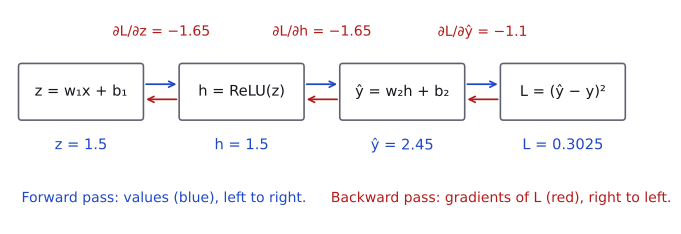
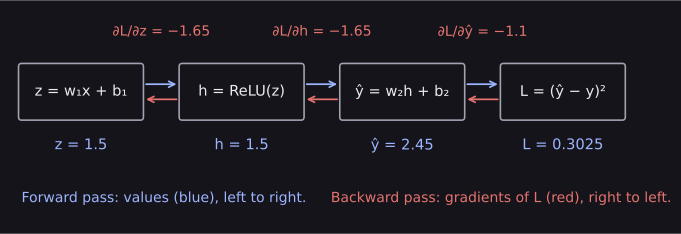
Backward pass. Now we go right to left, one box at a time. At each step we multiply the gradient arriving from the right by the box's local derivative.
- The loss box, . Its local derivative with respect to is , so . The minus sign says the prediction is too low: increasing would lower the loss.
- The output box, , has three inputs, so it passes three gradients back:
- to : the local derivative is , so ;
- to : the local derivative is 1, so ;
- to : the local derivative is , so .
- The ReLU box. is positive, so ReLU's local derivative is 1 and the gradient passes straight through: . (Had been negative, the local derivative would be 0 and nothing would reach and . Keep that in mind for later.)
- The hidden box, :
- to : the local derivative is , so ;
- to : the local derivative is 1, so .
That is every gradient we need:
| Weight | Value | Gradient |
|---|---|---|
| 0.5 | −3.3 | |
| 0.5 | −1.65 | |
| 1.5 | −1.65 | |
| 0.2 | −1.1 |
All four gradients are negative, so gradient descent will increase all four weights, which pushes up towards the target of 3. With a learning rate of 0.05, one step gives , , and , and running the forward pass again gives a loss of about , down from . (With a learning rate of 0.1 the step overshoots and the loss rises to about : the learning-rate trade-off from Gradient Descent again.)
Notice how little each step needed: its own local derivative, the value it saw going forwards, and the gradient handed to it from the right. A network with a thousand layers works exactly the same way, just with more boxes.
Checking our numbers with PyTorch
Now we can let PyTorch do the same calculation. Setting requires_grad=True on a tensor tells PyTorch to record every operation that uses it, building the computation graph as the code runs. Calling backward() on the loss then walks that graph backwards, exactly as we just did by hand.
import torch

x = torch.tensor(2.0)
y = torch.tensor(3.0)

# the four weights, marked so PyTorch tracks them
w1 = torch.tensor(0.5, requires_grad=True)
b1 = torch.tensor(0.5, requires_grad=True)
w2 = torch.tensor(1.5, requires_grad=True)
b2 = torch.tensor(0.2, requires_grad=True)

# forward pass, one step per line
z = w1 * x + b1
h = torch.relu(z)
y_hat = w2 * h + b2
loss = (y_hat - y) ** 2

# backward pass
loss.backward()
print(w1.grad, b1.grad, w2.grad, b2.grad)tensor(-3.3000) tensor(-1.6500) tensor(-1.6500) tensor(-1.1000)The same four numbers. After backward(), each tensor that asked for gradients has them stored in its .grad attribute. Our input x and target y did not ask, so PyTorch did not spend any work on them.
This is exactly what happens inside the training loop from PyTorch Basics. There, model.parameters() are tensors with requires_grad=True, loss.backward() fills in their .grad, and optimizer.step() reads those gradients to update the weights.
Why gradients add up
There is one behaviour of PyTorch that surprises nearly everyone at first. Let us run the forward and backward pass a second time, without clearing anything:
loss = (w2 * torch.relu(w1 * x + b1) + b2 - y) ** 2
loss.backward()
print(w1.grad)tensor(-6.6000)The gradient doubled. PyTorch does not overwrite .grad; it adds each new gradient to whatever is already there. This is deliberate, because it lets you combine gradients from several small batches when one big batch will not fit in memory. But in a normal training loop it is a bug: every step would use the sum of all previous gradients.
That is why every training loop calls optimizer.zero_grad() before loss.backward(). It resets every .grad to zero, so each step uses only its own gradient.
Vanishing and exploding gradients
Look back at the backward pass. Every weight's gradient was a product of local derivatives along the path from the loss to that weight. In a deep network, that path passes through many layers, so the gradient for an early weight is a product of many numbers.
Products of many numbers behave badly:
- If most of the factors are smaller than 1, the product shrinks towards zero. The early layers then get almost no gradient and barely learn. This is the vanishing gradient problem. For example, the derivative of the sigmoid activation is never larger than , and , so ten sigmoid layers can shrink a gradient about a million times.
- If most of the factors are larger than 1, the product grows out of control, the weights take huge steps, and the loss becomes
nan. This is the exploding gradient problem.
You saw a small version of this in our network: if had been negative, ReLU's local derivative would have been 0, and no gradient at all would have reached and . The choice of activation function is the first defence against vanishing gradients, which is why Activation Functions matters so much. Other fixes, such as careful weight initialisation, normalisation layers and gradient clipping, come later, at Silver level.
What autograd does for you, and what it does not
Autograd computes every gradient exactly, for any network you can write in PyTorch, and you will never compute one by hand in a contest. What it cannot do is notice when something is wrong. That part is still your job:
- Knowing that each weight's gradient says how the loss would change if that weight changed, so a gradient of zero means that weight is not learning.
- Clearing gradients with
zero_grad()every step. - Switching tracking off with
torch.no_grad()when you only want predictions, so PyTorch does not build a graph it will never use. - Recognising the symptoms of vanishing gradients (early layers stop changing) and exploding ones (the loss becomes
infornan).
Common mistakes
| Mistake | What you see | Fix |
|---|---|---|
Calling backward() twice on the same graph |
RuntimeError: Trying to backward through the graph a second time (or directly access saved tensors after they have already been freed). |
Run a fresh forward pass before each backward(), as a training loop does. |
Calling backward() on something that is not a single number |
RuntimeError: grad can be implicitly created only for scalar outputs |
Reduce the loss to one number first, for example with .mean(); PyTorch's loss functions already do this. |
Calling backward() when no tensor asked for gradients |
RuntimeError: element 0 of tensors does not require grad and does not have a grad_fn |
Make sure the weights have requires_grad=True. Model parameters have it already; check that you did not compute the loss inside torch.no_grad(). |
Forgetting optimizer.zero_grad() |
No error, but gradients add up step after step | Call it before every backward(). |
How to practise
- Work through another small network on paper, for example with a negative starting value of so that , and predict which gradients come out as zero. Then check your answers with the PyTorch code above.
- Watch Karpathy's building micrograd and type the code along with him. It is thorough practice for this topic, and it needs nothing but plain Python.
- Try the exercises at the end of Nielsen's chapter 2.
There are no backpropagation problems on CodeChef, CS50 or HackerRank, so the exercises above are the practice for this module.
Check yourself
What comes next
We now have both halves of training: backpropagation computes the gradient of every weight, and gradient descent uses it to take a step. The rest of Part 5.2 fills in the pieces we have been using without looking closely.
- Tensors, Matrices, and Related Mathematical Functions: the shapes and matrix operations that a real layer is made of.
- Activation Functions: ReLU and its alternatives, and how they keep gradients alive.
Resources
| Source | Title | Why read it |
|---|---|---|
| 3Blue1Brown | Backpropagation, intuitively | Our recommended starting point: what backpropagation is doing, with no calculus yet. |
| 3Blue1Brown | Backpropagation calculus | The follow-up video: the same idea with the chain rule written out. |
| Andrej Karpathy | The spelled-out intro to neural networks and backpropagation: building micrograd | Builds a tiny autograd engine from scratch in Python. The recommended next step once the basics are clear. |
| Michael Nielsen | Neural Networks and Deep Learning, chapter 2 | A free book chapter that derives backpropagation for a whole network, step by step. |
| Stanford CS231n | Backpropagation, Intuitions | Course notes on computation graphs and local gradients, with small worked circuits. |
| d2l.ai | Automatic Differentiation | How autograd works in code, followed by the chapter on backpropagation through an MLP. |
| PyTorch | Automatic Differentiation with torch.autograd | The official tutorial on requires_grad, backward and gradients in PyTorch. |
Finished this module? Mark it done.
Comments
Stuck on something, spotted a mistake, or found a resource that helped you? Tell us below.
Loading comments