5Deep Learning 5.3PyTorch Deep Learning Pipeline
5.3.4 Simple Problem Examples
The same PyTorch recipe on three more kinds of problem, predicting a number, a curved boundary and several labels at once, and a table of exactly what changes each time.
Why more examples?
In the last three modules we built one recipe: a Dataset and DataLoader, an MLP, a training loop that keeps the best epoch, and a pipeline around it from files to a submission. We used it for ten classes of digits in A Simple MLP in PyTorch and for a yes/no label in PyTorch Pipeline for a Simple Machine Learning Problem.
Almost every tabular task in a contest is one of a handful of problem types, and moving between them changes only four things: the size of the last layer, the loss, how the outputs become answers, and the metric. This page puts those four side by side, then works through three problem types we have not met yet: predicting a number, a yes/no problem with a curved boundary, and rows that can have several labels at once. Each example is complete and short, and each is compared with a simple baseline, because that is how you find out whether a network is worth it.
What you need to know
This table is the page in one view. All four names live in torch.nn, so in code they are nn.Linear, nn.MSELoss() and so on. is the size of the last hidden layer, the number of classes and the number of labels.
| Problem type | Last layer | Loss | From output to answer |
|---|---|---|---|
| Regression: each label is a number | Linear(h, 1) |
MSELoss |
the output itself |
| Binary: each label is 0 or 1 | Linear(h, 1) |
BCEWithLogitsLoss |
1 if the logit is above 0 |
| Multi-class: one of classes | Linear(h, C) |
CrossEntropyLoss |
the class with the largest logit |
| Multi-label: zeros and ones | Linear(h, K) |
BCEWithLogitsLoss |
1 for every logit above 0 |
Everything else stays the same: the scaler, the DataLoaders, the hidden layers, the training loop and the best epoch. Loss Functions explains why each loss belongs to its problem type, and Model Evaluation Metrics covers the metrics.
Learn it properly
The examples below reuse everything from the previous modules, so make sure those feel familiar first. For more worked examples in the same style, chapters 01 (regression) and 02 (binary and multi-class classification) of Learn PyTorch for Deep Learning build a model for each case.
A quick tour
The rest of this page defines a few helpers once, then solves three problems with them. Run each cell in a notebook as you read.
Helpers for every example
These are the functions from the previous modules, made general enough to serve all three problems. To keep them short, they leave out the GPU lines; add .to(device) as in A Simple MLP in PyTorch when you have one.
import copy
import numpy as np
import torch
from torch import nn
from torch.utils.data import TensorDataset, DataLoader
from sklearn.model_selection import train_test_split
from sklearn.preprocessing import StandardScaler

def make_mlp(n_inputs, n_hidden, n_outputs):
    return nn.Sequential(
        nn.Linear(n_inputs, n_hidden), nn.ReLU(),
        nn.Linear(n_hidden, n_hidden), nn.ReLU(),
        nn.Linear(n_hidden, n_outputs),
    )

def make_loader(features, labels, shuffle):
    dataset = TensorDataset(
        torch.tensor(features, dtype=torch.float32),
        torch.tensor(labels, dtype=torch.float32))
    return DataLoader(dataset, batch_size=32, shuffle=shuffle)

def validation_loss(model, loader, loss_fn):
    model.eval()
    total = 0.0
    with torch.no_grad():
        for x_batch, y_batch in loader:
            loss = loss_fn(model(x_batch), y_batch)
            total += loss.item() * len(y_batch)
    return total / len(loader.dataset)

def fit(model, loss_fn, train_loader, val_loader, epochs):
    optimizer = torch.optim.Adam(model.parameters(), lr=0.001)
    best_loss = float("inf")
    for epoch in range(epochs):
        model.train()
        for x_batch, y_batch in train_loader:
            loss = loss_fn(model(x_batch), y_batch)
            optimizer.zero_grad()
            loss.backward()
            optimizer.step()
        val_loss = validation_loss(model, val_loader, loss_fn)
        if val_loss < best_loss:
            best_loss = val_loss
            best_state = copy.deepcopy(model.state_dict())
    model.load_state_dict(best_state)
    return model

def predict(model, features):
    model.eval()
    with torch.no_grad():
        return model(torch.tensor(features, dtype=torch.float32))
Two details make one set of helpers work for every problem type:
- All labels are stored as
float32, with one column per output.MSELossandBCEWithLogitsLossboth want the labels to have the same shape as the model's output, so a single number per row becomes a column of shape(n, 1). (CrossEntropyLossis the one loss that wantslongclass numbers instead; A Simple MLP in PyTorch shows that case.) - Every example is split three ways, 60% for training, 20% for validation (to pick the best epoch) and 20% for the final test, with one more helper:
def split_three_ways(X, y, stratify=False):
    first = y if stratify else None
    X_train, X_rest, y_train, y_rest = train_test_split(
        X, y, test_size=0.4, stratify=first, random_state=0)
    second = y_rest if stratify else None
    X_val, X_test, y_val, y_test = train_test_split(
        X_rest, y_rest, test_size=0.5, stratify=second,
        random_state=0)
    return X_train, X_val, X_test, y_train, y_val, y_test
Example 1: predicting a number
The problem. scikit-learn's diabetes dataset describes 442 patients with 10 measurements each, such as age, body mass index and blood pressure. The target is a number that measures how far the disease progressed one year later. Predicting a number is regression.
from sklearn.datasets import load_diabetes

X, y = load_diabetes(return_X_y=True)
print(X.shape, y.min(), y.max())(442, 10) 25.0 346.0The targets run from 25 to 346. A network learns best when its outputs are small numbers too, so we scale the target as well as the features, with its own StandardScaler, fitted on the training rows only. .reshape(-1, 1) turns the targets into one column, the shape the scaler and the loss both expect.
X_train, X_val, X_test, y_train, y_val, y_test = split_three_ways(X, y)

x_scaler = StandardScaler().fit(X_train)
y_scaler = StandardScaler().fit(y_train.reshape(-1, 1))

def scaled_target(values):
    return y_scaler.transform(values.reshape(-1, 1))

train_loader = make_loader(x_scaler.transform(X_train),
                           scaled_target(y_train), shuffle=True)
val_loader = make_loader(x_scaler.transform(X_val),
                         scaled_target(y_val), shuffle=False)
What changes: one output, MSELoss, and the output is the answer. Only, it is a scaled answer, so inverse_transform turns the predictions back into disease-progression numbers:
from sklearn.metrics import mean_squared_error, r2_score

torch.manual_seed(0)
model = make_mlp(n_inputs=10, n_hidden=32, n_outputs=1)
model = fit(model, nn.MSELoss(), train_loader, val_loader,
            epochs=200)

scaled_predictions = predict(model, x_scaler.transform(X_test))
predictions = y_scaler.inverse_transform(scaled_predictions.numpy())
rmse = mean_squared_error(y_test, predictions) ** 0.5
print("RMSE:", round(rmse, 1), " R2:",
round(r2_score(y_test, predictions), 3))RMSE: 54.9 R2: 0.317The baseline. Linear Regression on the same scaled features, and the simplest possible guess, the average training target for every patient:
from sklearn.linear_model import LinearRegression

linear = LinearRegression().fit(x_scaler.transform(X_train), y_train)
linear_predictions = linear.predict(x_scaler.transform(X_test))
average_guess = np.full(len(y_test), y_train.mean())

print("linear RMSE:",
      round(mean_squared_error(y_test, linear_predictions) ** 0.5, 1))
print("average RMSE:",
round(mean_squared_error(y_test, average_guess) ** 0.5, 1))linear RMSE: 55.4
average RMSE: 66.7Both models beat the average guess by a similar margin: the network's typical error is 54.9 and the straight line's 55.4. An of 0.317 means the network explains about a third of the variation in the target (Model Evaluation Metrics explains the measure). Some targets simply cannot be predicted much better from the features given, and then a network has little to add. That is worth knowing rather than a failure: in a contest, the linear model would be the quick, safe first submission here.
Example 2: a curved boundary
The problem. Two interleaving half-moons of points, one class each, generated by scikit-learn with some noise. It is a yes/no problem like the one in the pipeline, but the boundary between the classes is curved, much like the XOR problem and the four quarters in Multi-Layer Perceptrons.
from sklearn.datasets import make_moons

X, y = make_moons(n_samples=600, noise=0.2, random_state=0)
X_train, X_val, X_test, y_train, y_val, y_test = split_three_ways(
    X, y, stratify=True)
X.shape, y[:10]((600, 2), array([1, 0, 0, 1, 0, 1, 1, 1, 1, 0]))The two features are already on a small scale, so there is nothing to scale here. What changes: one output, BCEWithLogitsLoss, and a logit above 0 means class 1. The labels become one column:
train_loader = make_loader(X_train, y_train.reshape(-1, 1), True)
val_loader = make_loader(X_val, y_val.reshape(-1, 1), False)

torch.manual_seed(0)
model = make_mlp(n_inputs=2, n_hidden=32, n_outputs=1)
model = fit(model, nn.BCEWithLogitsLoss(), train_loader, val_loader,
            epochs=200)

logits = predict(model, X_test)
predictions = (logits > 0).int().numpy().ravel()
print(round((predictions == y_test).mean(), 3))0.942.ravel() flattens the predictions of shape (120, 1) into (120,), to compare them with the labels. The baseline is logistic regression, which can only draw a straight boundary:
from sklearn.linear_model import LogisticRegression

logistic = LogisticRegression().fit(X_train, y_train)
round(logistic.score(X_test, y_test), 3)0.842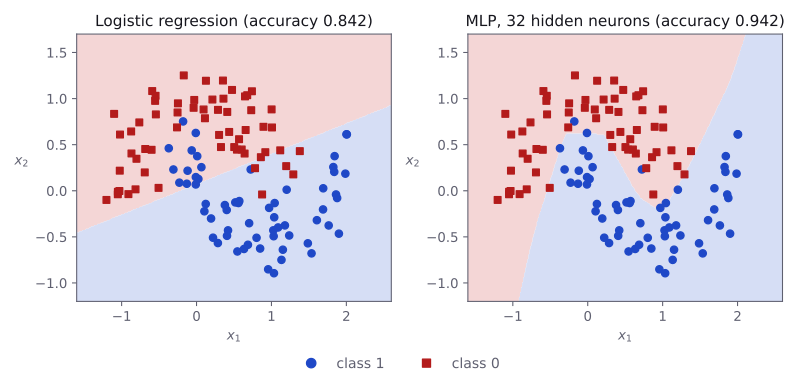
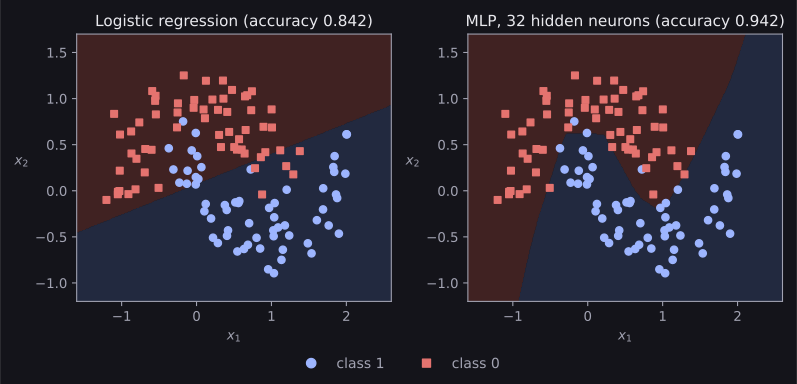
The network gets 0.942 of the test points right and logistic regression 0.842, a gap of ten points. The picture shows why: logistic regression can only cut the plane with one straight line, so the tips of the moons, where they reach into each other, end up on the wrong side, while the network bends its boundary around them. This is the kind of problem where a network earns its place.
Example 3: several labels at once
The problem. Sometimes each row can have several labels at the same time: a news article can be about both sport and money, and a photo can contain both a dog and a car. This is multi-label classification. scikit-learn can generate such data: here, 1,000 made-up rows with 20 features and 5 possible labels, where each row has any number of them.
from sklearn.datasets import make_multilabel_classification

X, Y = make_multilabel_classification(
    n_samples=1000, n_features=20, n_classes=5, random_state=0)
print(X.shape, Y.shape)
print(Y[:4])(1000, 20) (1000, 5)
[[0 0 1 1 1]
[0 0 1 0 0]
[1 1 0 1 0]
[1 1 1 1 1]]The labels are a table with one 0/1 column per label. The first row has labels 2, 3 and 4 switched on; the fourth row has all five. On average, a row has about two labels.
What changes: five outputs, one per label, and BCEWithLogitsLoss, which treats each label as its own yes/no question. The label matrix already has one column per output, so it goes into the loader as it is:
X_train, X_val, X_test, Y_train, Y_val, Y_test = split_three_ways(X, Y)
scaler = StandardScaler().fit(X_train)
train_loader = make_loader(scaler.transform(X_train), Y_train, True)
val_loader = make_loader(scaler.transform(X_val), Y_val, False)

torch.manual_seed(0)
model = make_mlp(n_inputs=20, n_hidden=64, n_outputs=5)
model = fit(model, nn.BCEWithLogitsLoss(), train_loader, val_loader,
            epochs=100)

logits = predict(model, scaler.transform(X_test))
predictions = (logits > 0).int().numpy()
print(predictions[:4])[[0 1 0 0 0]
[1 0 1 0 0]
[0 0 1 0 1]
[0 0 0 1 1]]Every logit above 0 switches its label on, so a row can get none, one or several labels. There are two natural ways to score this: the share of all individual labels that are right, and the share of rows where all five labels are right, which is much stricter:
def label_scores(predicted, true):
    each_label = (predicted == true).mean()
    whole_rows = (predicted == true).all(axis=1).mean()
    print("each label:", round(each_label, 3),
          " whole rows:", round(whole_rows, 3))

label_scores(predictions, Y_test)each label: 0.803 whole rows: 0.41The baseline is one logistic regression per label. scikit-learn's MultiOutputClassifier trains them for us:
from sklearn.multioutput import MultiOutputClassifier

per_label = MultiOutputClassifier(LogisticRegression(max_iter=1000))
per_label.fit(scaler.transform(X_train), Y_train)
label_scores(per_label.predict(scaler.transform(X_test)), Y_test)each label: 0.778 whole rows: 0.33The network gets 80.3% of the individual labels right, and all five labels right on 41% of the test rows, against 77.8% and 33% for the separate logistic regressions. Two things can help the network here: it can draw curved boundaries, and its hidden layers are shared by all five labels, so what it learns for one label can help with the others. The logistic regressions learn each label on its own, with a straight boundary.
Recognising the problem type
In a task statement, the problem type is usually hidden in the description of the labels and the submission file. A few signs to look for:
- One number per row, such as a price, a temperature or a score: regression.
- One of two answers, such as yes or no, spam or not, 0 or 1: binary classification.
- One of several classes, such as a species, a digit or a language: multi-class classification.
- A list of zero or more tags per row, or several 0/1 columns in the submission: multi-label classification.
When the metric needs probabilities, such as log loss or ROC AUC, submit the sigmoid or softmax of the logits instead of hard answers. Model Evaluation Metrics lists which metrics need which.
Common mistakes
| Mistake | What you see | Fix |
|---|---|---|
Regression labels of shape (n,) with outputs of shape (n, 1) |
UserWarning: Using a target size (torch.Size([32])) that is different to the input size (torch.Size([32, 1])), and the model learns badly |
Reshape the labels to (n, 1), or squeeze the outputs. |
Forgetting inverse_transform after scaling the target |
No error, but the predictions are small numbers near 0 | Turn the predictions back with the target's scaler. |
CrossEntropyLoss for a multi-label problem |
No error, but it forces the labels of each row to compete, as if only one could be true | Use BCEWithLogitsLoss, one output per label. |
argmax on multi-label outputs |
Exactly one label per row, however many are true | Switch on every label whose logit is above 0. |
A softmax or sigmoid inside the model, then a ...WithLogits loss or CrossEntropyLoss |
No error, but slow and unstable training | Output raw logits; these losses apply the squashing themselves. |
How to practise
There is no PyTorch section on the practice sites we use (CodeChef, CS50 and HackerRank), so practise on the datasets that ship with scikit-learn, listed on its toy datasets page:
- Wine (
load_wine): three classes. Use the multi-class recipe from A Simple MLP in PyTorch and compare it with logistic regression. - California housing (
fetch_california_housing, a download on first use): regression with 20,640 rows. Is the network's gain over linear regression bigger than on the diabetes data? - Two moons with more noise: raise
noiseto 0.35. What happens to the gap between the network and logistic regression, and why? - For every problem, fill in the four columns of the table at the top of this page before writing any code.
Check yourself
What comes next
- Model Evaluation Metrics: which metric fits which problem type, and when to submit probabilities.
- Loss Functions: the losses in the table above, and options such as weighting rare classes.
- Convolutional Neural Networks: the next kind of network, built for images.
- Bag of Words and Audio Feature Extraction with Librosa: how text and sound become feature tables, so that the recipes on this page apply to them too.
Resources
| Source | Title | Why read it |
|---|---|---|
| Daniel Bourke | 01. PyTorch Workflow Fundamentals | A regression model in PyTorch, from data to predictions. |
| Daniel Bourke | 02. PyTorch Neural Network Classification | Binary and multi-class classifiers, including the two-moons style of curved data used here. |
| Dive into Deep Learning | Concise Implementation of Linear Regression | Regression with nn.Linear and MSELoss, with the theory alongside. |
| scikit-learn | Toy and generated datasets | The built-in datasets used on this page, and more to practise on. |
Finished this module? Mark it done.
Comments
Stuck on something, spotted a mistake, or found a resource that helped you? Tell us below.
Loading comments